Contents
- 1 Why “Just Searching” Isn’t the Same Thing
- 2 How to Set Up Your Semrush Project (Step-by-Step)
- 3 The Alternative: Quick Evaluation Without a Project
- 4 What the Semrush Dashboard Looks Like After Project Setup
- 5 Semrush Pricing: Which Plan Do You Need for a Full Evaluation?
- 6 After the Project: The Evaluation Workflow That Actually Works
- 7 Where Most Beginners Go Wrong
- 8 Frequently Asked Questions
- 8.1 Do I need a paid plan to create a Semrush Project?
- 8.2 Can I evaluate a website I don’t own using Semrush?
- 8.3 What’s the difference between Domain Overview and a full Project evaluation?
- 8.4 How long does a Semrush Site Audit take?
- 8.5 What does the AI Visibility metric in Semrush actually measure?
- 8.6 Is Semrush worth it just for a one-time website evaluation?
- 9 The Short Version
- 10 Everything You Need About Semrush Free Trial
Most people open Semrush, stare at the dashboard for a few seconds, and start typing a competitor’s URL into the search bar. That actually works — you’ll get data. But it’s not the same data you’d get if you’d done this properly.
Here’s the thing: Semrush is built around a concept called a Project. Everything changes once you understand that one distinction.
Quick Answer
The first step before using Semrush to evaluate a website is to create a Project for your target domain. By adding the site to a Project, Semrush aggregates personalized, ongoing data — keyword rankings, site health, technical errors, and traffic insights — specific to that domain. Without a Project, you’re only running one-off lookups, not a real evaluation.
Why “Just Searching” Isn’t the Same Thing
You can absolutely type any URL into Semrush’s Domain Overview tool and get organic traffic estimates, backlink counts, keyword rankings, and more. That’s useful for a quick competitive snapshot.
But evaluating a website you’re responsible for — whether it’s your own, a client’s, or one you’re auditing — requires something different. One-off searches give you a static picture. A Project gives you a living one.
When I audit client websites, the first thing I do before touching any report is set up the Project. It’s the difference between reading someone’s medical record and actually running tests. The data quality is just not comparable.
A Project does several things a quick search cannot:
- Activates Position Tracking — daily keyword rank monitoring in your target location and device
- Enables Site Audit — a crawl-based technical health check of every indexable page
- Connects Organic Traffic Insights — pulling in your Google Analytics and Search Console data for richer performance context
- Builds a persistent SEO Dashboard — so you’re tracking progress over time, not just snapshots
Without it, you’re evaluating. With it, you’re actually monitoring.
How to Set Up Your Semrush Project (Step-by-Step)
This takes under two minutes.
1. Go to your Semrush dashboard and click “Create project”
From the main navigation, select the Projects tab. Click the green “Create project” button. You’ll be prompted to enter a domain.
2. Enter the exact domain you want to evaluate
Type it as example.com — no need for the full https:// prefix. Semrush will automatically scope the project to include all subdomains unless you adjust this later.
3. Name the project
Give it a recognizable label, especially if you’re managing multiple clients or sites. Something like “Client — Brand Name” works fine.
4. Start setting up the tools Semrush prompts you with
After creating the project, Semrush walks you through setting up the three most critical tools:
- Site Audit — crawls for technical issues like broken links, slow-loading pages, duplicate content, missing meta tags, and more
- Position Tracking — enter your target keywords and location to start monitoring daily rank changes
- Organic Traffic Insights — connect GA4 and Search Console to see real user data alongside Semrush estimates
You don’t have to enable all three at once. But Site Audit and Position Tracking are the ones I’d activate immediately — they give you the fastest actionable feedback.
The Alternative: Quick Evaluation Without a Project
If you’re doing a fast, top-level competitive check on a site you don’t own — say you’re scoping out a potential niche or researching a prospect — the Domain Overview tool works well.
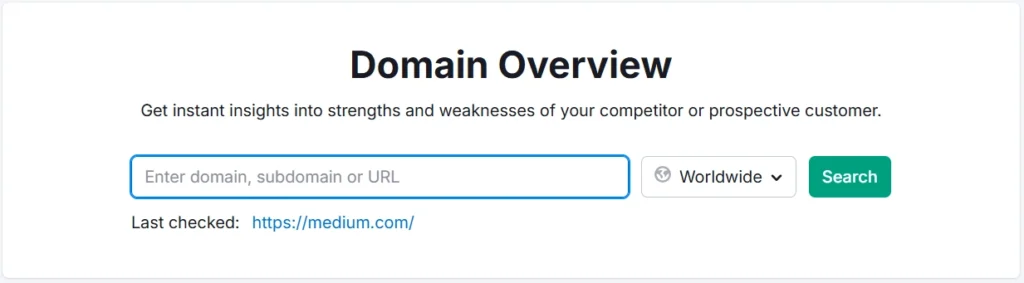
Enter any domain in the main Semrush search bar and you’ll instantly see:
- Estimated monthly organic traffic
- Authority Score
- Number of organic keywords
- Referring domains and backlinks
- AI Visibility score (showing brand mentions in ChatGPT, Gemini, AI Overview, and other LLMs)
- Paid traffic data if relevant
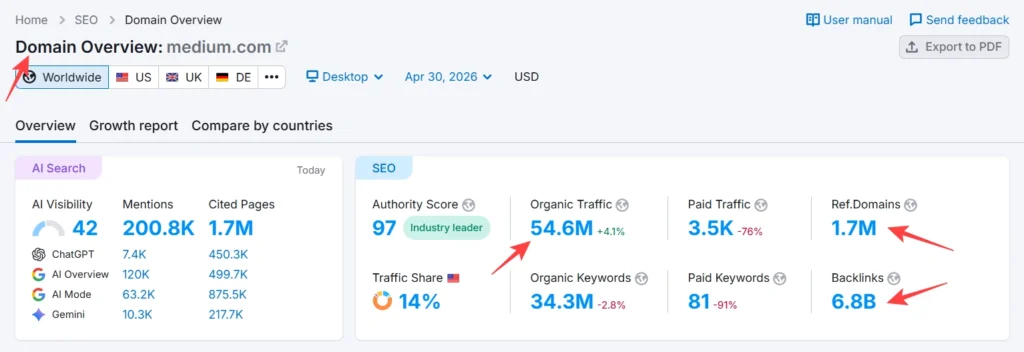
This is genuinely useful. In my experience across dozens of client pitches, pulling a quick Domain Overview on a prospect’s site before a meeting has saved me from walking in underprepared more than once.
Just know what it is: a snapshot. Not a full evaluation.
For a real evaluation — one where you track performance over time, fix technical issues, and monitor keyword movements — you need the Project.
What the Semrush Dashboard Looks Like After Project Setup
Once you’ve set up your Project and activated a few tools, your SEO Dashboard starts populating with live data. You’ll see:
- AI Visibility score — how often your domain gets mentioned across AI platforms like ChatGPT, AI Overview, and Gemini
- Position Tracking overview — visibility percentage, average position, top/bottom keywords
- Site Audit widget — site health score, errors, warnings, and crawled pages
- Organic Traffic Insights — sessions, users, and engagement rate pulled from GA4
Each metric on the dashboard is clickable and links to the full report. It’s genuinely well-designed for an evaluation workflow — you can go from the dashboard health score straight into the specific errors causing the problem in about two clicks.
One observation from my own workflow: the AI Visibility metric has become increasingly relevant. In client audits over the past year, I’ve seen brands with strong traditional SEO but near-zero AI presence, and the gap matters more than people realize now. Semrush is currently one of the few tools that surfaces this data alongside traditional SEO metrics.
Semrush Pricing: Which Plan Do You Need for a Full Evaluation?
This depends on the scale of the site and what “evaluate” means in your context.
SEO Classic Plans
These are Semrush’s traditional SEO-focused plans, available monthly or annually (annual saves up to 17%).
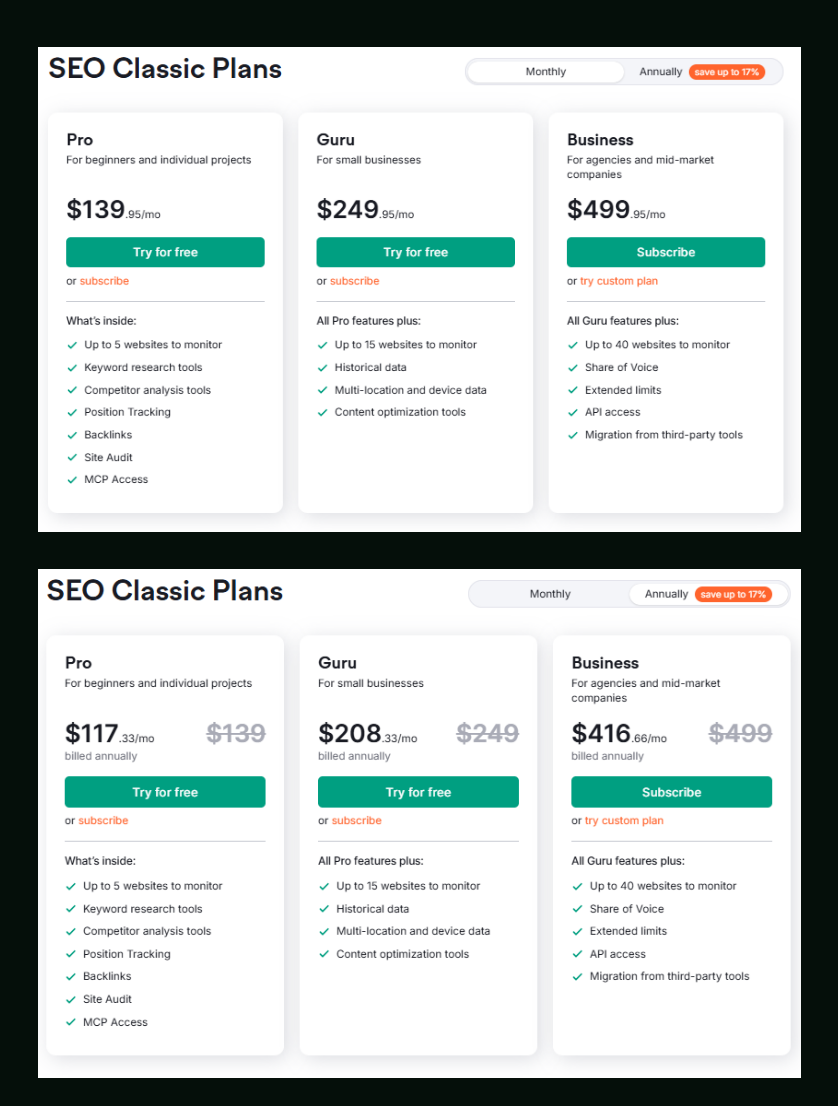
| Plan | Monthly Price | Annual Price (billed monthly) | Best For |
|---|---|---|---|
| Pro | $139.95/mo | $117.33/mo | Beginners & individual projects |
| Guru | $249.95/mo | $208.33/mo | Small businesses |
| Business | $499.95/mo | $416.66/mo | Agencies & mid-market companies |
Pro gives you 5 websites to monitor, 500 keywords to track daily, Site Audit (100,000 pages/month), keyword research, competitor analysis, position tracking, backlinks, and MCP access. Solid for evaluating a single site or a small client roster.
Guru adds historical data, multi-location and device tracking, content optimization tools, keyword cannibalization reporting, 1,500 keywords daily, up to 15 websites, 300,000 pages/month crawl, and Looker Studio integration. The historical data alone is worth the jump for serious evaluations — seeing how a site’s rankings changed over time is often more revealing than its current state.
Business unlocks Share of Voice, API access, migration from third-party tools, 5,000 keywords daily, up to 40 websites, and 1,000,000 pages per month. This is the agency tier.
Notable limits worth knowing for evaluations:
- Results per report: Pro (10,000), Guru (30,000), Business (50,000)
- Reports per day: Pro (3,000), Guru (5,000), Business (10,000)
- Keyword metric updates/month: Pro (250), Guru (1,000), Business (5,000)
- JavaScript rendering in Site Audit: Pro does not include this — Guru and Business do. If you’re evaluating a JavaScript-heavy site (React, Next.js, Vue), this matters.
Semrush One Plans (Traditional SEO + AI Visibility + GEO)
Semrush One is the newer combined plan that covers traditional SEO alongside AI search visibility and GEO (Generative Engine Optimization). Currently offered at introductory pricing.
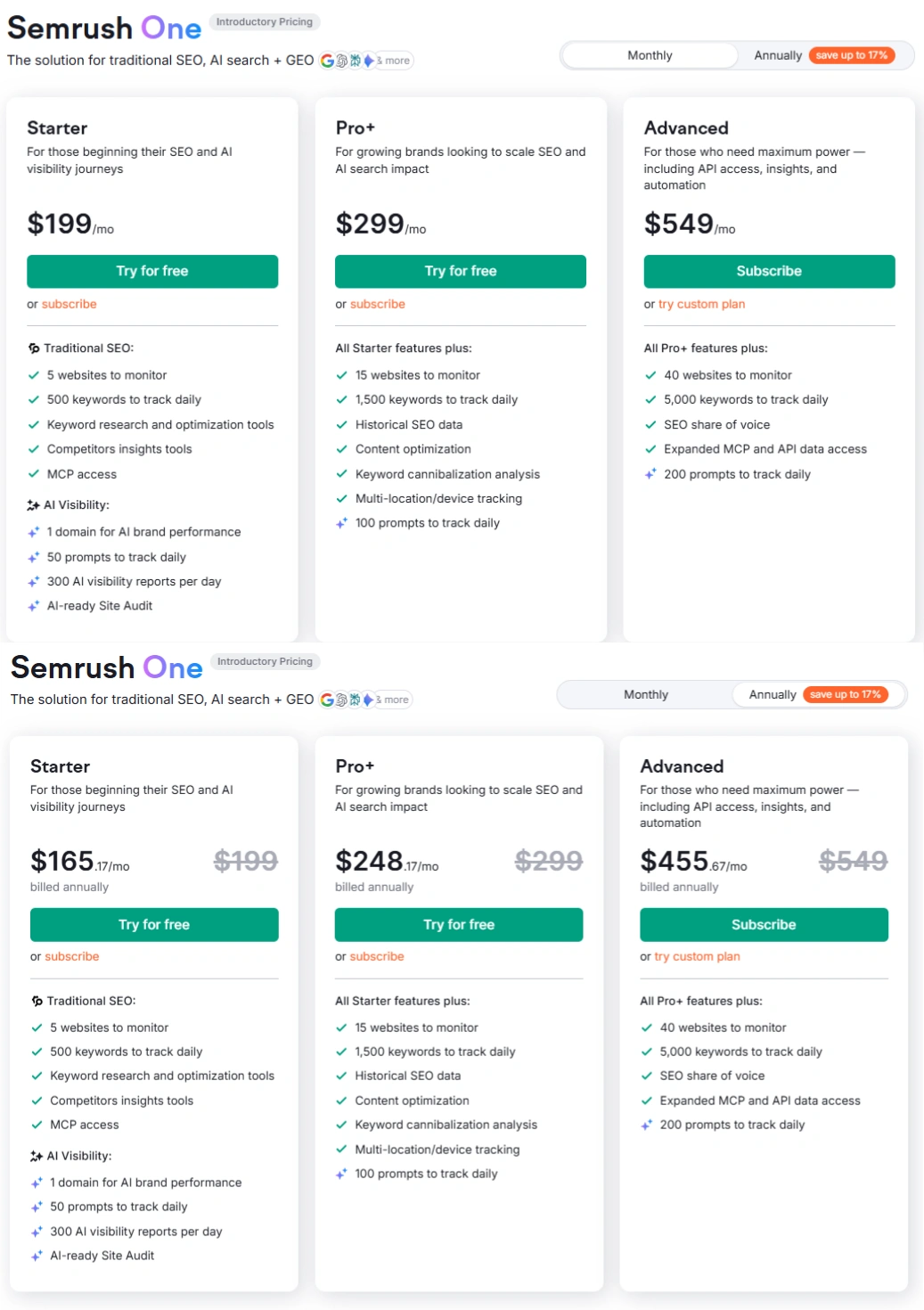
| Plan | Monthly Price | Annual Price (billed monthly) | Best For |
|---|---|---|---|
| Starter | $199/mo | $165.17/mo | Beginners starting with SEO + AI visibility |
| Pro+ | $299/mo | $248.17/mo | Growing brands scaling SEO and AI search |
| Advanced | $549/mo | $455.67/mo | Maximum power — API, automation, AI insights |
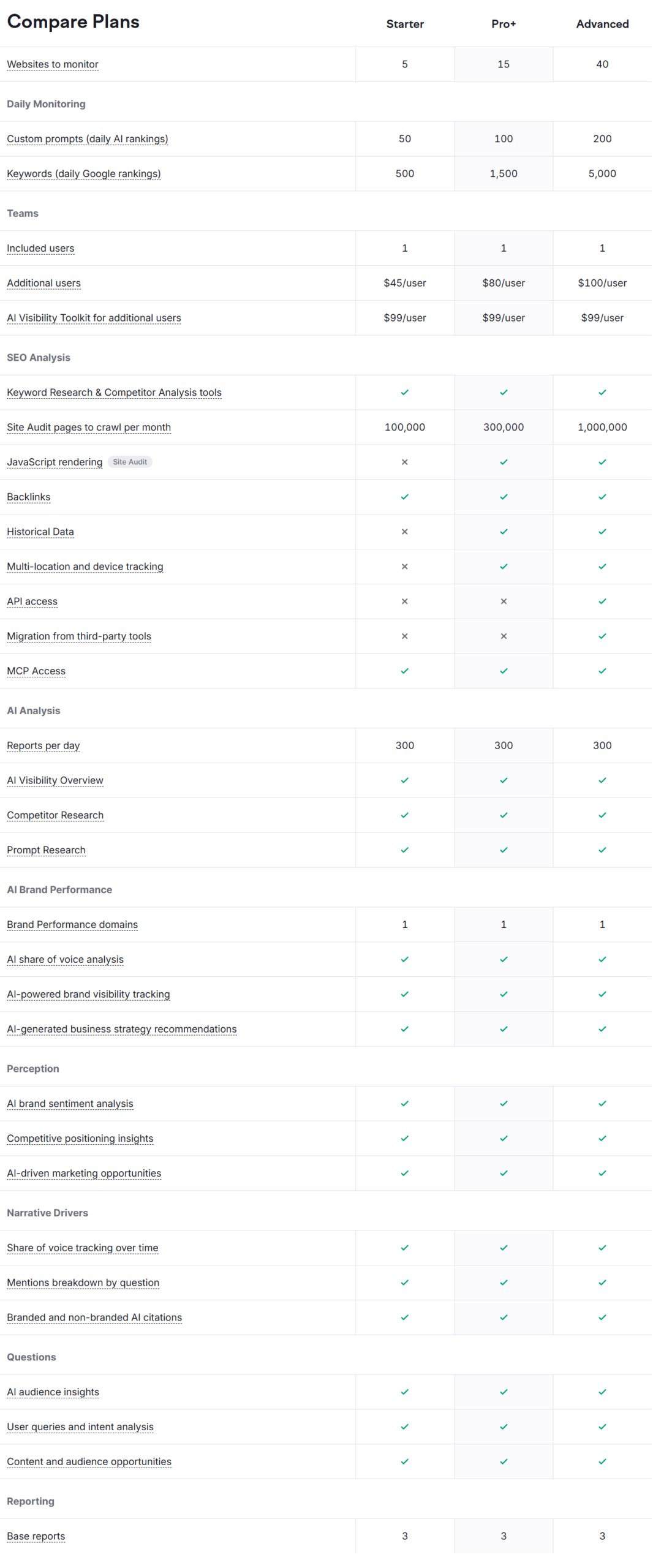
Starter includes 5 websites to monitor, 500 keywords daily, keyword research and competitor tools, MCP access, plus AI Visibility: 1 domain for AI brand performance, 50 prompts to track daily, 300 AI visibility reports per day, and AI-ready Site Audit.
Pro+ adds 15 websites, 1,500 keywords daily, historical SEO data, content optimization, keyword cannibalization analysis, multi-location and device tracking, and 100 prompts to track daily.
Advanced covers 40 websites, 5,000 keywords daily, SEO share of voice, expanded MCP and API data access, and 200 prompts to track daily.
Semrush One Compare Plans — Key Details:
| Feature | Starter | Pro+ | Advanced |
|---|---|---|---|
| Websites to monitor | 5 | 15 | 40 |
| Keywords (daily) | 500 | 1,500 | 5,000 |
| Custom prompts (daily AI rankings) | 50 | 100 | 200 |
| Site Audit pages/month | 100,000 | 300,000 | 1,000,000 |
| JavaScript rendering | ✗ | ✓ | ✓ |
| Historical data | ✗ | ✓ | ✓ |
| API access | ✗ | ✗ | ✓ |
| AI visibility reports/day | 300 | 300 | 300 |
| Additional users | $45/user | $80/user | $100/user |
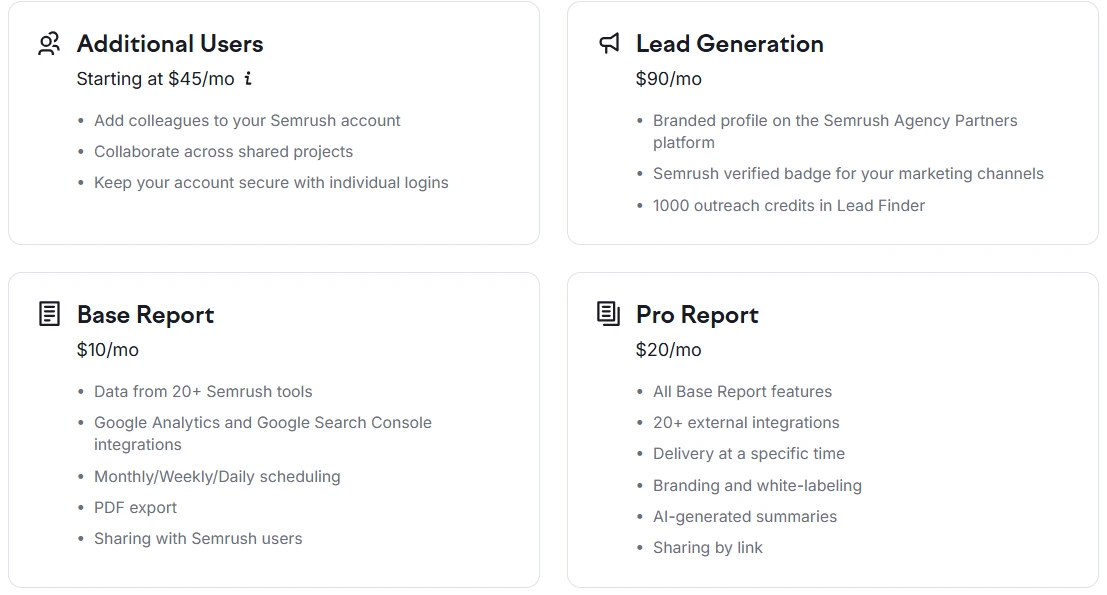
Add-ons available across plans:
- Additional Users: from $45/mo
- Lead Generation: $90/mo (branded agency profile, Semrush verified badge, 1,000 Lead Finder credits)
- Base Report: $10/mo (data from 20+ tools, GA/GSC integrations, PDF export)
- Pro Report: $20/mo (20+ external integrations, branding/white-labeling, AI-generated summaries)
If your evaluation involves tracking how a brand appears in AI-generated answers — something that’s increasingly important for any serious SEO work — Semrush One is the more relevant product. If your evaluation is purely traditional SEO, the Classic plans are more cost-effective entry points.
Both Starter (Semrush One) and Pro (SEO Classic) offer a 7-day free trial, which is enough time to run a full site evaluation cycle. You can start your 7-day free trial here.
Semrush SEO Free Trial ( Pro & Guru )
Get full Pro access for 7 days — keyword research, site audit, backlink analysis & competitor research. No charge until after the trial ends.
Start Your Semrush 7-Day Free Trial→If you’re weighing plan options, this breakdown of Semrush Pro vs Guru covers the practical differences for different use cases.
After the Project: The Evaluation Workflow That Actually Works
Setting up the Project is step one. Here’s what a focused evaluation looks like once it’s running:
Step 1 — Run Site Audit immediately
Don’t wait for the crawl to finish before moving on. Schedule it, let it run in the background, and come back to the results. The audit score and error list are your baseline.
Step 2 — Set up Position Tracking for your core keywords
Even if you’re evaluating a site for the first time, enter 10–20 of the most important keywords. This starts building historical rank data from day one — data you’ll wish you had six months later if you skip this.
Step 3 — Pull Domain Overview on 2–3 direct competitors
With your own site’s Project running, you now have context. A competitor’s 200K monthly visitors means something different when your own site is at 15K versus 150K.
Step 4 — Check the Keyword Gap report
This is where most evaluations uncover the most useful findings. The Keyword Gap tool shows keywords your competitors rank for that your site doesn’t — those are your content and optimization opportunities.
Step 5 — Review On-Page SEO Checker recommendations
Set it up for your highest-traffic pages and let Semrush’s recommendations guide your optimization priorities. The tool categorizes ideas into strategy, content, UX, technical, and backlinks — so you always know where to focus first.
Where Most Beginners Go Wrong
Honestly, the most common mistake isn’t a technical one.
It’s using Semrush reactively — running searches when a question comes up, rather than maintaining a live Project that surfaces answers before you even think to ask. The difference between an SEO who spots a ranking drop early and one who notices it three weeks later usually comes down to whether Position Tracking was set up from the start.
The second mistake: starting with competitor research before understanding your own site’s health. Competitor gaps mean nothing if your site has 86 crawl errors quietly suppressing its performance. Fix the foundation first.
If you want to explore how Semrush stacks up against alternatives before committing, this Semrush vs Ahrefs comparison covers the practical differences for website evaluation specifically.

Semrush SEO Free Trial
Get full Pro access for 7 days — keyword research, site audit, backlink analysis & competitor research. No charge until after the trial ends.
Start Your Semrush 7-Day Free Trial →Frequently Asked Questions
Do I need a paid plan to create a Semrush Project?
No, you can create a Project with a free Semrush account. Free accounts allow limited tool access (Site Audit crawls up to 100 pages, 10 keyword searches per day, 10 results per report). For a meaningful full-site evaluation, the 7-day free trial unlocks significantly more — 3,000 reports per day, 10,000 results per report, and up to 100,000 pages per Site Audit crawl. That’s enough depth to do a proper evaluation of most sites. You can activate the free trial here.
Can I evaluate a website I don’t own using Semrush?
Yes. The Domain Overview tool lets you analyze any publicly indexed website without ownership verification. You don’t need to connect Google Analytics or Search Console for competitor analysis — those integrations only enhance the evaluation of sites you control. For a site you own or manage, creating a full Project with GA/GSC connected gives you more accurate traffic and user behavior data.
What’s the difference between Domain Overview and a full Project evaluation?
Domain Overview gives you a static, one-time snapshot of any domain’s estimated organic traffic, backlinks, keywords, and authority score. A Project adds ongoing monitoring — daily rank tracking, scheduled site crawls, historical trend data, and integrated GA/GSC metrics. For a quick competitive check, Domain Overview is sufficient. For an actual site evaluation with actionable findings, you need the Project setup.
How long does a Semrush Site Audit take?
It depends on the crawl limit you set and the size of the site. A 100-page crawl typically completes in a few minutes. Larger crawls (10,000–100,000 pages) can take anywhere from 20 minutes to a few hours. You can schedule audits to run weekly or monthly automatically — which is recommended for ongoing monitoring rather than one-time evaluation.
What does the AI Visibility metric in Semrush actually measure?
AI Visibility is a 0–100 score showing how often a brand or domain appears in AI-generated answers across platforms like ChatGPT, Google AI Overview, Gemini, and AI Mode. Semrush tracks this in its AI Visibility Toolkit (available on Semrush One plans). In my testing across client projects in competitive niches, brands with high traditional Authority Scores sometimes have surprisingly low AI Visibility — meaning they rank well in Google but barely appear when users ask AI tools related questions. This gap is increasingly worth tracking. If you want to explore the AI-specific tools, you can check out the AI Visibility Toolkit here.
Is Semrush worth it just for a one-time website evaluation?
The 7-day free trial makes a one-time evaluation completely viable without any cost. You can set up a Project, run Site Audit, pull keyword data, analyze competitors, and export findings — all within the trial window. If you find the data useful and want ongoing monitoring, the Pro or Starter plans are the natural next step. If you only need periodic evaluations, learning how to use Semrush for free with a free account covers the basics for light, occasional use.
The Short Version
The first step before evaluating a website with Semrush is to create a Project for that domain. It takes two minutes, and it’s the difference between a one-off data pull and a real, ongoing website evaluation with historical context, daily rank tracking, and technical health monitoring baked in.
If you want to test the full evaluation workflow before committing, the 7-day free trial gives you full tool access — Site Audit, Position Tracking, Keyword Research, Competitor Analysis, the works.
Start your free 7-day Semrush trial →
Everything You Need About Semrush Free Trial
Activate your Semrush free trial directly, read our step-by-step guide on how to get it, or learn how to cancel before getting charged — all in one place.
Start Semrush Free Trial
Get full Pro access for 7 days — keyword research, site audit, backlink analysis & competitor research. No charge until after the trial ends.
Start Free Trial →How to Get Free Trial
Step-by-step guide to activate your Semrush free trial — what you unlock, how to use it right, and how to get maximum value in 7 days.
Read Full Guide →How to Cancel Trial
Don’t get charged by mistake. Step-by-step guide to cancel your Semrush trial before the billing date — timing tips included.
Read Cancel Guide →