Contents
- 1 They Solve Completely Different Problems
- 2 What Semrush Does That Google Analytics Simply Can’t
- 3 A Realistic Look at Where Google Analytics Is Still Essential
- 4 Semrush Pricing: What You’re Actually Paying For
- 5 The Data Source Difference Nobody Talks About
- 6 When Semrush Is the Clearly Better Choice
- 7 Quick Side-by-Side: Semrush vs Google Analytics
- 8 Frequently Asked Questions
- 8.1 Is Semrush actually better than Google Analytics?
- 8.2 Can Semrush replace Google Analytics completely?
- 8.3 Why does Semrush show different traffic numbers than Google Analytics?
- 8.4 Is the Semrush free trial actually free?
- 8.5 Which Semrush plan is best for someone switching from Google Analytics?
- 8.6 Does Semrush integrate with Google Analytics?
- 8.7 Is Semrush worth it if I already have Google Analytics?
- 9 The Bottom Line
Quick Answer: Semrush is better than Google Analytics for competitive research, keyword discovery, backlink analysis, and proactive SEO strategy — because it shows you what’s happening outside your website. Google Analytics only tracks what happens on your site after visitors arrive. For anyone focused on growing organic traffic, Semrush gives you the intelligence layer that Google Analytics simply wasn’t built to provide.
Most people who ask “why is Semrush better than Google Analytics” are actually asking a slightly different question: “I’m using Google Analytics already — do I really need Semrush too?”
And that’s worth answering properly. Not with a vague “they do different things” answer that competitors seem to copy-paste from each other — but with a clear breakdown of what each tool actually does, and where Semrush genuinely pulls ahead when it comes to growing search traffic.
Here’s the thing most comparison articles miss entirely: this isn’t a fair fight. It’s not supposed to be. These tools were built for different jobs. But if your goal is to rank higher, attract more organic traffic, and understand why your competitors are winning, Semrush is better. Full stop.
They Solve Completely Different Problems
Google Analytics answers questions about your existing audience. It tells you how long visitors stay, which pages they read, which channels brought them in, and how your conversion funnel is performing. It’s diagnostic — reactive by nature.
Semrush, on the other hand, is proactive. It answers questions you can’t get from your own data:
- Which keywords are your competitors ranking for that you’re not?
- Where are their backlinks coming from?
- What’s the search volume for a topic before you spend time writing about it?
- Which pages on your site are losing rankings this week?
In my experience, auditing client sites, Google Analytics will show you a page suddenly dropped from 1,000 visits to 200. Semrush will show you why — a competitor gained three strong backlinks, your ranking slipped from position 4 to 11, and a featured snippet swallowed most of the clicks. That’s an entirely different level of visibility.
One is a rearview mirror. The other is a GPS.
What Semrush Does That Google Analytics Simply Can’t
Competitor Intelligence — The Game Changer
This is genuinely where Semrush earns its reputation. Type any competitor’s domain into Semrush’s Organic Research tool, and within seconds, you’re looking at their estimated monthly traffic, their top-ranking keywords, their traffic trends over the past year, and even the pages driving the most organic visits.
Google Analytics cannot do this. Not even close. It’s locked to your own property — you have zero visibility into what’s working for anyone else.
After running competitor audits across dozens of client projects, I’ve consistently found that Semrush’s competitor data changes the entire content strategy conversation. Instead of writing content based on guesses, teams can see exactly what search terms are already generating traffic in their niche — and either compete directly or find gaps to fill.
Keyword Research Built for SEO Decisions
Semrush’s Keyword Magic Tool gives you access to keyword data from its database of over 25 billion keywords. You get search volume, keyword difficulty scores, CPC data, SERP feature indicators, and intent classification — all in one view.
Google Analytics shows you what keywords already brought people to your site (and even then, a significant portion is masked by “not provided”). It has no native keyword research capability for prospecting.
The practical difference: if you’re planning a new article or landing page, Semrush tells you whether it’s worth pursuing before you write a single word. Google Analytics can only tell you how a page performed after you’ve already published it.
Backlink Analysis and Link Building
Semrush’s Backlink Analytics tool tracks your backlink profile — total links, referring domains, authority scores, newly gained or lost links — and does the same for any competitor’s domain.
Google Analytics has no backlink data. None.
In terms of SEO growth, knowing your competitor just picked up 40 new links from industry publications is actionable intelligence. You can reach out to the same publishers, pitch a different angle, or produce something linkworthy in the same space. Without Semrush, you’d never know this was happening.
Position Tracking With Daily Updates
Semrush’s Position Tracking tool monitors your keyword rankings on a daily basis. You set up a campaign, add your target keywords, and every morning you can see exactly where you stand in Google — across different devices and locations if needed.
Google Analytics doesn’t track keyword rankings at all. Even Google Search Console (GA’s closest sibling) only gives you an approximate average position — not daily tracking, not device-level splits, not competitive comparison.
For agencies managing clients, this is non-negotiable. Showing ranking progress over time — with actual position data — is what keeps clients confident in the work being done.
Site Audit That Catches What You’d Otherwise Miss
Semrush’s Site Audit crawls your website and identifies technical SEO issues: broken links, missing meta descriptions, duplicate content, Core Web Vitals problems, crawl errors, internal linking gaps, and more. The Pro plan handles up to 100,000 pages per month, Guru goes up to 300,000, and Business reaches 1,000,000.
Google Analytics tracks user behavior — it doesn’t crawl your site or flag SEO health issues. You’d have to notice problems indirectly, through things like a bounce rate spike or a traffic drop, with no clear cause identified.
A Realistic Look at Where Google Analytics Is Still Essential
Honestly? Google Analytics does things Semrush doesn’t.
- User behavior depth: Session duration, engagement rate, pages per session, event tracking, custom conversions — Google Analytics tracks all of this far more granularly.
- Real-time traffic monitoring: Watching live traffic during a product launch or campaign is still best done in GA.
- Revenue and ecommerce attribution: If you’re tracking transactions, GA4’s ecommerce tracking is deeply integrated with Google Ads and much harder to replicate elsewhere.
- Free: Google Analytics costs nothing. That matters.
So the question isn’t really “which one is better overall.” The real question is: what are you trying to accomplish?
If you’re trying to grow organic search traffic — rank for more keywords, understand why competitors are winning, find link building opportunities, and catch technical issues before they cost you rankings — Semrush is better. It’s built for that.
If you’re trying to understand user behavior, track conversions, and measure marketing channel performance, Google Analytics is still the standard.
Most serious SEOs and content marketers use both. They’re not substitutes. But for anyone focused on search growth, Semrush carries the heavier load.
Semrush Pricing: What You’re Actually Paying For
Semrush’s SEO Classic plans are priced as follows:
| Plan | Monthly Price | Annual Price (per month) | Best For |
|---|---|---|---|
| Pro | $139.95/mo | $117.33/mo | Beginners & individual projects |
| Guru | $249.95/mo | $208.33/mo | Small businesses |
| Business | $499.95/mo | $416.66/mo | Agencies & mid-market companies |
Annual billing saves up to 17%.
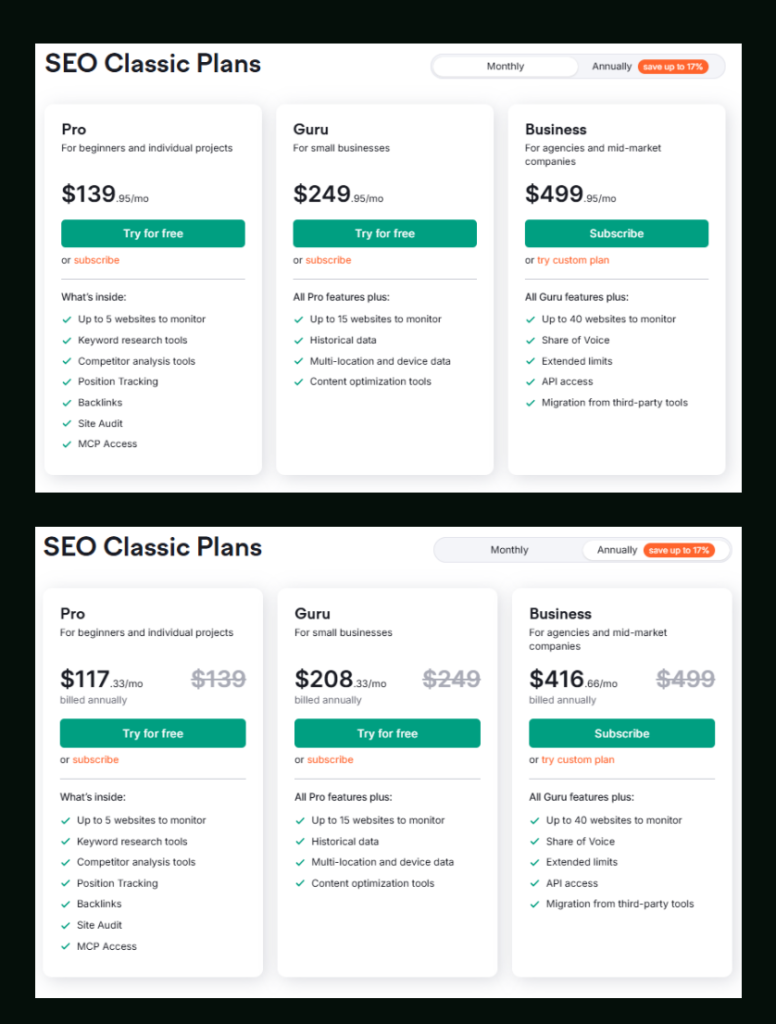
Pro gives you access to keyword research tools, competitor analysis, position tracking, backlinks, site audit, and MCP access. You can monitor up to 5 websites, track 500 keywords daily, crawl up to 100,000 pages per month, and pull 10,000 results per report.
Guru steps up to 15 websites, 1,500 keyword tracking, 300,000 pages crawled per month, 30,000 results per report, historical data, multi-location tracking, and content optimization tools. It also includes Looker Studio integration and keyword cannibalization reporting — both Pro omissions that matter for agency work.
Business is for teams managing scale: 40 websites, 5,000 keywords tracked, 1,000,000 pages crawled monthly, 50,000 results per report, Share of Voice tracking, API access, and migration from third-party tools.
For anyone deciding between Pro and Guru, historical data alone is often the deciding factor — it’s what lets you analyze how competitors built their organic presence over time. You can dig deeper into Semrush Pro vs Guru to figure out which plan actually fits your situation.
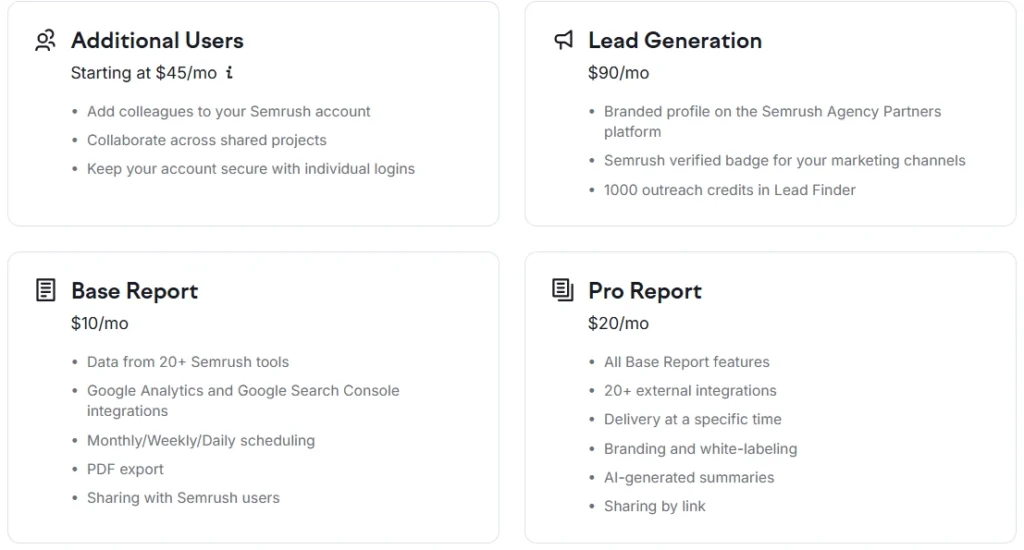
Add-ons available:
- Additional Users: Starting at $45/mo — adds team members with individual logins
- Lead Generation: $90/mo — branded agency profile, Semrush verified badge, 1,000 outreach credits in Lead Finder
- Base Report: $10/mo — automated reports pulling from 20+ tools, GA and GSC integration, PDF export
- Pro Report: $20/mo — all Base Report features plus 20+ external integrations, white-labeling, AI-generated summaries, and delivery scheduling
Google Analytics, for comparison, is completely free, which is worth acknowledging. The trade-off is that free comes with limitations: no competitor data, no keyword prospecting, no rank tracking.
If you want to test Semrush before committing, both the Pro and Guru plans currently offer a 7-day free trial so you can explore the full toolset before paying.
Semrush SEO Free Trial ( Pro & Guru )
Get full Pro access for 7 days — keyword research, site audit, backlink analysis & competitor research. No charge until after the trial ends.
Start Your Semrush 7-Day Free Trial→The Data Source Difference Nobody Talks About
Here’s a detail most comparison articles skip: Semrush and Google Analytics pull from completely different data sources.
Google Analytics uses first-party data — it only knows what happened on your website because your tracking code recorded it. Every number is derived from actual user sessions on your property.
Semrush pulls from third-party data sources — its own crawler, clickstream data partnerships, its massive keyword database, and machine learning models. This means Semrush can estimate traffic and rankings for any website, not just yours. But it also means Semrush’s traffic estimates for your own site won’t always match your GA numbers exactly.
I’ve seen clients panic when Semrush shows 8,000 monthly visitors, but GA shows 14,000. Both can be right. Semrush is estimating based on ranking positions and click-through rates; GA is counting actual sessions. The discrepancy is normal, and understanding it saves a lot of confusion.
The smarter approach: use Semrush for competitive benchmarking and keyword strategy, and use GA for your own internal performance measurement. They answer different questions, so they should produce different numbers.
When Semrush Is the Clearly Better Choice
You’re doing content marketing and SEO: Semrush tells you what to write, who you’re competing against, and whether it’s working.
You manage multiple client websites: The reporting, position tracking, and site audit capabilities in Semrush are built for agency workflows. GA is not.
You need to justify content investment: Semrush gives you keyword difficulty, search volume, and traffic potential before you commit resources. GA only tells you performance afterward.
You’re trying to grow organic traffic from a standing start: Semrush’s gap analysis and competitor keyword data give you a roadmap. GA gives you data about traffic you don’t have yet.
You want to understand why a competitor is outranking you: Semrush answers this. GA doesn’t even try.
Quick Side-by-Side: Semrush vs Google Analytics
| Capability | Semrush | Google Analytics |
|---|---|---|
| Keyword research | ✅ Yes | ❌ No |
| Competitor traffic analysis | ✅ Yes | ❌ No |
| Daily rank tracking | ✅ Yes | ❌ No |
| Backlink analysis | ✅ Yes | ❌ No |
| Technical site audit | ✅ Yes | ❌ No |
| On-site user behavior | ❌ Limited | ✅ Yes |
| Conversion tracking | ❌ No | ✅ Yes |
| Real-time traffic monitoring | ❌ No | ✅ Yes |
| Ecommerce attribution | ❌ No | ✅ Yes |
| Cost | Paid (from $117.33/mo annual) | Free |

Semrush SEO Free Trial
Get full Pro access for 7 days — keyword research, site audit, backlink analysis & competitor research. No charge until after the trial ends.
Start Your Semrush 7-Day Free Trial →Frequently Asked Questions
Is Semrush actually better than Google Analytics?
It depends entirely on what you’re trying to do. For keyword research, competitor analysis, backlink tracking, and rank monitoring, Semrush is significantly more capable. Google Analytics is better for tracking user behavior, conversions, and on-site engagement metrics. For SEO-focused work, most professionals consider Semrush the more powerful tool — but the two complement each other rather than replace each other.
Can Semrush replace Google Analytics completely?
Not really, and honestly, you wouldn’t want it to. Semrush doesn’t track individual user sessions, conversion paths, or on-site behavioral data the way GA does. If you’re running paid campaigns, tracking revenue, or analyzing funnel performance, you need Google Analytics. Semrush fills the external intelligence gap that Google Analytics was never designed to fill.
Why does Semrush show different traffic numbers than Google Analytics?
This is one of the most common points of confusion. Semrush estimates traffic based on keyword rankings and modeled click-through rates, while Google Analytics counts actual recorded sessions. The two methodologies produce different numbers by design — neither is “wrong.” Semrush is better for benchmarking against competitors; GA is better for tracking your own actual performance. For a deeper look at how Semrush compares to other tools in terms of data accuracy, that comparison is worth reading.
Is the Semrush free trial actually free?
Yes. Pro and Guru plans both offer a 7-day free trial with full access to the toolset — no restrictions on which features you can use during the trial period. The Business plan doesn’t include a free trial; it goes straight to subscription. If you cancel before the 7 days end, you’re not charged. The Semrush free trial process is straightforward and doesn’t require a long-term commitment upfront.
Which Semrush plan is best for someone switching from Google Analytics?
For most individuals or small teams coming from a GA-only setup, the Pro plan at $117.33/mo (billed annually) is a solid starting point. It covers keyword research, competitor analysis, position tracking for up to 500 keywords, site audit, and backlinks, which is more than enough to understand the platform’s core value. If you need historical data or manage more than five websites, Guru becomes the more practical choice.
Does Semrush integrate with Google Analytics?
Yes, through the Semrush Base Report add-on ($10/mo) and Pro Report add-on ($20/mo), you can pull Google Analytics and Google Search Console data directly into Semrush reports. This is actually one of the more underrated features — it lets you combine Semrush’s external SEO data with GA’s internal behavioral data in a single report, which is especially useful for client reporting. You can also learn more about using Semrush for free before committing to a paid plan.
Is Semrush worth it if I already have Google Analytics?
If you’re actively trying to grow organic traffic, yes — by a significant margin. Google Analytics tells you what’s happening on your site. Semrush tells you what you need to do to make more of it happen. The two tools operate on entirely different layers of the SEO workflow. In my experience working across client projects, teams that add Semrush to an existing GA setup consistently identify more keyword opportunities and spot competitor movements they would have missed entirely.
The Bottom Line
Google Analytics is excellent at what it does. But “what it does” is internal — it measures your existing traffic, not the opportunity you haven’t captured yet.
Semrush is better for anyone whose primary goal is growing organic search traffic. The competitor intelligence, keyword database, daily rank tracking, and backlink analysis tools don’t exist in Google Analytics. They were never meant to.
The professionals who get the most value out of both tools use them for what each does best: Semrush for planning and competitive strategy, Google Analytics for measuring and optimizing what’s already running.
If you want to try Semrush and see how it compares with your own data, the 7-day free trial gives you full access to the Pro or Guru toolset — enough time to run a real competitor analysis, check your keyword gaps, and see what you’ve been missing.