Contents
- 0.1 What You Actually Get with a Free Account
- 0.2 Semrush free account limits official
- 0.3 Where the Free Plan Hits Its Ceiling
- 0.4 The SEO Classic Plans: What Paid Actually Costs
- 0.5 Semrush One: The Newer, Bigger Picture
- 0.6 Add-Ons Worth Knowing About
- 0.7 Free vs. Paid: The Honest Side-by-Side
- 0.8 Who Should Stay on the Free Plan
- 0.9 Who Actually Needs a Paid Plan
- 0.10 The 7-Day Free Trial: What It Actually Unlocks
- 1 Everything You Need About Semrush Free Trial
- 1.1 Start Semrush Free Trial
- 1.2 How to Get Free Trial
- 1.3 How to Cancel Trial
- 1.4 Semrush SEO Free Trial
- 1.5 Frequently Asked Questions
- 1.6 Does the free Semrush account require a credit card?
- 1.7 How quickly do you hit the free plan’s limits in real use?
- 1.8 Is the free plan’s site audit actually useful?
- 1.9 What’s the main reason to choose Semrush One over the classic SEO plans?
- 1.10 Can I switch from the free plan to a paid plan without losing my data?
- 1.11 Is there a meaningful difference between Semrush and Ahrefs at the free tier?
- 1.12 Can I cancel the paid plan anytime?
- 1.13 The Bottom Line
- 2 Best Semrush Alternatives to Consider
Most people sign up for the free Semrush account and immediately feel like they’re getting access to something powerful. And honestly, they’re not wrong — the free plan is genuinely useful. But there’s a point, usually around day three, where the daily limits kick in, and you start feeling them.
That friction is where the real question begins: Is the free account enough, or is the paid version worth the jump?
Quick Answer: The free Semrush account gives you access to core tools — keyword research, domain analysis, site audit, position tracking — but with tight daily query limits (typically 10 per tool per day) and restricted data depth. Paid plans remove those limits, unlock historical data, increase crawl capacity, and — with Semrush One — add AI visibility tracking across platforms like ChatGPT, Gemini, and Google AI.
What You Actually Get with a Free Account
Let me be direct: the free plan isn’t a demo. It’s a genuinely functional entry point that lets you do real work — just within boundaries.
Here’s what’s available on a free Semrush account:
Semrush free account limits official
| Tool | Free Limit | What You Can Do |
|---|---|---|
| Domain Overview | 10 queries/day | Check SEO + AI visibility for any domain |
| Keyword Research | 10 queries/day | Identify valuable keywords |
| Competitor Research | 10 queries/day | Analyze competitor traffic and strategy |
| Site Audit | 100 pages/month | Fix technical issues on your site |
| Position Tracking | 10 keywords | Track your most important rankings |
| Backlinks | 10 queries/day | See who links to you or competitors |
| SEO Ideas | Limited access | Improve pages with on-page suggestions |
For a single-site operator who’s just getting started, this is workable. You can run your own domain, check a couple of competitors, and get a general sense of your visibility — all without spending a cent.
The problem shows up when you scale. Ten queries per day sounds reasonable until you’re mid-audit and the counter hits zero.
Where the Free Plan Hits Its Ceiling
Here’s the thing most comparison articles skip over — it’s not just about query limits. The free plan is missing entire data layers that affect the quality of your decisions.
No historical data. On the free plan, you only see current keyword metrics. You can’t look at how a keyword’s volume has trended over 12 months, which means you can’t distinguish seasonal spikes from genuine growth. Paid plans (Guru and above in the SEO Classic lineup, or Pro+ and above in Semrush One) include full historical data.
No JavaScript rendering in Site Audit. If your site runs on React, Next.js, or any JavaScript-heavy framework, the free site audit misses a huge chunk of your actual page structure. This is only available from Guru onwards.
No Looker Studio integration. If you’re reporting to clients or a team, you need to export data manually on the free plan. Guru and Business unlock direct Looker Studio integration.
No Share of Voice tracking. Understanding your brand’s overall presence in the SERPs — not just individual keywords — requires Business-level access on the classic SEO plans.
In my experience, auditing client sites, the JavaScript rendering gap alone has caused real problems. A free-plan audit on a JavaScript-rendered site once showed clean technical health, when the actual issues were completely invisible to the crawler. That kind of false clarity is more dangerous than no data at all.
The SEO Classic Plans: What Paid Actually Costs
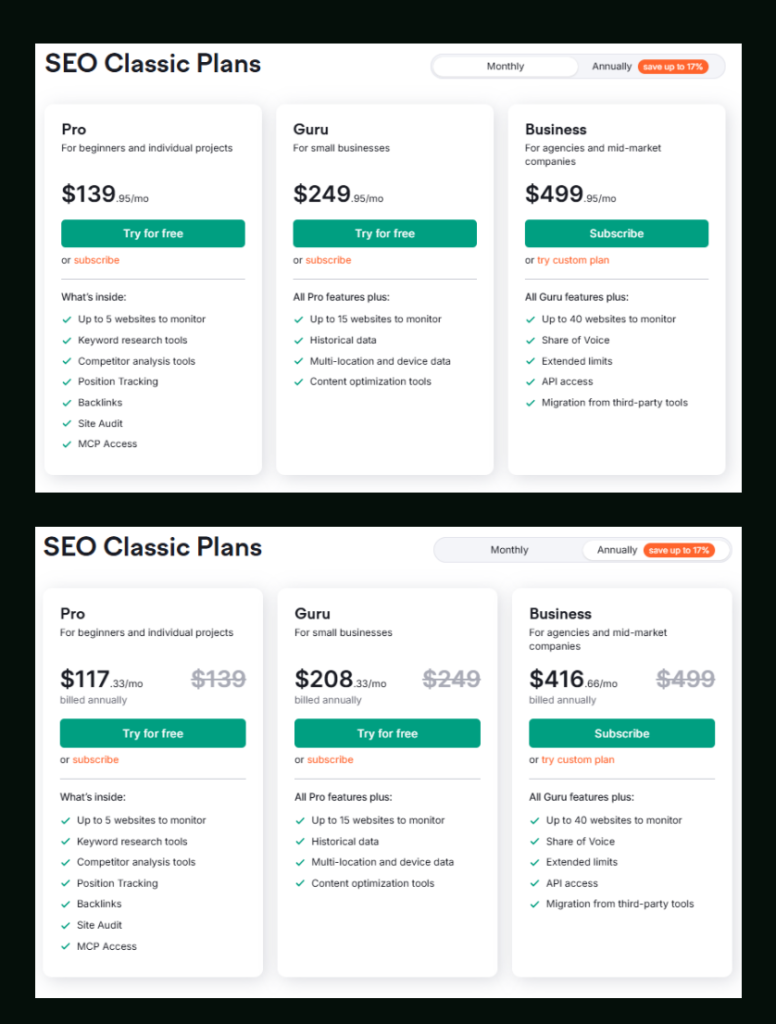
Semrush’s traditional SEO plans are what most people know. Three tiers, scaled by project size and data depth.
Monthly pricing:
- Pro — $139.95/mo (for beginners and individual projects)
- Guru — $249.95/mo (for small businesses)
- Business — $499.95/mo (for agencies and mid-market companies)
Annual pricing (save up to 17%):
- Pro — $117.33/mo billed annually
- Guru — $208.33/mo billed annually
- Business — $416.66/mo billed annually
Pro and Guru both offer a 7-day free trial so you can test the full feature set before committing.
What changes as you move up?
Here’s where the differences actually live:
| Feature | Pro | Guru | Business |
|---|---|---|---|
| Keywords to track (daily) | 500 | 1,500 | 5,000 |
| Websites to monitor | 5 | 15 | 40 |
| Pages to crawl/month | 100,000 | 300,000 | 1,000,000 |
| Results per report | 10,000 | 30,000 | 50,000 |
| Historical data | ✗ | ✓ | ✓ |
| JavaScript rendering | ✗ | ✓ | ✓ |
| Keyword metric updates/month | 250 | 1,000 | 5,000 |
| Looker Studio integration | ✗ | ✓ | ✓ |
| Share of Voice tracking | ✗ | ✗ | ✓ |
| Keyword Cannibalization report | ✗ | ✓ | ✓ |
| Topics | ✗ | ✓ | ✓ |
| Targets per monitored website | 1 | 10 | Unlimited |
| SEO Idea Units/month | 500 | 800 | 2,000 |
The Pro plan is genuinely solid for freelancers running one or two client sites. The moment you’re juggling 5+ sites or need content-level data, Guru starts making more sense.
Semrush One: The Newer, Bigger Picture
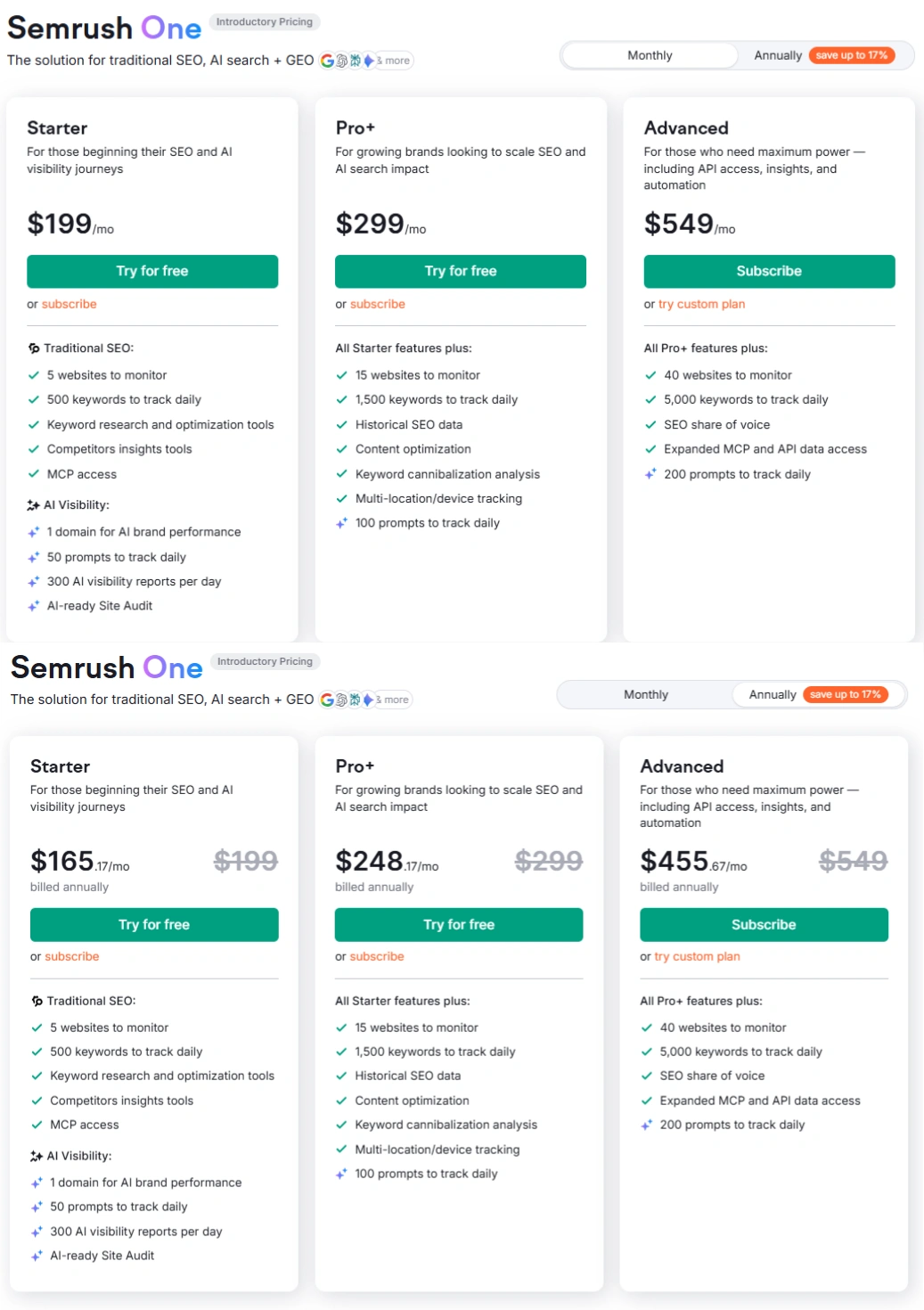
If you’ve been looking at Semrush recently, you’ve probably noticed something called Semrush One — labelled as introductory pricing, positioned as the solution for traditional SEO, AI search, and GEO together.
This is a different product tier entirely, and it’s worth understanding what it adds.
Semrush One Monthly pricing:
- Starter — $199/mo
- Pro+ — $299/mo
- Advanced — $549/mo
Semrush One Annual pricing (save up to 17%):
- Starter — $165.17/mo billed annually
- Pro+ — $248.17/mo billed annually
- Advanced — $455.67/mo billed annually
Starter and Pro+ include a 7-day free trial. Advanced requires a direct subscription.
What Semrush One adds beyond the classic plans
The fundamental addition is AI Visibility tracking — which is not a gimmick in 2025’s search landscape.
The Starter plan, for example, includes:
- 1 domain for AI brand performance monitoring
- 50 custom AI prompts to track daily
- 300 AI visibility reports per day
- AI-ready Site Audit
The Pro+ plan extends this to 1,500 keywords to track daily, 100 AI prompts to track, historical SEO data, content optimization, and keyword cannibalization analysis.
Advanced adds 5,000 keywords daily, 200 AI prompts, SEO share of voice, expanded MCP and API data access.
For teams or agencies actively tracking how their brand appears in ChatGPT, Gemini, Google AI Overviews, and Perplexity — this is where Semrush One earns its premium.
| Feature | Starter | Pro+ | Advanced |
|---|---|---|---|
| Websites to monitor | 5 | 15 | 40 |
| Keywords (daily Google rankings) | 500 | 1,500 | 5,000 |
| AI prompts to track daily | 50 | 100 | 200 |
| Site Audit pages/month | 100,000 | 300,000 | 1,000,000 |
| Historical data | ✗ | ✓ | ✓ |
| JavaScript rendering | ✗ | ✓ | ✓ |
| Multi-location/device tracking | ✗ | ✓ | ✓ |
| API access | ✗ | ✗ | ✓ |
| Migration from third-party tools | ✗ | ✗ | ✓ |
| Additional users | $45/user | $80/user | $100/user |
| AI Visibility Toolkit (add-on) | $99/user | $99/user | $99/user |
Add-Ons Worth Knowing About
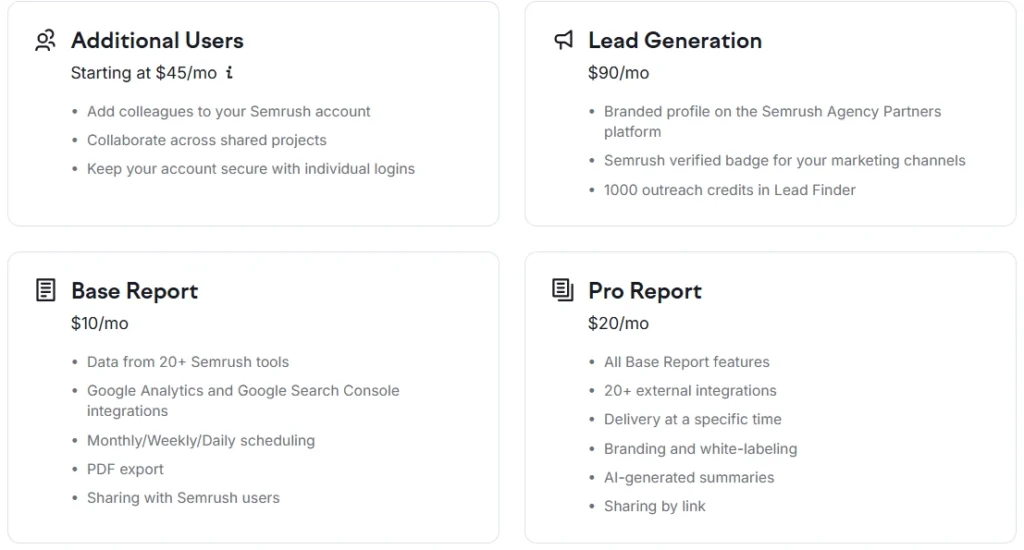
Beyond the core plans, Semrush offers add-ons that can extend what any plan does:
- Additional Users — Starting at $45/mo (lets you add teammates to your account)
- Lead Generation — $90/mo (branded agency profile, verified badge, 1,000 Lead Finder outreach credits)
- Base Report — $10/mo (automated reports pulling data from 20+ Semrush tools, PDF export, Google Analytics + Search Console integrations)
- Pro Report — $20/mo (everything in Base Report, plus white-labeling, branding, AI-generated summaries, 20+ external integrations, and scheduled delivery)
The Lead Generation add-on is particularly relevant for agencies. Having a verified Semrush badge on your profile carries actual weight when pitching prospects.
Free vs. Paid: The Honest Side-by-Side
Let me cut through the noise and give you the comparison that actually matters for decision-making.
| What You’re Trying to Do | Free Plan | Paid Plan |
|---|---|---|
| Check your own site’s basic health | Yes | Yes (with more depth) |
| Research keywords for a new article | Yes (10/day limit) | Yes (unlimited) |
| Audit your full site | 100 pages only | Up to 1M pages (Business/Advanced) |
| Track how rankings change over time | 10 keywords | 500–5,000 keywords |
| See historical keyword trends | No | From Guru / Pro+ up |
| Report to clients automatically | No | Yes (with report add-ons) |
| Track AI brand visibility | Limited basics | Full suite (Semrush One) |
| Analyze competitor backlink profile | Limited | Full access |
| JavaScript-rendered site audits | No | From Guru / Pro+ up |
Who Should Stay on the Free Plan
Not everyone needs to pay. Honestly.
The free account makes sense if you’re managing a single personal site, validating a niche idea before committing, a student or beginner learning SEO fundamentals, or someone who needs occasional spot-checks but not ongoing monitoring.
If you fit any of those descriptions and you’re running 10 or fewer queries per day comfortably, there’s no urgency to upgrade. You can also learn a lot about how the platform works before spending anything, which is a smarter approach than committing to a paid plan blindly.
For a deeper look at how to extract maximum value before upgrading, check out how to use Semrush for free.
Who Actually Needs a Paid Plan
The calculus shifts quickly once you cross certain thresholds.
You’re likely ready for a paid plan if you’re managing more than one website, regularly running out of daily queries mid-session, need to track more than 10 keywords across multiple campaigns, want historical data to support content decisions, or need to audit sites with more than 100 pages.
For most professional SEOs, freelancers, and small agencies, the Pro plan at $117.33/mo (billed annually) is the natural starting point. It covers 5 websites, 500 keywords to track, and 100,000 crawl pages monthly — enough for a solid client roster.
If content strategy and multi-location tracking matter to your workflow, Guru at $208.33/mo annually is where the feature set becomes complete for most use cases.
Not sure which paid tier fits your situation? The Semrush Pro vs Guru breakdown covers that decision in detail.
The 7-Day Free Trial: What It Actually Unlocks
Both the SEO Classic Pro and Guru plans offer a 7-day free trial, as do Semrush One’s Starter and Pro+ plans. During those seven days, you get full platform access — no artificial data caps, no tool restrictions.
In my experience across dozens of client onboarding projects, the trial period is most valuable for three things: running a complete site audit on your main domain, pulling a full backlink analysis against a primary competitor, and setting up position tracking for your core keyword set. Seven days is enough to do all three with meaningful results.
If you want to activate your trial, you can start the Semrush free trial here.
Everything You Need About Semrush Free Trial
Activate your Semrush free trial directly, read our step-by-step guide on how to get it, or learn how to cancel before getting charged — all in one place.
Start Semrush Free Trial
Get full Pro access for 7 days — keyword research, site audit, backlink analysis & competitor research. No charge until after the trial ends.
Start Free Trial →How to Get Free Trial
Step-by-step guide to activate your Semrush free trial — what you unlock, how to use it right, and how to get maximum value in 7 days.
Read Full Guide →How to Cancel Trial
Don’t get charged by mistake. Step-by-step guide to cancel your Semrush trial before the billing date — timing tips included.
Read Cancel Guide →
Semrush SEO Free Trial
Get full Pro access for 7 days — keyword research, site audit, backlink analysis & competitor research. No charge until after the trial ends.
Start Your Semrush 7-Day Free Trial →Frequently Asked Questions
Does the free Semrush account require a credit card?
No. You can create and use a free Semrush account without entering any payment information. If you want to activate the 7-day free trial on a paid plan, you will need to provide card details — but you won’t be charged during the trial period, and you can cancel before it ends.
How quickly do you hit the free plan’s limits in real use?
Faster than you’d expect. In a single research session — checking your domain, two competitors, and running a few keyword searches — you can burn through the daily 10-query limit in under 30 minutes. The position tracking cap of 10 keywords is the other limit that frustrates people quickly, especially once you’re optimizing more than a handful of pages.
Is the free plan’s site audit actually useful?
For small sites, yes. The 100-page monthly crawl is enough to identify your most critical technical issues on a simple blog or landing page site. For anything beyond that — an e-commerce store, a content site with hundreds of URLs, or a JavaScript-rendered site — the free audit gives you an incomplete picture that can be misleading.
What’s the main reason to choose Semrush One over the classic SEO plans?
If AI search visibility matters to your strategy — tracking how your brand appears in ChatGPT, Gemini, Google AI Overviews, or Perplexity — Semrush One is the only plan tier that covers that systematically. Classic SEO plans focus on traditional Google rankings. If you’re managing brands that need visibility across both channels, Semrush One is worth the premium.
Can I switch from the free plan to a paid plan without losing my data?
Yes. All your saved projects, tracked keywords, and configured campaigns carry over when you upgrade from the free plan to any paid tier.
Is there a meaningful difference between Semrush and Ahrefs at the free tier?
Both tools offer free access with significant restrictions. The more relevant question is which paid plan fits your workflow better. If you’re weighing that decision, the Semrush vs Ahrefs comparison breaks down how the two platforms differ once you’re actually paying.
Can I cancel the paid plan anytime?
Monthly plans can be cancelled at any time. Annual plans are billed upfront, so it’s worth making sure the tier you choose fits your actual needs before committing to the annual rate — even though the savings (up to 17%) are meaningful over twelve months.
The Bottom Line
The free Semrush account is a real tool, not just a teaser. But it’s designed for a specific scale — one site, low query volume, basic monitoring. Once your work outgrows those boundaries, the friction compounds fast.
For most professional use cases, the Pro plan is where the platform’s full value becomes accessible. Guru unlocks the data depth that content-focused teams need. And if AI search is part of your remit, Semrush One is the only plan that addresses that properly.
The 7-day free trial on Pro and Guru (and Semrush One Starter and Pro+) makes it risk-free to find out which side of that line you’re actually on. Try it here — no commitment required.
Best Semrush Alternatives to Consider
If Semrush’s pricing feels steep after the trial, these three tools cover most of what you need at a lower price point — SE Ranking, Mangools, and Ubersuggest all offer free trials too.
SE Ranking
More affordable entry pricing, solid rank tracking and audit features. Good for small agencies and freelancers who don’t need Semrush’s full data depth.
Try SE Ranking →Mangools
Beginner-friendly, clean UI, strong keyword and SERP tools at a much lower price point. Perfect for solo bloggers who need keyword research without the complexity.
Try Mangools →Ubersuggest
Neil Patel’s SEO Tool — keyword research, site audit, and competitor analysis at a very affordable price. Great for beginners and small business owners on a tight budget.
Try Ubersuggest →