Contents
- 0.1 The Fundamental Data Difference (This Is What Most People Miss)
- 0.2 What Semrush Actually Does (Beyond the Generic Description)
- 0.3 What Google Analytics Actually Does (That Semrush Cannot)
- 0.4 The Overlap Zone: Where They Actually Share Ground
- 0.5 Semrush Pricing (Current Plans)
- 0.6 The Workflow That Actually Makes Sense
- 0.7 Who Should Use What
- 0.8 Semrush SEO Free Trial
- 1 Frequently Asked Questions
- 1.1 Can Semrush replace Google Analytics?
- 1.2 Does Google Analytics help with SEO?
- 1.3 How accurate is Semrush traffic data?
- 1.4 Is Google Analytics really free?
- 1.5 Which is better for a beginner?
- 1.6 Do I need to integrate Semrush with Google Analytics?
- 1.7 What’s the main limitation of Semrush compared to GA?
Most people searching this question already use one of these tools and are wondering if they need the other. The short answer — yes, you probably do. But the real answer is more interesting than that.
These two aren’t competing for the same job. Comparing Semrush to Google Analytics is a bit like asking whether a map is better than a GPS tracker. One tells you where opportunities exist across the terrain. The other tells you exactly where you are and how you got there.
Quick Answer: Semrush is a competitive intelligence and SEO research platform that lets you analyze any website — yours or your competitors’. Google Analytics is a first-party web analytics tool that measures what happens on your own site. They serve entirely different purposes and work best when used together.
The Fundamental Data Difference (This Is What Most People Miss)
Here’s the thing most comparisons gloss over: these tools don’t just do different things — they’re built on completely different types of data.
Google Analytics collects first-party, verified behavioral data. Every session, click, scroll, and conversion is tracked via a snippet installed directly on your site. The numbers are exact. 100 visitors means exactly 100 visitors.
Semrush works on third-party estimated data. It aggregates clickstream data, search volume patterns, and machine learning models to estimate traffic and keyword behavior across millions of domains. The numbers are directional, not absolute.
This distinction matters enormously in practice. In my experience auditing client sites, I’ve seen Semrush traffic estimates run anywhere from 60% to 90% accurate depending on the niche and domain size. That’s not a flaw — it’s the nature of estimated data. The mistake is treating Semrush numbers like GA numbers. They’re not the same thing, and they’re not supposed to be.
| Semrush | Google Analytics | |
|---|---|---|
| Data Type | Third-party estimated | First-party exact |
| Scope | Any website | Your website only |
| Primary Use | Research & strategy | Measurement & analysis |
| Cost | Paid (plans from $117.33/mo billed annually) | Free |
| Real-time data | No | Yes |
| Competitor analysis | Yes | No |
| Keyword discovery | Yes | Limited (via GSC integration) |
| User behavior tracking | No | Yes |
| Conversion tracking | No | Yes |
What Semrush Actually Does (Beyond the Generic Description)
Semrush started as a keyword research tool and has evolved into a full competitive intelligence suite. When I first started using it across client projects — this was before it had half the features it does now — the competitive research alone justified the cost. Today it does a lot more.
The three things Semrush genuinely does better than anything else:
1. Competitive keyword intelligence You can enter any competitor’s domain and pull their entire organic keyword profile — every keyword they rank for, their position, traffic estimate, and difficulty score. GA can’t touch this. It only shows data for your own site.
2. Backlink analysis and gap identification Semrush’s backlink database is one of the largest available. You can see who’s linking to competitors but not to you — that’s your link-building hit list.
3. Technical SEO auditing The Site Audit tool crawls your site and surfaces technical issues — broken links, crawl errors, Core Web Vitals, JavaScript rendering problems — with prioritized fix recommendations. This is internal-facing, not competitor-facing, but it’s a capability GA4 simply doesn’t have.
And then there’s the newer layer: the AI Search Site Audit feature, which is included across all current SEO plans (Pro, Guru, and Business). That’s a signal of where search is headed — Semrush is building toward AI visibility, not just traditional SERP rankings.
What Google Analytics Actually Does (That Semrush Cannot)
Google Analytics gives you verified, behavioral truth about your own audience. No estimates. No approximations.
Real-time user data. You can watch visitors move through your site right now, in real time. Which page are they on? Where did they come from? What device are they using? Semrush has no equivalent for this.
Conversion and funnel tracking. If you want to know why 80% of users abandon your checkout page at step 3, that’s a GA4 funnel exploration. You can set up custom conversion events, track form submissions, button clicks, scroll depth — any interaction you define. Semrush can’t track behavior on your own site at all.
Session and engagement depth. GA4 gives you average engagement time, bounce behavior, session quality signals. These are metrics you need to evaluate content effectiveness after publishing, not to plan what to write.
Audience segmentation. Want to compare how organic traffic from India behaves versus direct traffic from the US? GA4 lets you build those segments and cross-reference them against conversion data. This is the kind of analysis that informs actual product and content decisions.
The one place GA falls short — and where it’s gotten worse over time — is keyword data. Since Google moved to secure search, organic keywords in GA show up largely as “(not provided).” You connect Google Search Console to fill this gap partially, but even then, the keyword reporting is limited. That gap is exactly where Semrush earns its keep.
This is where it gets genuinely interesting, and it’s something most comparison articles skip.
There IS an overlap between Semrush and Google Analytics — primarily in two areas:
Traffic estimation vs. traffic reality. Semrush’s Traffic Analytics tool estimates total visits, traffic sources, and engagement metrics for any domain. When you run it on your own domain, you can compare Semrush’s estimate against your actual GA4 numbers. The delta tells you how much to trust Semrush estimates for competitors of similar size. I’ve used this comparison across dozens of projects — it’s the fastest calibration exercise you can do.
Keyword performance. Semrush’s Position Tracking shows where you rank for specific keywords daily. GA4 (via GSC integration) shows which keywords are actually driving clicks and impressions. They answer adjacent questions — ranking position versus actual traffic behavior. Neither alone is enough; together, they tell the full keyword story.
Site audit overlap with Core Web Vitals. GA4 now includes some Core Web Vitals data (via its integration with Google’s speed signals). Semrush’s Site Audit covers similar ground but goes deeper technically. If your site is slow, both tools will flag it — but Semrush will give you more specific crawl-level diagnostics.
Semrush Pricing (Current Plans)
Since Google Analytics is free, the real cost question is about Semrush.
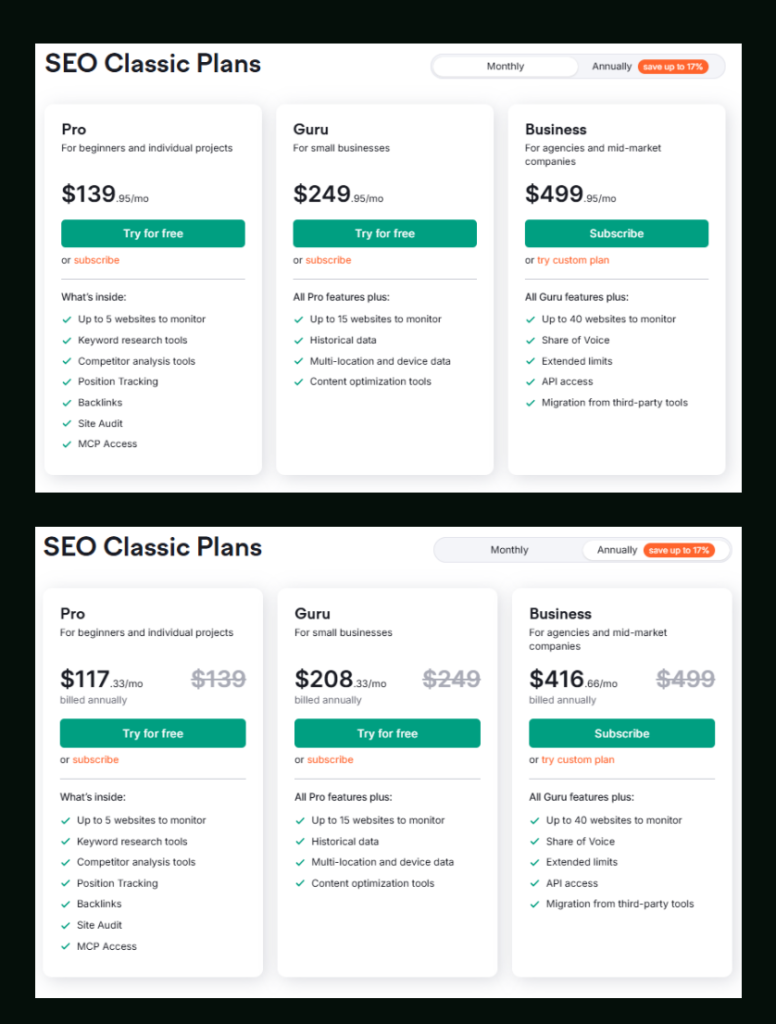
Semrush’s SEO plans (billed monthly, no commitment):
| Plan | Monthly Price | Best For |
|---|---|---|
| Pro | $139.95/mo | Freelancers, individual projects |
| Guru | $249.95/mo | Small businesses, growing teams |
| Business | $499.95/mo | Agencies, mid-market companies |
Billed annually, prices drop meaningfully:
| Plan | Annual Price (per month) | Savings vs Monthly |
|---|---|---|
| Pro | $117.33/mo | ~$139 saved/yr |
| Guru | $208.33/mo | ~$499 saved/yr |
| Business | $416.66/mo | ~$999 saved/yr |
The Pro and Guru plans both include a 7-day free trial — no credit card friction if you want to test before committing. Start your 7-day free trial here.
A few feature differences worth noting before you pick a plan:
- Historical data is Guru and above only — Pro users get current snapshots only
- JavaScript rendering in Site Audit requires Guru+
- Keywords to track goes from 500 (Pro) → 1,500 (Guru) → 5,000 (Business)
- Pages to crawl per month is 100,000 on Pro, 300,000 on Guru, 1,000,000 on Business
- Keyword Cannibalization reports are Guru and above
- Share of Voice tracking is Business only
If you’re choosing between Pro and Guru, the Semrush Pro vs Guru breakdown covers the real-world differences in detail.
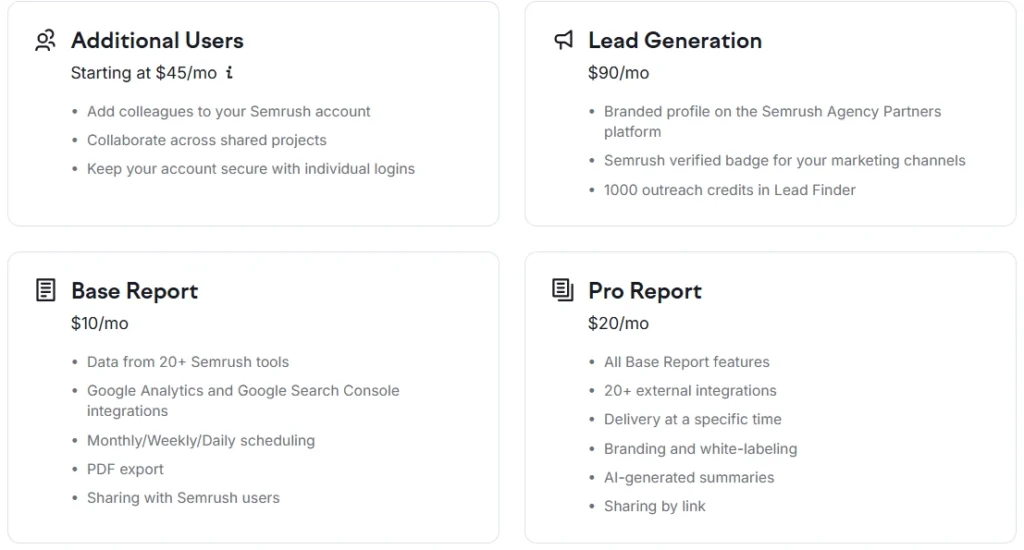
Add-ons available across plans:
| Add-on | Price |
|---|---|
| Additional Users | Starting at $45/mo |
| Lead Generation | $90/mo |
| Base Report | $10/mo |
| Pro Report | $20/mo |
The Workflow That Actually Makes Sense
Here’s how I use both tools in practice — not in theory. The pattern repeats across almost every content project:
Phase 1 — Research (Semrush)
Start in Semrush’s Keyword Magic Tool. Find a target keyword with enough volume and manageable difficulty. Pull the competitor pages’ ranking for it. Check what angle they’re taking and what they’re missing.
Phase 2 — Create and publish.
Write the piece, optimize it, and publish it. Nothing fancy here — execution matters more than tooling at this stage.
Phase 3 — Monitor (Google Analytics + Semrush Position Tracking)
After a few weeks, check GA4 for organic traffic to that URL. Check engagement time and bounce behavior — is the content actually holding attention? Simultaneously, watch Semrush Position Tracking to see if rankings are moving.
Phase 4 — Refine (based on both signals)
If rankings are climbing but engagement time in GA is low, the content needs depth or a better structure. If engagement time is high but traffic is stagnant, the issue is authority — backlinks. Both signals together tell you where to invest next.
This loop — Semrush for direction, GA for reality check — is how the two tools actually earn their place in the same workflow.
Who Should Use What
Use Google Analytics if: You want to understand your own audience, track conversions, measure campaign performance, or analyze user behavior on your site. It should be installed on every website, full stop.
Use Semrush if: You’re doing keyword research, planning content strategy, running technical SEO audits, building backlinks, or tracking competitor rankings. It’s a paid tool — it makes sense once you’re actively investing in SEO growth.
Use both if: You’re running any kind of serious content or SEO program. Honestly, trying to do meaningful SEO work without both is like trying to navigate with only a speedometer. You know how fast you’re going, but not where you are.
If budget is a concern and you’re just starting, using Semrush for free via its limited free tier is a reasonable starting point before committing to a paid plan.

Semrush SEO Free Trial
Get full Pro access for 7 days — keyword research, site audit, backlink analysis & competitor research. No charge until after the trial ends.
Start Your Semrush 7-Day Free Trial →Frequently Asked Questions
Can Semrush replace Google Analytics?
No — and this is probably the most important thing to understand about both tools. Semrush has no visibility into your actual visitor behavior. It can’t track conversions, sessions, or real-time user data on your site. Google Analytics does that. Semrush does competitive and keyword research. They’re not interchangeable.
Does Google Analytics help with SEO?
Indirectly, yes. GA4 connected to Google Search Console shows which queries bring users to your site and how those users engage once they arrive. It tells you which existing content is performing and where users are dropping off. What it can’t do is find new keyword opportunities or show you what competitors rank for — that’s Semrush territory.
How accurate is Semrush traffic data?
It’s estimated data, so not exact — but it’s directionally reliable for competitive benchmarking. In my testing across client accounts where I had both GA data and Semrush estimates visible, accuracy varied by niche. High-volume domains in competitive niches tend to have better estimate accuracy than small, niche sites. Use the numbers for trend analysis and competitive comparison, not as absolutes.
Is Google Analytics really free?
Yes, the standard version is completely free. There’s a paid enterprise tier (GA360) aimed at large corporations, but the free version is sufficient for the vast majority of websites. Semrush has no free tier that gives meaningful competitive research — its 7-day free trial is the best way to test it before paying.
Which is better for a beginner?
Start with Google Analytics — it’s free, and understanding your own traffic is the foundation. Once you have a handle on your site’s baseline and you’re ready to actively grow organic traffic, that’s when Semrush starts paying for itself. If you’re evaluating alternatives at that point, the Semrush vs Ahrefs comparison is worth reading before committing.
Do I need to integrate Semrush with Google Analytics?
Not directly — they’re separate platforms. What you do is integrate Google Analytics and Google Search Console together inside your GA4 property. Semrush has its own GSC integration that pulls ranking data into your Semrush dashboard. Running both integrations in parallel gives you the most complete keyword performance picture available.
What’s the main limitation of Semrush compared to GA?
The biggest one is data scope: Semrush can only show you what’s visible externally. Anything that happens inside someone’s site that isn’t reflected in search rankings or public traffic signals is invisible to Semrush. GA shows you the internal reality — conversion paths, user flows, micro-behaviors — that no external tool can estimate accurately.