If you’ve ever run a competitor check in Semrush and thought, “Wait, that number seems way off,” — you’re not imagining it. Semrush traffic numbers are estimates, not live analytics. And the way those estimates are built is actually more nuanced than most guides bother to explain.
I’ve spent a good amount of time digging into this — both from Semrush’s own knowledge base and from running my own cross-checks — so let me break it down properly.
Quick Answer
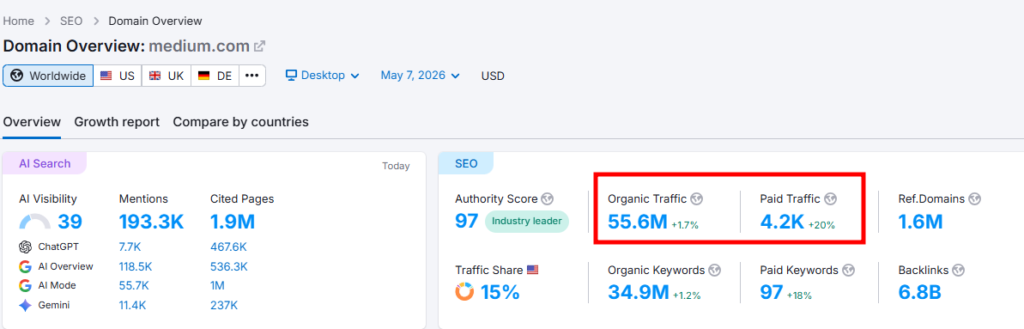
Semrush uses two separate methods to estimate traffic. Domain Analytics calculates potential traffic using keyword rankings multiplied by estimated CTR (click-through rate). Traffic Analytics uses clickstream data from real user behavior across multiple sources. Both tools will almost always show different numbers — and that’s by design, not a bug.
Two Tools, Two Very Different Methods
This is the part most people miss. When someone asks “how does Semrush calculate traffic,” they’re actually asking about two different systems running under the same roof.
Domain Analytics and Traffic Analytics pull from completely different data sources. Using both without understanding the difference is like comparing your GPS route time to your actual commute — related, but not the same thing.
Domain Analytics: The Keyword Position Method
Domain Analytics builds its traffic estimate from one core formula:
Estimated Traffic = Search Volume × Estimated CTR (based on ranking position)
So if a page ranks #3 for a keyword with 10,000 monthly searches, Semrush applies an average CTR for position 3 (roughly 10–15%) and estimates around 1,000–1,500 monthly visits from that keyword alone. It does this across every keyword the domain ranks for, then totals it up.
What this means practically: Domain Analytics is showing you how much traffic a site could theoretically be getting from its organic and paid search positions. It doesn’t see direct traffic, social referrals, email clicks, or any non-search source.
In my testing, this often underestimates traffic for brands with strong direct or social channels — a news site or a well-known brand will look far smaller in Domain Analytics than it actually is.
Traffic Analytics: The Clickstream Method
Traffic Analytics works differently. Instead of keyword positions, it analyzes clickstream data — aggregated, anonymized behavioral data from real users navigating the web.
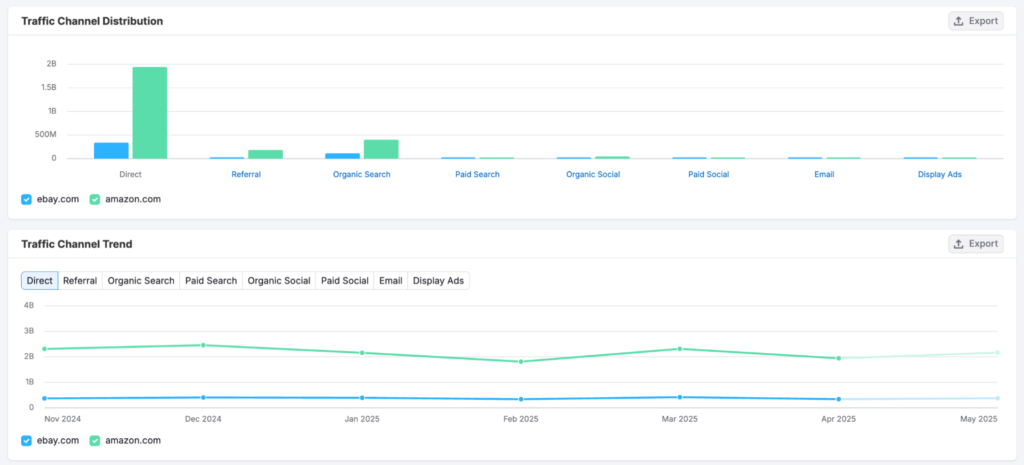
This allows it to estimate traffic across all channels:
- Direct (people typing the URL or using bookmarks)
- Organic search
- Paid search
- Referral
- Organic social
- Paid social
- Display advertising
The Traffic Channel Distribution chart inside Traffic Analytics shows this breakdown clearly. It’s genuinely useful for competitive benchmarking — you can see where a competitor’s audience is coming from, not just how much traffic they get.
That said, Traffic Analytics numbers shift depending on the filters you apply. Whether you select desktop vs. mobile, a specific regional database, or a custom date range, all of it changes the output. Semrush’s own knowledge base is upfront about this.
Why the Numbers Are Always Different
Here’s the thing: Domain Analytics and Traffic Analytics will almost never show the same traffic estimate for the same website. Semrush acknowledges this directly.
Domain Analytics misses everything that isn’t search-driven. Traffic Analytics captures the full picture but relies on panel-based clickstream modeling, which has its own sampling limitations.
Neither number is “wrong.” They’re answering different questions:
| Tool | What It Measures | Best For |
|---|---|---|
| Domain Analytics | Keyword-position-based traffic potential | SEO & PPC research, keyword gap analysis |
| Traffic Analytics | Multi-channel traffic estimation | Competitive benchmarking, audience analysis |
If you’re comparing SEO reach between two competitors, Domain Analytics is your tool. If you want to understand total audience size or traffic sources, Traffic Analytics gives you the fuller picture.
Where People Go Wrong with These Numbers
Most people look at a competitor’s Semrush traffic number and take it at face value. That’s a mistake.
A few things Semrush’s estimates won’t capture:
- Brand traffic — Direct visits from loyal users aren’t modeled well in keyword-based tools
- International gaps — Semrush’s regional database coverage isn’t uniform across all countries
- Content that ranks for long-tail clusters — Lots of low-volume, high-intent keywords can add up to meaningful traffic that position-based estimates undercount
One pro observation worth noting: in my own cross-checks between Semrush Domain Analytics and Google Search Console data for sites I manage, Semrush typically reads 20–40% lower than actual organic traffic. This isn’t a flaw per se — it’s a reflection of how keyword-based estimation inherently underestimates some traffic. Keep this margin in mind whenever you’re using it for competitor analysis.
So, Should You Trust Semrush Traffic Data?
Yes — but contextually.
Semrush itself says it clearly: don’t use Semrush to measure your own traffic. Google Analytics or Search Console is the right tool for that. What Semrush is built for is competitive intelligence — seeing how your competitors get traffic, benchmarking your SEO reach, and finding keyword opportunities.
For that purpose, the estimates are genuinely valuable. You’re not looking for precision; you’re looking for directional insight and relative comparisons.
If you’re evaluating whether Semrush’s Traffic & Market Toolkit makes sense for your workflow, you can explore it here: Traffic & Market Toolkit.
A Quick Note on Plan Access
Not every Semrush plan includes Traffic Analytics. Here’s what’s relevant from current pricing:
- Pro — $139.95/mo (monthly) or $117.33/mo billed annually
- Guru — $249.95/mo (monthly) or $208.33/mo billed annually
- Business — $499.95/mo (monthly) or $416.66/mo billed annually
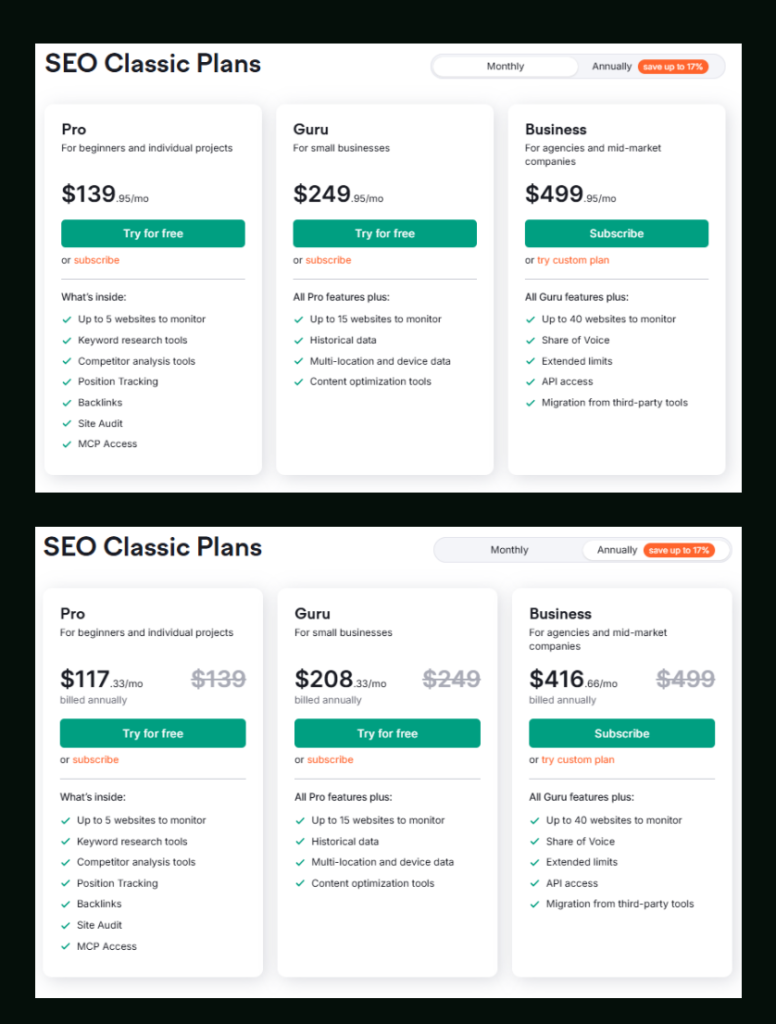
Traffic Analytics with full multi-channel data is part of the Traffic & Market Toolkit, which is available as a separate add-on depending on your plan. If you’re on Pro and primarily need Domain Analytics for organic SEO work, that’s already included. Guru unlocks historical data, which is genuinely useful for spotting traffic trends over time.
Unsure which plan fits your actual needs? The Semrush Pro vs Guru breakdown covers that in detail.
And if you want to test any of this before committing, both Pro and Guru offer a free trial: Start your Semrush free trial here.
Semrush SEO Free Trial ( Pro & Guru )
Get full Pro access for 7 days — keyword research, site audit, backlink analysis & competitor research. No charge until after the trial ends.
Start Your Semrush 7-Day Free Trial→
Semrush SEO Free Trial
Get full Pro access for 7 days — keyword research, site audit, backlink analysis & competitor research. No charge until after the trial ends.
Start Your Semrush 7-Day Free Trial →Frequently Asked Questions
Does Semrush show real traffic or estimated traffic?
Semrush shows estimated traffic, not real visitor counts. Domain Analytics estimates potential organic traffic based on keyword rankings and average CTRs. Traffic Analytics uses clickstream data to model multi-channel traffic. For actual traffic measurement on your own site, Semrush recommends using Google Analytics alongside its tools.
Why does Semrush Traffic Analytics show different numbers than Domain Analytics?
Because they use completely different data sources. Domain Analytics is based on keyword positions and estimated click-through rates. Traffic Analytics models real user behavior from clickstream data across all traffic channels. Filters like device type, region, and date range also affect Traffic Analytics results, making a direct comparison unreliable.
Is Semrush traffic data accurate?
It’s directionally accurate, not precisely accurate. In my cross-checks, Domain Analytics tends to read 20–40% lower than actual Google Search Console data for organic traffic. For your own site, always trust GSC. For competitor analysis and benchmarking, Semrush estimates are reliable enough to identify trends, gaps, and traffic share differences.
What is clickstream data in Semrush?
Clickstream data is aggregated, anonymized data collected from real users browsing the internet — tracking which sites they visit and how they arrive there. Semrush uses this for Traffic Analytics to estimate how much traffic a domain receives from sources like direct, referral, organic, social, paid search, and email — not just from search engine rankings.
Can I use Semrush Traffic Analytics on a free plan?
Traffic Analytics has limited access on free Semrush accounts. Full access to the Traffic & Market Toolkit, including Traffic Channel Distribution and audience data, typically requires a paid plan or add-on. You can test it through the Semrush free trial to see what’s included before subscribing.
Which Semrush tool should I use for competitor research — Domain Analytics or Traffic Analytics?
It depends on your goal. Use Domain Analytics if you want to understand a competitor’s keyword strategy, SEO ranking footprint, or paid search reach. Use Traffic Analytics if you want to know their total audience size, where their traffic comes from, or how engaged their visitors are. For a full competitive picture, using both together gives you the most complete view.
Everything You Need About Semrush Free Trial
Activate your Semrush free trial directly, read our step-by-step guide on how to get it, or learn how to cancel before getting charged — all in one place.
Start Semrush Free Trial
Get full Pro access for 7 days — keyword research, site audit, backlink analysis & competitor research. No charge until after the trial ends.
Start Free Trial →How to Get Free Trial
Step-by-step guide to activate your Semrush free trial — what you unlock, how to use it right, and how to get maximum value in 7 days.
Read Full Guide →How to Cancel Trial
Don’t get charged by mistake. Step-by-step guide to cancel your Semrush trial before the billing date — timing tips included.
Read Cancel Guide →