Contents
- 1 What the KD% Score Actually Measures
- 2 The 6 KD Difficulty Bands — And What They Mean in Practice
- 3 Personal Keyword Difficulty (PKD%) — The Part Most Articles Miss
- 4 How to Check Keyword Difficulty in Semrush
- 5 What a Good KD Score Actually Looks Like for Your Site
- 6 The Factors That Move KD Up or Down
- 7 Using KD Without Getting Misled By It
- 8 Where to Start If You’re New to KD in Semrush
- 9 Everything You Need About Semrush Free Trial
- 10 Frequently Asked Questions
- 10.1 What is keyword difficulty in Semrush, and how is it calculated?
- 10.2 What’s the difference between KD% and PKD% in Semrush?
- 10.3 Is a KD score of 50 too high to target?
- 10.4 What KD range should a new website target?
- 10.5 Does a lower KD always mean the keyword is worth targeting?
- 10.6 Can Semrush’s KD score change over time?
- 10.7 Where can I see keyword difficulty scores in Semrush?
- 11 The Bottom Line
- 12 All Semrush Toolkits — Quick Overview
Most SEOs look at keyword difficulty and treat it like a traffic light — green means go, red means stop. And honestly? That’s where a lot of strategies quietly fall apart.
The KD% score in Semrush is more nuanced than a single number on a dial. Understanding what’s actually behind it — and more importantly, how to use it without getting misled — is what separates decent keyword research from the kind that actually moves rankings.
Quick Answer
Keyword difficulty (KD%) in Semrush is a percentage-based score from 0 to 100 that estimates how much SEO effort it would take for a page to rank in Google’s top 10 for a specific keyword. The score factors in backlink profiles, authority scores, search volume, SERP features, and keyword characteristics of the pages currently ranking. Higher scores mean stronger competition.
What the KD% Score Actually Measures
Here’s the thing most people skip past — Semrush’s KD% isn’t measuring how “popular” a keyword is. It’s measuring how strong the competition is for that keyword in Google’s top 10 organic results.
The formula draws from several signals:
- Median number of referring domains pointing to the URLs currently ranking — more quality referring domains means harder to displace
- Median ratio of follow to nofollow links — pages with cleaner, stronger follow-link profiles are harder to outrank
- Authority Scores of ranking domains — Semrush’s own 1–100 metric that factors in link power, organic traffic, and spam profile
- Search volume — higher-volume keywords tend to attract more competition, which pushes KD up
- SERP features — if a keyword triggers featured snippets, People Also Ask boxes, or knowledge panels, organic clicks get diluted, which affects how difficult it is to capture meaningful traffic
- Branded vs. non-branded nature of the keyword — brand-dominated SERPs are structurally harder for non-brand sites to break into
- Keyword length (word count) — longer, more specific queries typically carry lower difficulty because they attract less competitive interest
No single factor dominates. It’s a weighted combination that Semrush claims is the most accurate on the market — and in my testing across client projects, it does align better with real-world ranking effort than most alternatives I’ve worked with.
The 6 KD Difficulty Bands — And What They Mean in Practice
Semrush breaks the 0–100 scale into six tiers. On paper, these are clean categories. In practice, they behave differently depending on your domain’s current authority.
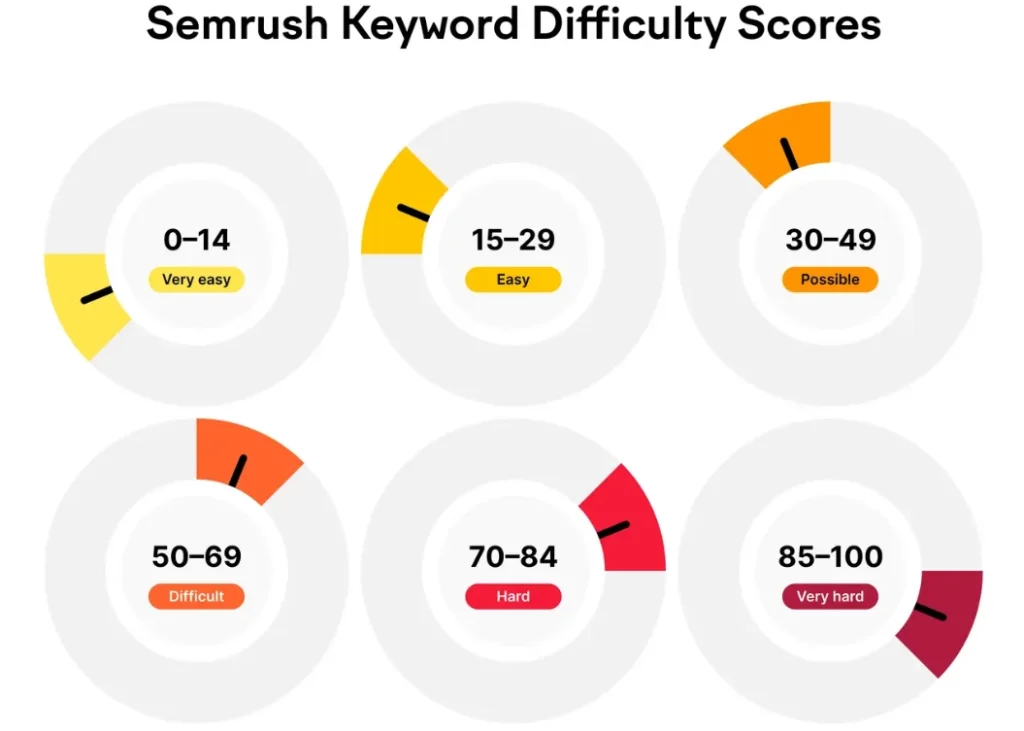
| KD Range | Label | What It Actually Means |
|---|---|---|
| 0–14 | Very Easy | New sites can rank quickly with solid on-page work and minimal links |
| 15–29 | Easy | Achievable even with a newer domain — quality content focused on intent matters most here |
| 30–49 | Possible | You’ll need well-structured content and some backlink support |
| 50–69 | Difficult | Quality backlinks become non-negotiable at this range |
| 70–84 | Hard | Requires sustained link building plus a highly optimized, unique content asset |
| 85–100 | Very Hard | Expect significant investment across content, links, on-page SEO, and promotion — and a long timeline |
One thing competitors don’t spell out clearly enough: these bands aren’t fixed reality — they’re general reality. A domain with an Authority Score of 60+ can realistically target “Difficult” keywords that would be completely out of reach for a new site. This is exactly why Semrush introduced Personal Keyword Difficulty.
Personal Keyword Difficulty (PKD%) — The Part Most Articles Miss
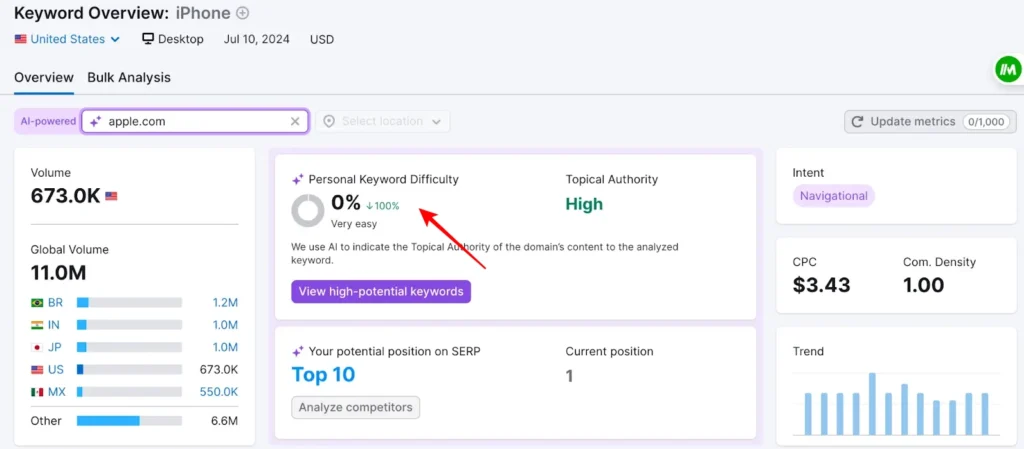
The standard KD% tells you how competitive a keyword is for any website on the internet. Personal Keyword Difficulty (PKD%) tells you how competitive it is specifically for your website.
That distinction matters more than most people realise.
PKD% is calculated based on your domain’s authority relative to the domains currently ranking. A keyword with a KD of 65 might show a PKD of 28 for an established domain with strong topical authority — meaning it’s genuinely achievable for that specific site, even though the general score suggests otherwise.
Semrush surfaces three additional data points alongside PKD:
- Topical Authority — AI-assessed relevance of your domain’s content to the target keyword
- Potential SERP position — where Semrush estimates you could realistically land
- Current position — your existing ranking for that keyword, if any
To see your PKD score, enter your domain in the AI-powered search box inside the Keyword Overview tool. Every variation and related keyword then shows its PKD score alongside the standard KD%.
This is the feature I consistently point to when advising clients who feel discouraged by high general KD scores. In practice, I’ve seen sites with solid topical clusters rank for keywords the general KD score suggested were completely off-limits.
How to Check Keyword Difficulty in Semrush
There are two primary places to find KD data inside Semrush:
Keyword Overview Tool
Enter any keyword directly into Keyword Overview, and you’ll see the KD% prominently displayed alongside volume, intent, CPC, and competitive density. If you’ve added your domain to the AI-powered field, you’ll also see your PKD% for that specific term.
Keyword Magic Tool
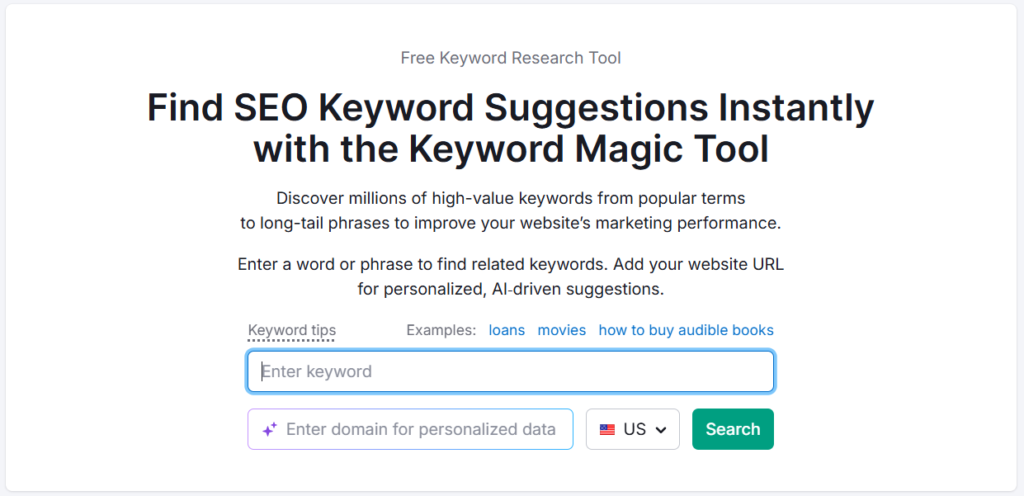
This is where KD becomes a research filter, not just an observation. The KD% column appears for every keyword suggestion. You can:
- Sort by KD% to surface easier targets quickly
- Filter by KD range (e.g., only show keywords with KD under 40)
- Add your domain to see PKD% alongside standard KD for each result
- Toggle “Show ranking keywords” to see your current positions in context
A filter combination that works well in practice: set PKD to “Possible” and KD to “Difficult.” This isolates keywords where the general competition is high, but your domain specifically has a realistic shot — hidden opportunities that competitors without PKD access would overlook entirely.
What a Good KD Score Actually Looks Like for Your Site
There’s no universal “good” KD score. That answer depends entirely on where your domain sits right now.
A few practical anchors:
- New or low-authority domains — stay in the 0–29 range initially. Build traffic, earn links, establish topical depth. Fighting for KD 50+ keywords from day one is one of the most common reasons new content strategies stall.
- Mid-authority domains (AS 30–55) — the 30–49 “Possible” range is your productive zone, with selective pushes into 50–69 on topics where you already have established content clusters.
- Established domains (AS 55+) — the 50–69 range becomes realistic territory, and targeted 70+ keywords are worth pursuing where you have genuine topical authority.
The smarter move at any stage is to use PKD as your primary decision filter, and treat general KD as a rough market-temperature reading.
Keywords with search volumes over 100,000 tend to cluster around 76% difficulty or higher. Keywords in the 11–100 monthly search range average around 39% — not because they’re low value, but because they attract less competition. Long-tail keywords in this range often convert at higher rates, too, because searchers know exactly what they want.
The Factors That Move KD Up or Down
Understanding what causes difficulty to shift helps you anticipate it, not just react to it.
Backlink Strength of Current Rankings
The single biggest driver. If the pages ranking for your target keyword have hundreds of referring domains from authoritative sites, Semrush will reflect that in a higher KD. Conversely, if the top 10 is populated by pages with thin backlink profiles — which happens more often than you’d expect in niche topics — the KD can be surprisingly low despite decent search volume.
SERP Feature Saturation
Keywords that trigger multiple SERP features (featured snippets, PAA boxes, image carousels, video panels) push the KD higher — not always because the organic competition is fierce, but because the available organic click share shrinks. You can rank position 3 for a featured snippet keyword and get less traffic than position 1 on a clean SERP. That’s a practical consideration that sits alongside the KD score, not inside it.
Branded Keyword Dynamics
If the keyword contains or is dominated by a brand name, Google prioritises the brand’s own pages structurally. That’s a form of difficulty the KD score partially captures but doesn’t fully explain. Non-brand sites trying to rank for brand-heavy queries face an uphill battle regardless of backlinks.
Long-Tail Specificity
Longer keyword phrases (four-plus words) almost always carry lower KD scores because the universe of competing pages is smaller. This is where content-first strategies can gain ground without needing dominant link authority. The trade-off is lower volume — but often significantly better conversion intent.
Using KD Without Getting Misled By It
A few things the number alone won’t tell you:
KD is backward-looking. It reflects how competitive the current top-10 is. It doesn’t predict how much that will change. Emerging topics can have low KD today and spike dramatically within months as more content enters the space.
KD doesn’t account for content quality gaps. I’ve audited SERPs where the top-ranking pages were genuinely weak — thin content, poor structure, minimal on-page optimisation — despite high KD scores. The difficulty was backlink-driven, not content-driven. That’s a different kind of opportunity than a KD number alone suggests.
KD doesn’t reflect search intent alignment. A keyword can have a KD of 35, but if the SERP intent is mismatched with what you’re creating, you won’t rank regardless. Always check the actual SERP alongside the score.
The KD metric is most useful as a filtering tool in early research, not a final verdict. Once you’ve shortlisted candidates, dig into the actual SERP: who’s ranking, what kind of content they have, and whether there’s a genuine gap.
If you want to explore how Semrush compares to other tools in keyword research depth, the Semrush vs Ahrefs breakdown covers how each tool calculates difficulty differently and what that means for your workflow.
Where to Start If You’re New to KD in Semrush
If you haven’t used Semrush yet, the 7-day free trial gives you full access to both the Keyword Magic Tool and Keyword Overview — enough time to run your seed keywords, pull KD and PKD data, and build an initial keyword list with realistic difficulty targets.
You can start the Semrush free trial here to explore KD% and PKD% for your own domain without committing to a paid plan upfront.
For anyone deciding between plans, the Semrush Pro vs Guru breakdown is worth reading — the keyword research limits differ between tiers in ways that matter for heavier research workloads.
Everything You Need About Semrush Free Trial
Activate your Semrush free trial directly, read our step-by-step guide on how to get it, or learn how to cancel before getting charged — all in one place.
Start Semrush Free Trial
Get full Pro access for 7 days — keyword research, site audit, backlink analysis & competitor research. No charge until after the trial ends.
Start Free Trial →How to Get Free Trial
Step-by-step guide to activate your Semrush free trial — what you unlock, how to use it right, and how to get maximum value in 7 days.
Read Full Guide →How to Cancel Trial
Don’t get charged by mistake. Step-by-step guide to cancel your Semrush trial before the billing date — timing tips included.
Read Cancel Guide →Semrush One Free Trial
Dominate the future of AI search. Unlock advanced brand share of voice, monitor generative AI visibility, automate insights, and scale marketing impact across all digital channels.
Semrush Pro & Guru Free Trial
Master your organic rankings. Run comprehensive site audits, track keyword positions, analyze backlink profiles, and spy on competitor SEO strategies completely risk-free for 7 days.
Frequently Asked Questions
What is keyword difficulty in Semrush, and how is it calculated?
Keyword difficulty (KD%) in Semrush is a 0–100 score that estimates how hard it would be to rank in Google’s top 10 for a given keyword. It factors in the median number of referring domains to ranking pages, their follow-to-nofollow link ratios, domain authority scores, search volume, SERP feature presence, whether the keyword is branded, and keyword length. The score is displayed as a percentage — higher means harder.
What’s the difference between KD% and PKD% in Semrush?
KD% (Keyword Difficulty) is a universal score reflecting how competitive a keyword is for any website. PKD% (Personal Keyword Difficulty) is site-specific — it measures how difficult that same keyword would be for your domain based on its authority and topical relevance. PKD is the more actionable metric for day-to-day keyword selection. A keyword with a KD of 65 might show a PKD of 25 for a domain with strong topical authority in that subject area.
Is a KD score of 50 too high to target?
Not necessarily — it depends on your domain’s authority. For a newer or low-authority site, KD 50+ is likely out of reach in the short term. For an established domain with an Authority Score above 45–50 and relevant content clusters, KD 50–69 is realistic. Always check your PKD alongside general KD before making the call. If you’re exploring how to use Semrush for free to test this, the free account lets you view limited KD data before upgrading.
What KD range should a new website target?
New websites should generally focus on keywords in the 0–29 range initially — what Semrush labels “Very Easy” to “Easy.” These give you a realistic path to ranking, which builds domain authority, organic traffic, and the link equity needed to compete for harder keywords over time. The goal is compounding momentum, not swinging for high-KD terms before the domain is ready.
Does a lower KD always mean the keyword is worth targeting?
No. Low KD is a necessary filter but not a sufficient one. A keyword can be easy to rank for and still be strategically worthless — zero business relevance, wrong intent match, or so specific that the traffic ceiling is trivially low. KD should be evaluated alongside search volume, search intent, topical relevance to your site, and commercial value before making a targeting decision.
Can Semrush’s KD score change over time?
Yes. KD scores are recalculated as the SERP changes — new pages enter the top 10, backlinks are gained or lost, and SERP features appear or disappear. A keyword you researched six months ago may have a noticeably different KD today, particularly in fast-moving niches. Semrush updates these metrics regularly, so it’s worth re-checking KD for important keywords periodically rather than treating an old score as permanent.
Where can I see keyword difficulty scores in Semrush?
KD% appears in two main places: the Keyword Overview tool (for individual keyword analysis) and the Keyword Magic Tool (where KD% appears as a column for every keyword suggestion, and can be filtered by range). If you enter your domain in the AI-powered field, the Keyword Magic Tool will also show PKD% for personalized difficulty alongside the standard score.
The Bottom Line
Keyword difficulty in Semrush is a genuinely useful signal — but only if you understand what it’s actually measuring and what it can’t tell you.
The KD% score gives you a competitive benchmark against the current SERP. The PKD% gives you a reality check specific to your domain. Used together, they’re one of the strongest keyword filtering combinations available in any SEO tool.
The mistake most people make is treating KD as a final decision rather than an opening filter. It tells you the landscape. It doesn’t tell you whether there’s a gap in that landscape worth stepping into. That part still requires looking at the actual SERP, understanding intent, and evaluating content quality — not just the number.
Start with PKD. Use general KD to understand the market. Then look at the actual pages ranking before you commit to a target.
All Semrush Toolkits — Quick Overview
Semrush is not just one tool. It’s a complete platform of 8 specialized toolkits — each built for a specific marketing goal. Pick the one that fits your workflow, or go all-in with Semrush One.