Most people assume Google Keyword Planner is the obvious choice — it’s free, it’s from Google, and it’s right there inside Google Ads. Hard to argue with that, right?
Honestly, that reasoning made sense five years ago. In 2026, it’s a little more complicated.
I’ve used both tools across client projects — a local service business, a SaaS blog, and a few affiliate sites — and the difference in what these two tools actually show you is significant enough to change your entire keyword strategy. Not slightly different. Meaningfully different.
Semrush vs Google Keyword Planner: Quick Answer
Google Keyword Planner gives you free, Google-sourced keyword data — but it’s designed for paid advertisers, not SEO. Semrush gives you deeper organic search data, competitor intelligence, and rank tracking across a full SEO workflow. If you’re running Google Ads, GKP is useful. If you’re building organic traffic, Semrush is in a different league.
What Each Tool Is Actually Built For
This part matters more than most comparisons let on.
Google Keyword Planner was built for Google Ads campaign planning. Everything about it — the volume ranges, the bid estimates, the ad group suggestions — is designed to help you spend money on ads more effectively. The fact that SEOs use it is a workaround, not an intended use case.
Semrush was built specifically for an organic search strategy. Keyword research, competitor gap analysis, backlink auditing, rank tracking, site health — it’s a complete SEO operating system. Keyword research is just one module inside a much larger toolkit.
That difference in intent shapes everything about how these tools behave.
Keyword Data: Where the Gap Becomes Obvious
Let me be specific, because this is where people get confused.
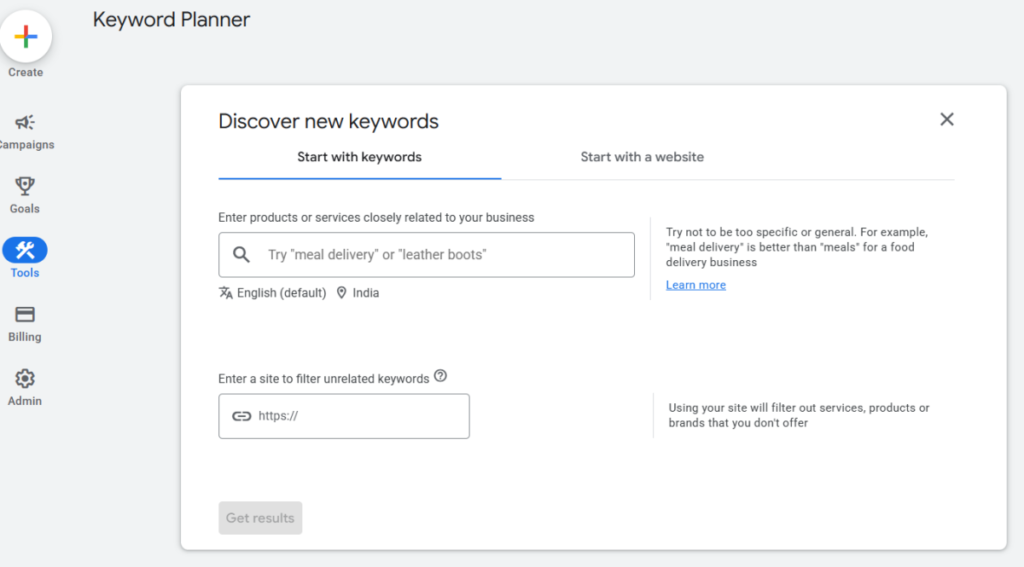
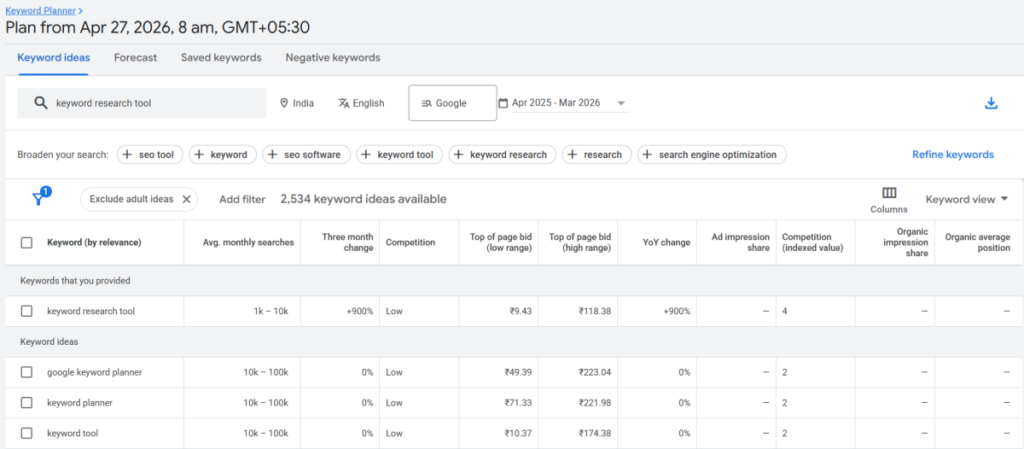
Google Keyword Planner shows volume as ranges — not exact numbers. You’ll often see “1K–10K monthly searches” for a keyword. That’s an enormous range. A keyword with 1,200 searches/month and one with 9,800 searches/month will show identically in GKP. For ad budget planning, that’s fine. For choosing which article to write first? That’s nearly useless.
Semrush shows exact monthly search volume estimates, keyword difficulty scores (0–100), CPC data, SERP feature presence, and trend graphs over 12 months. In my testing on a client’s home services site, Semrush flagged a cluster of “near me” keywords with difficulty scores under 30 — stuff GKP showed in the same bucket as much harder terms. That insight directly shaped a content sprint that moved three pages into the top 5 within 90 days.
Another thing GKP won’t show you: what your competitors are ranking for. Semrush’s Keyword Gap tool lets you drop in up to five competitor domains and surface keywords they rank for that you don’t. That’s organic intelligence that Google has zero interest in giving you for free.
Semrush vs Google Keyword Planner: Feature Comparison at a Glance
| Feature | Semrush (Pro) | Google Keyword Planner |
|---|---|---|
| Exact search volume | ✅ | ❌ (ranges only) |
| Keyword difficulty score | ✅ | ❌ |
| Competitor keyword analysis | ✅ | ❌ |
| Rank tracking | ✅ (500 keywords) | ❌ |
| Backlink analysis | ✅ | ❌ |
| Site audit | ✅ (100K pages/mo) | ❌ |
| Historical keyword data | ✅ (Guru+) | Limited |
| SERP analysis | ✅ | ❌ |
| Content optimization | ✅ | ❌ |
| Cost | $139.95/mo (or $117.33 billed annually) | Free |
| Designed for | SEO + content strategy | Google Ads campaigns |
Where Google Keyword Planner Still Wins
It’s not a shutout. There are real scenarios where GKP is the right call.
You’re running Google Ads. This is the obvious one. GKP integrates directly with your campaigns, shows real bid estimates, and lets you build ad groups from keyword lists. Semrush has ad data too, but GKP is the source of truth here.
You’re just starting and have zero budget. If you’re brand new to SEO, GKP at least gets you thinking about search intent and keyword categories. Pair it with Google Search Console, and you have a functional (if limited) free stack.
You need fast keyword ideas for a Google Ads campaign. The turnaround time is instant, and the integration is seamless.
But the moment your goal shifts to organic rankings — writing content, building topical authority, outranking competitors — GKP’s limitations become frustrating fast.
Semrush Pricing: What You’re Actually Paying For
Here’s the current pricing structure based on the latest data:
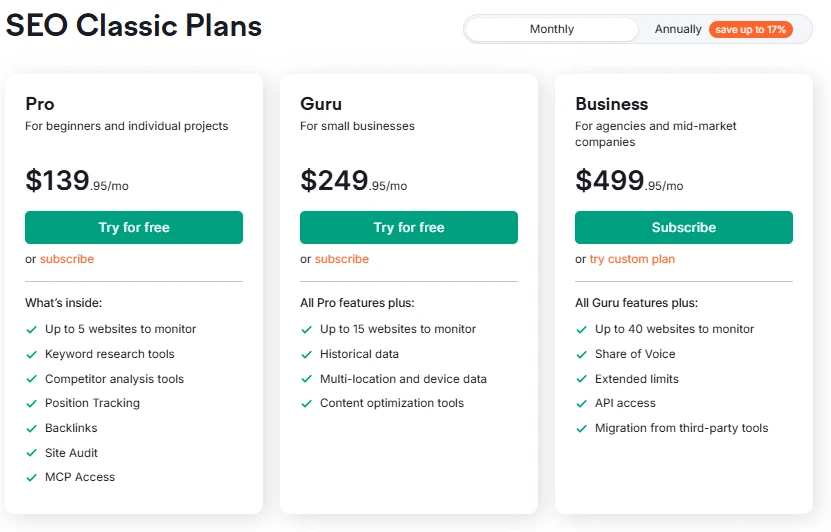
Monthly billing:
- Pro: $139.95/mo
- Guru: $249.95/mo
- Business: $499.95/mo
Annual billing (saves up to 17%):
- Pro: $117.33/mo
- Guru: $208.33/mo
- Business: $416.66/mo
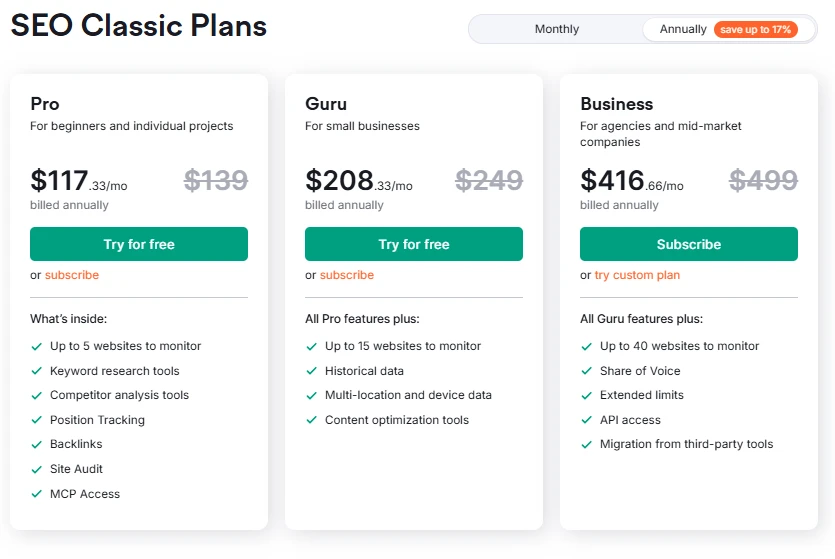
The Pro plan gives you enough to run serious keyword research — 10,000 results per report, 3,000 reports/day, 500 keywords tracked, and crawling up to 100,000 pages/month across 5 websites. For most freelancers and early-stage bloggers, that’s more than enough.
Guru unlocks historical keyword data (critical for spotting seasonal trends), multi-location tracking, content optimization tools, and 1,500 tracked keywords. If you’re managing multiple client sites or running a content-heavy operation, the jump makes sense. You can explore the differences in detail in this Semrush Pro vs Guru breakdown.
Business is clearly aimed at agencies — 5,000 tracked keywords, unlimited targets per monitored site, Share of Voice tracking, API access, and crawling up to 1,000,000 pages/month.
Want to test it before committing? Both Pro and Guru have a free trial available — here’s how to get the Semrush free trial if you want to check the workflow before paying anything.
The “Free” Question — And Why It’s More Nuanced Than It Looks
Google Keyword Planner is free. Semrush is not. That’s a real difference and I’m not going to pretend otherwise.
But here’s what “free” actually costs you in practice:
You’re working with volume ranges that could be off by 10x. You’re missing keyword difficulty data, so you can’t prioritize effectively. You have no visibility into what competitors rank for. You can’t track whether your content is actually moving up in rankings. And you have no idea if your site has technical issues killing your SEO before you even start.
That’s not a knock on Google — it’s just what the tool was built for.
If the budget is genuinely tight, there’s also a legitimate way to use Semrush for free with limited daily queries. It won’t replace the full plan, but it gives you a taste of the data quality difference.
Pro Observation: The Data Freshness Gap
Something most comparisons skip: keyword metric update frequency.
Semrush Pro updates keyword metrics 250 times per month. Guru bumps that to 1,000 updates. Business goes up to 5,000. For fast-moving niches — tech, finance, health — this matters. A keyword that was low competition six months ago might now be contested by three major publishers.
Google Keyword Planner, by contrast, shows averages over 12-month windows by default. You can pull recent-month data, but the granularity isn’t there for competitive SEO decisions.
Who Should Use Which Tool
Stick with Google Keyword Planner if:
- Your primary goal is Google Ads, not organic SEO
- You’re in a pure research/exploration phase with no budget
- You need basic keyword ideation fast and free
Go with Semrush if:
- You’re building an SEO content strategy
- You want to understand what competitors rank for
- You need rank tracking, site auditing, or backlink analysis
- You’re managing more than one website
- You want data you can actually make decisions with
There’s also an argument for using both simultaneously — GKP for paid campaigns, Semrush for organic. Several agencies I know run exactly that setup.
One More Thing Worth Knowing
Semrush also has add-ons worth mentioning if your needs grow:
- Additional Users from $45/mo — useful if you’re collaborating with a team; each user gets their own login and can work across shared projects securely
- Lead Generation at $90/mo — gives you a branded profile on the Semrush Agency Partners platform, a Semrush verified badge for your marketing channels, and 1,000 outreach credits in Lead Finder. Solid pick if you’re actively trying to win new agency clients
- Base Report at $10/mo — pulls data from 20+ Semrush tools with Google Analytics and Search Console integrations, supports monthly/weekly/daily scheduling, and includes PDF export
- Pro Report at $20/mo — everything in Base Report plus 20+ external integrations, white-labeling, AI-generated summaries, delivery at a specific time, and sharing by link
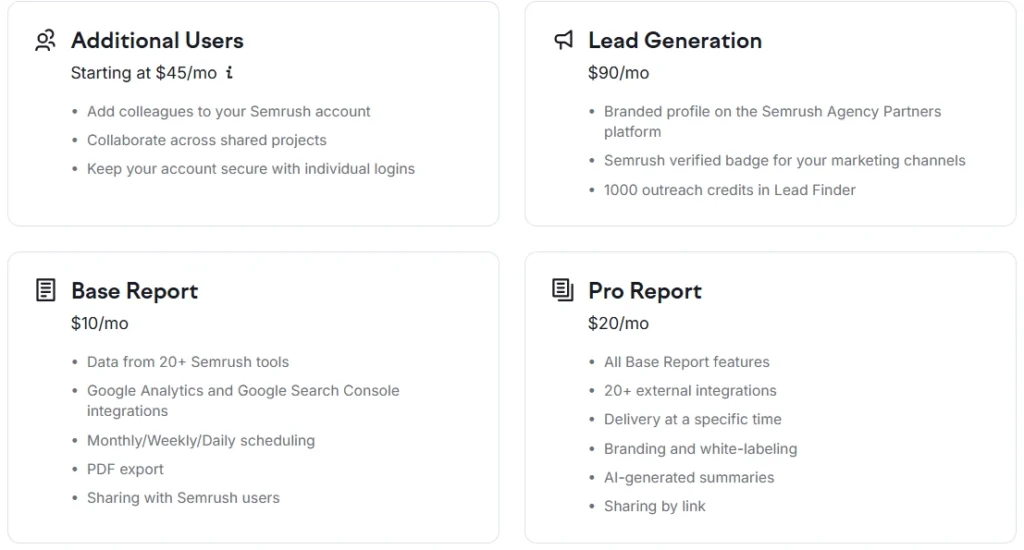
These aren’t necessary for most solo users. But for agencies building client-ready deliverables — or actively prospecting for new business — the reporting and lead gen add-ons are genuinely useful extras.

Semrush SEO Free Trial
Get full Pro access for 7 days — keyword research, site audit, backlink analysis & competitor research. No charge until after the trial ends.
Start Your Semrush 7-Day Free Trial →Semrush vs Google Keyword Planner: Frequently Asked Questions
Is Google Keyword Planner good enough for SEO?
It depends on what you need. GKP is fine for initial keyword brainstorming and understanding search intent broadly. But it shows volume as ranges (e.g., 1K–10K), doesn’t include keyword difficulty scores, and offers zero competitor data. For a serious SEO strategy, those gaps add up quickly.
Can I use Semrush and Google Keyword Planner together?
Yes — and it’s actually a smart setup if you run both paid and organic campaigns. Use GKP to plan Google Ads keywords and estimate bid costs, and Semrush for organic keyword research, rank tracking, and competitor gap analysis. They serve different masters.
Does Semrush show more accurate search volume than Google Keyword Planner?
Semrush provides estimated exact monthly volumes rather than ranges, which makes it more actionable for content planning. That said, all keyword volume tools are estimates — Google’s own data is proprietary. Semrush’s figures are widely considered reliable enough for strategic prioritization.
What is the cheapest way to use Semrush?
The Pro plan billed annually comes to $117.33/mo, saving about 17% versus monthly billing at $139.95/mo. There’s also a free trial for Pro and Guru plans. If you’re not ready to commit, you can also use Semrush for free with limited daily queries.
Does Google Keyword Planner show competitor keywords?
No. GKP shows keyword ideas and ad metrics, but has no way to reveal what specific competitor domains are ranking for organically. That’s a core Semrush capability — the Keyword Gap and Organic Research tools let you analyze any competitor’s keyword profile directly.
Is Semrush worth it for a small blog or personal site?
Honestly, it depends on your goals. If you’re casually blogging, probably not right away. But if you’re building a content site with monetization in mind, the keyword and competitor data pays for itself fast — especially when you can identify low-difficulty, high-value keywords your competitors haven’t targeted yet.
Can I cancel Semrush after the free trial?
Yes. You can cancel before the trial ends without being charged. If you’re unsure about the process, this guide on how to cancel a Semrush trial walks through it step by step.
Best Semrush Alternatives to Consider
If Semrush’s pricing feels steep after the trial, these three tools cover most of what you need at a lower price point — SE Ranking, Mangools, and Ubersuggest all offer free trials too.
SE Ranking
More affordable entry pricing, solid rank tracking and audit features. Good for small agencies and freelancers who don’t need Semrush’s full data depth.
Try SE Ranking →Mangools
Beginner-friendly, clean UI, strong keyword and SERP tools at a much lower price point. Perfect for solo bloggers who need keyword research without the complexity.
Try Mangools →Ubersuggest
Neil Patel’s SEO Tool — keyword research, site audit, and competitor analysis at a very affordable price. Great for beginners and small business owners on a tight budget.
Try Ubersuggest →