Most comparisons treat this like a coin flip. They’re not.
Semrush and Surfer SEO solve different problems — and understanding which problem you actually have will save you from a subscription you’ll cancel in 60 days.
I’ve used both extensively across client projects, and the honest answer is: one of these tools will feel essential to your workflow, and the other will sit half-used. Let me tell you which is which.
Semrush vs Surfer SEO: Quick Answer
Semrush is a full-suite SEO platform covering keyword research, competitor analysis, backlinks, site audits, and more. Surfer SEO focuses almost entirely on content optimization and AI visibility. If you need to find and track SEO opportunities, Semrush wins. If you need to write and optimize content that ranks (and gets cited in AI search), Surfer has the edge.
They’re Not Really Competing — Until Your Budget Says Otherwise
Here’s the thing that most comparison articles skip: Semrush and Surfer SEO aren’t true head-to-head competitors in the traditional sense. Semrush is an all-in-one SEO command center. Surfer is a content intelligence platform that’s increasingly built around AI search visibility.
The reason they land in comparisons together? Both touch “content optimization.” And both cost enough that most people are choosing one, not running both.
So the real question isn’t which is better. It’s what’s right for what you’re trying to do.
What You’re Actually Paying For
Semrush: The Full SEO Machine
Semrush’s SEO Classic Plans break down into three tiers:
| Plan | Monthly Price | Annual Price (per mo) | Best For |
|---|---|---|---|
| Pro | $139.95/mo | $117.33/mo | Freelancers & solo projects |
| Guru | $249.95/mo | $208.33/mo | Small businesses & agencies |
| Business | $499.95/mo | $416.66/mo | Agencies & enterprise |
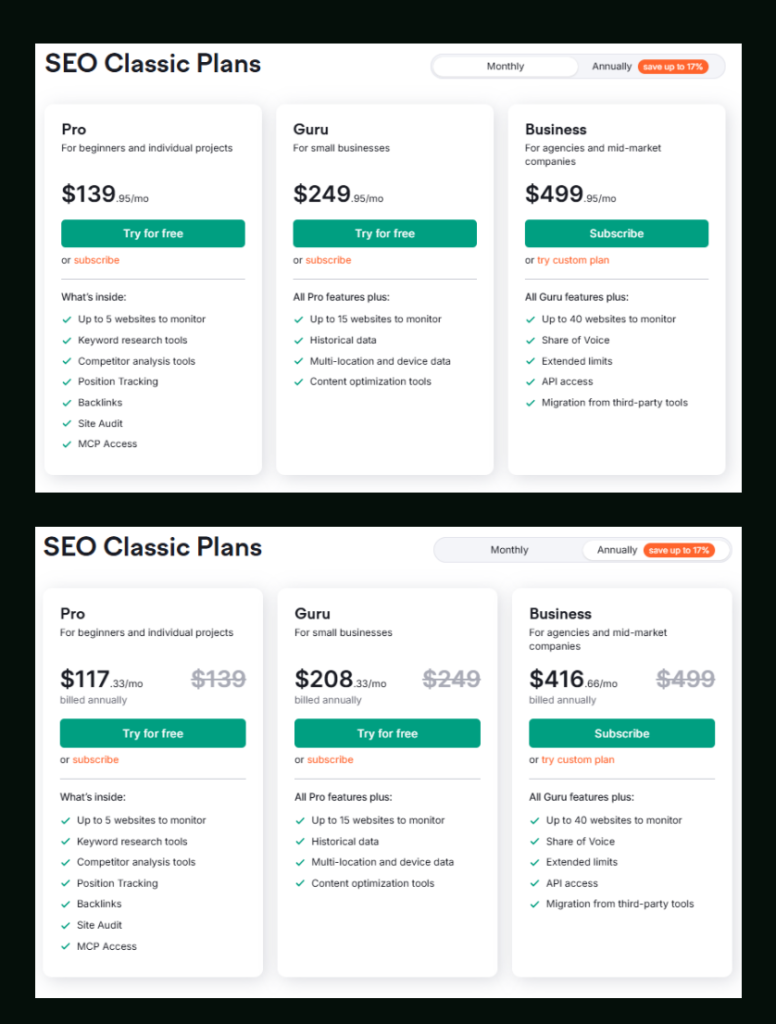
The annual discount saves you up to 17%, which adds up fast — especially on Guru, where you’re saving over $500/year.
Pro gives you keyword research, competitor analysis, position tracking for up to 500 keywords, backlink tools, site audit for up to 100,000 pages/month, and MCP Access. That’s a lot for one subscription.
Guru is where things get significantly more useful — historical data unlocks, JavaScript rendering for site audits becomes available, you can track 1,500 keywords daily across 15 websites, and the Keyword Cannibalization report appears. In my testing, the absence of historical data in Pro was genuinely frustrating when trying to spot trend shifts. Guru fixes that.
Business is squarely aimed at agencies — unlimited targets per monitored website, Share of Voice tracking, 5,000 daily keywords, API access, and migration from third-party tools baked in.
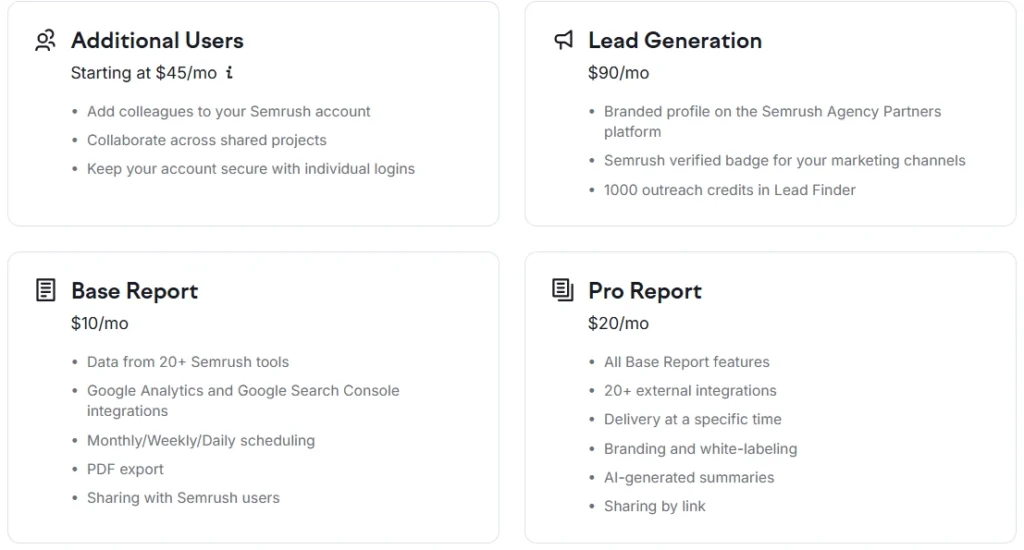
Worth noting: Semrush also offers add-ons on top of any plan. Additional users start at $45/mo, a Lead Generation add-on (branded profile + 1,000 outreach credits) costs $90/mo, and report add-ons run $10–$20/mo depending on features like white-labeling and AI-generated summaries.
Both Pro and Guru come with a free trial — Business requires a direct subscription.
Surfer SEO: The Content Optimization Play
Surfer’s pricing structure has a different philosophy. They’re built around content workflows and, increasingly, AI search visibility tracking.
Monthly billing:
| Plan | Price/mo |
|---|---|
| Discovery | $59 |
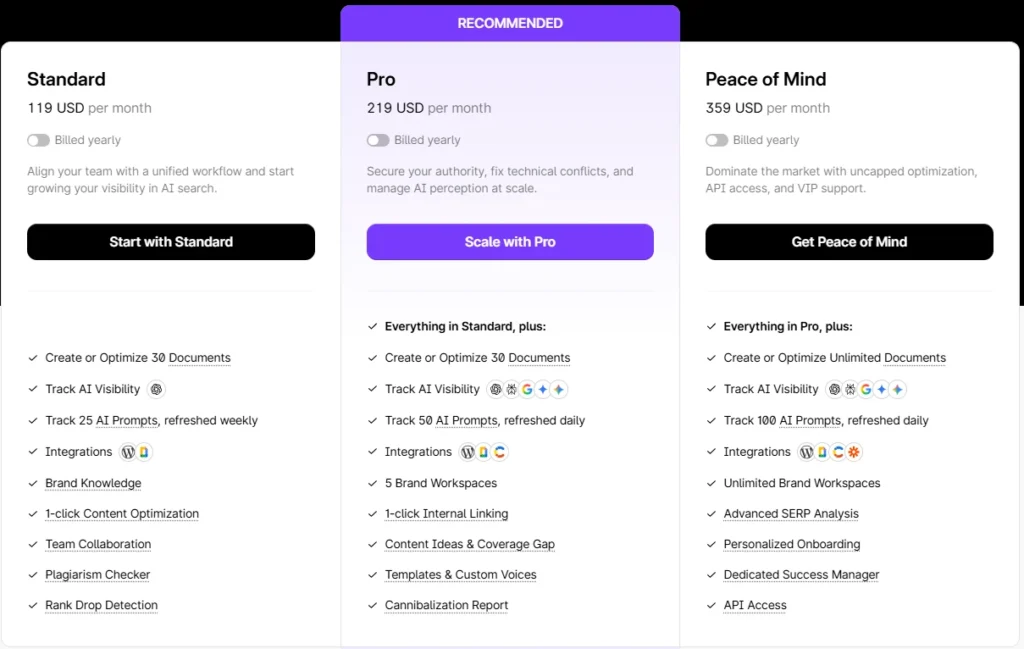
| Standard | $119 |
| Pro | $219 |
| Peace of Mind | $359 |
| Enterprise | $999 |
Annual billing (saves more):
| Plan | Price/mo (billed annually) |
|---|---|
| Discovery | $49 |
| Standard | $99 |
| Pro | $182 |
| Peace of Mind | $299 |
| Enterprise | $999 |
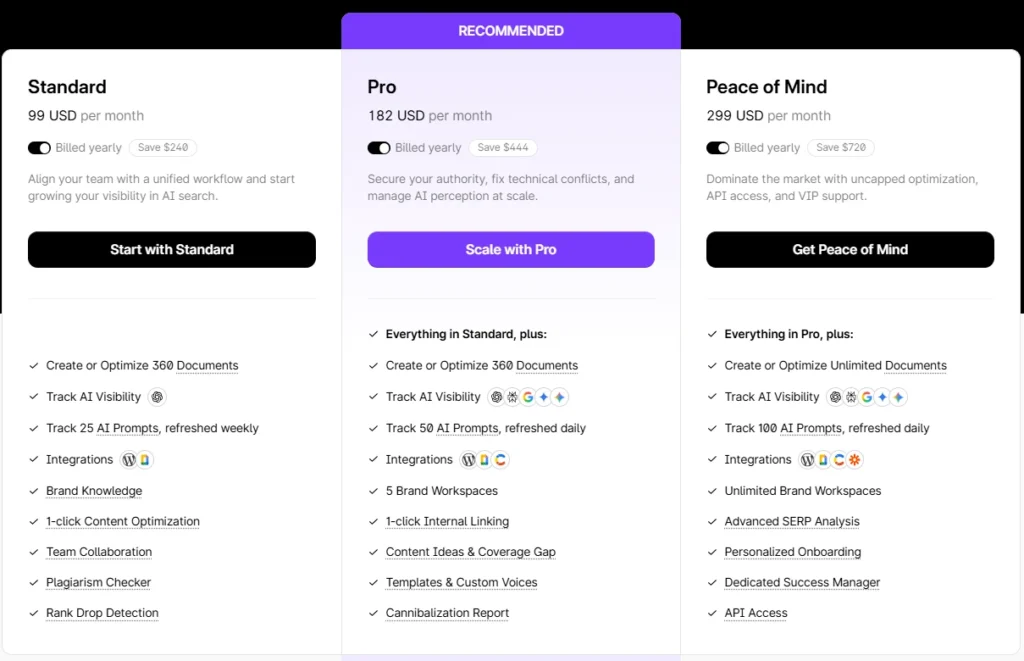
Discovery is basically a starter — 10 documents/month on monthly billing (120 on annual), tracking 10 pages, with AI SEO optimization and Surfy (their AI writing assistant). No plagiarism check, no 1-click optimization. It’s enough to test the platform.
Standard ($99/yr, $119/mo) is where Surfer becomes genuinely usable — 360 documents/year on annual billing, plagiarism check, 1-click content optimization, keyword research, ranking drop alerts, 3 team seats, and AI Visibility tracking via ChatGPT. This is honestly the entry point for anyone using Surfer seriously.
Pro is Surfer’s most recommended tier. You get everything in Standard plus 1-click Internal Linking, 5 Brand Workspaces, Cannibalization Report, Content Ideas & Coverage Gap, 50 AI Prompts tracked daily across ChatGPT, Perplexity, Google AI Mode, Google AI Overview, and Google Gemini. That last part matters more than people realize — Surfer is positioning itself hard around AI search citations, not just Google blue links.
Peace of Mind adds unlimited documents, 100 AI Prompts tracked daily, Advanced SERP Analysis, a dedicated success manager, and API access. Named appropriately — it’s for teams that need uncapped scale.
The Feature Gap Nobody Talks About
This is where it gets interesting.
Semrush has a content tool — it’s in the Guru plan and above, and it works. But it’s not the core of Semrush’s identity. The content features feel like a useful addition to what is fundamentally a research and monitoring platform.
Surfer is inverted. Content optimization is the core. Everything else — keyword research, rank tracking, site audit — is secondary and more limited than Semrush’s equivalents.
Pro Observation: I noticed something in testing Surfer’s AI Visibility tracking that doesn’t get enough coverage. The Standard plan only tracks AI prompts via ChatGPT, refreshed weekly. Pro unlocks daily tracking across five AI platforms simultaneously. For brands trying to understand whether they’re getting cited in AI search results, that weekly vs. daily gap is actually significant — trends in AI visibility can shift fast.
Semrush, by contrast, doesn’t have an equivalent AI citation tracking feature at this level. Their AI Search Site Audit is available across all plans, but it’s more about technical readiness for AI search than active citation monitoring.
Where Each One Falls Short
Semrush’s weak spots:
- The content optimization features only become meaningful at Guru level — $208.33/mo billed annually. That’s a steep entry point just to get the content workflow.
- Historical data is locked behind Guru. If you’re on Pro and want to analyze keyword trend history, you’re stuck.
- JavaScript rendering for site audits is also Guru-only. For modern SPAs and dynamic sites, that’s a real gap.
- The learning curve is steep. Semrush has a lot of tools. In my experience, new users get overwhelmed and end up using maybe 30–40% of what they’re paying for.
Surfer’s weak spots:
- Keyword research exists, but it feels thin compared to Semrush. Surfer won’t replace a dedicated keyword research workflow.
- No real backlink analysis. Zero. If link building is part of your strategy, Surfer contributes nothing there.
- Discovery plan’s document limits (10/month on monthly billing) are too low for real content operations. You’ll need a standard minimum.
- The AI-heavy focus means that if you’re skeptical of AI content tools, a lot of what you’re paying for on higher tiers feels less valuable.
Real-World Scenarios: Who Should Pick What
You’re a freelance SEO consultant managing 3–5 client sites. → Semrush Pro or Guru. The competitor analysis, keyword tracking, and site audit features are what clients pay you for. Surfer’s content tools are secondary unless you’re doing content deliverables too.
You run a content team publishing 15–20 articles/month. → Surfer Standard or Pro, and possibly a lighter Semrush plan for keyword research. These two actually complement each other well when the budget allows.
You’re a solo blogger trying to grow organic traffic. → Semrush Pro with the free trial first. The breadth of tools gives you more leverage than Surfer’s content focus at this stage.
You’re an agency managing 10+ clients with full-service SEO. → Semrush Business for the infrastructure, potentially Surfer Pro for content workflows. At this level, running both is justifiable.
You’re focused on AI search visibility specifically. → Surfer Pro. Nothing in Semrush’s current lineup matches the depth of Surfer’s multi-platform AI prompt tracking.
Pricing Side-by-Side (Realistic Entry Points)
| Use Case | Semrush Option | Surfer Option |
|---|---|---|
| Beginner / Testing | Pro ($117.33/mo annual) + free trial | Discovery ($49/mo annual) |
| Serious Solo SEO | Pro ($117.33/mo annual) | Standard ($99/mo annual) |
| Small Agency | Guru ($208.33/mo annual) | Pro ($182/mo annual) |
| Full Agency | Business ($416.66/mo annual) | Peace of Mind ($299/mo annual) |
Surfer is generally cheaper at equivalent tiers, but it’s doing fewer things. You’re not comparing apples to apples.
My Take After Using Both
Karan here — I’ve run both tools on live client projects across different niches, and this is where I land:
If a client comes to me with a budget for one tool and needs to grow organic traffic from the ground up, I recommend Semrush. The keyword data, competitor gap analysis, and backlink tracking alone justify the subscription. The free trial makes it easy to verify this yourself before committing.
If a client already has a solid keyword strategy and needs to execute content better, Surfer is the faster path. The Content Score feature, combined with the AI visibility tracking on the Pro plan, is something I’ve seen move the needle noticeably in competitive niches.
The one scenario where I’d run both? An agency with a dedicated content team. Semrush handles the research and monitoring layer. Surfer handles the writing and optimization layer. They don’t overlap enough to feel wasteful.
If you want to dig deeper into how Semrush stacks up against other research-focused competitors, I’ve written separate breakdowns — Semrush vs Ahrefs covers the big one, and Semrush vs SE Ranking is worth reading if budget is tight.
And if you want to understand which Semrush plan makes the most sense for your stage, the Semrush Pro vs Guru breakdown is the clearest I’ve put together.

Semrush SEO Free Trial
Get full Pro access for 7 days — keyword research, site audit, backlink analysis & competitor research. No charge until after the trial ends.
Start Your Semrush 7-Day Free Trial →Semrush vs Surfer SEO: Frequently Asked Questions
Is Semrush better than Surfer SEO overall?
It depends entirely on what you’re trying to do. Semrush is better for keyword research, backlink analysis, competitor tracking, and site audits — it’s a full SEO suite. Surfer SEO is better for content optimization and AI search visibility monitoring. For most SEOs starting out, Semrush delivers more immediate value because of its research depth.
Does Surfer SEO have a free trial?
Surfer offers a Discovery plan starting at $49/month (billed annually) or $59/month, which serves as an entry-level option to test the platform. There’s no traditional free trial, but Discovery gives you 10 documents/month (monthly billing) or 120 documents/year (annual), which is enough to evaluate whether the content score and optimization features fit your workflow.
Can I use Semrush and Surfer SEO together?
Yes, and many content-focused agencies do exactly this. Semrush handles the research, keyword planning, and performance monitoring. Surfer handles content creation and optimization. The two tools have minimal overlap, so running them together makes sense for teams where content output volume justifies both costs.
Which Semrush plan should I start with?
For most individuals and small businesses, the Pro plan at $117.33/month (billed annually) covers keyword research, competitor analysis, position tracking for 500 keywords, and site audits. If you need historical keyword data, JavaScript rendering, or multi-location tracking, Guru at $208.33/month annually is a meaningful upgrade. Both come with a free trial.
Does Surfer SEO track AI search visibility?
Yes, and this is one of Surfer’s standout differentiators in 2026. From the Standard plan onward, you get AI Visibility tracking via ChatGPT (weekly refresh). The Pro plan expands this to five AI platforms — ChatGPT, Perplexity, Google AI Mode, Google AI Overview, and Google Gemini — with daily refreshes and up to 50 tracked prompts.
Is Semrush worth it for beginners?
Honestly, yes — but with a caveat. Semrush has a lot of features, and beginners often feel overwhelmed in the first few weeks. The key is starting with the free trial, focusing on keyword research and the site audit tool first, and gradually exploring the rest. The how to use Semrush for free guide is a good starting point before committing to a paid plan.
Which tool is better for content marketing teams?
Surfer SEO is built for content teams. The workflow from keyword research to content brief to optimized draft to publishing (with WordPress and Google Docs integrations) is tighter in Surfer than in Semrush. Teams publishing frequently will find Surfer’s Content Score, AI writing assistant (Surfy), and collaboration features more directly useful day-to-day.
Best Semrush Alternatives to Consider
If Semrush’s pricing feels steep after the trial, these three tools cover most of what you need at a lower price point — SE Ranking, Mangools, and Ubersuggest all offer free trials too.
SE Ranking
More affordable entry pricing, solid rank tracking and audit features. Good for small agencies and freelancers who don’t need Semrush’s full data depth.
Try SE Ranking →Mangools
Beginner-friendly, clean UI, strong keyword and SERP tools at a much lower price point. Perfect for solo bloggers who need keyword research without the complexity.
Try Mangools →Ubersuggest
Neil Patel’s SEO Tool — keyword research, site audit, and competitor analysis at a very affordable price. Great for beginners and small business owners on a tight budget.
Try Ubersuggest →