Contents
- 1 Finding the Tool Inside Semrush
- 2 Setting Up Your First Backlink Audit Project
- 3 What You’re Actually Looking At After Setup
- 4 Which Semrush Plans Include Backlink Audit
- 5 The Disavow Workflow — From Audit to Submission
- 6 A Few Things Worth Knowing Before You Run Your First Audit
- 7 Frequently Asked Questions
- 7.1 Is the Backlink Audit tool available on the free Semrush plan?
- 7.2 How long does a Semrush backlink audit take to complete?
- 7.3 Can I connect Google Search Console to the Backlink Audit tool?
- 7.4 What does the toxicity score actually mean in Semrush Backlink Audit?
- 7.5 Does Semrush automatically update the backlink audit over time?
- 7.6 Can I export the disavow file directly from Semrush?
- 8 The Bottom Line
- 9 Everything You Need About Semrush Free Trial
Most SEOs obsess over building links. Far fewer actually audit the ones they already have — and that’s where rankings quietly bleed out.
Semrush’s Backlink Audit tool sits inside the Link Building section of the platform, but getting to it, setting it up correctly, and actually using it in a way that moves the needle is where most people get stuck.
Quick Answer: To access the Backlink Audit tool on Semrush, log into your account, go to the left-hand sidebar, scroll to the “Link Building” section, and click “Backlink Audit.” You’ll then create a new project or open an existing one to start your audit. The full setup takes under five minutes.
This guide walks through exactly that — plus the parts the official docs skip over.
Finding the Tool Inside Semrush
When you log into Semrush, the dashboard can feel like a lot at first. There’s a left-hand navigation panel that organizes everything into categories: SEO, Advertising, Content, and so on.
Here’s the path you’re looking for:
Left sidebar → Link Building → Backlink Audit
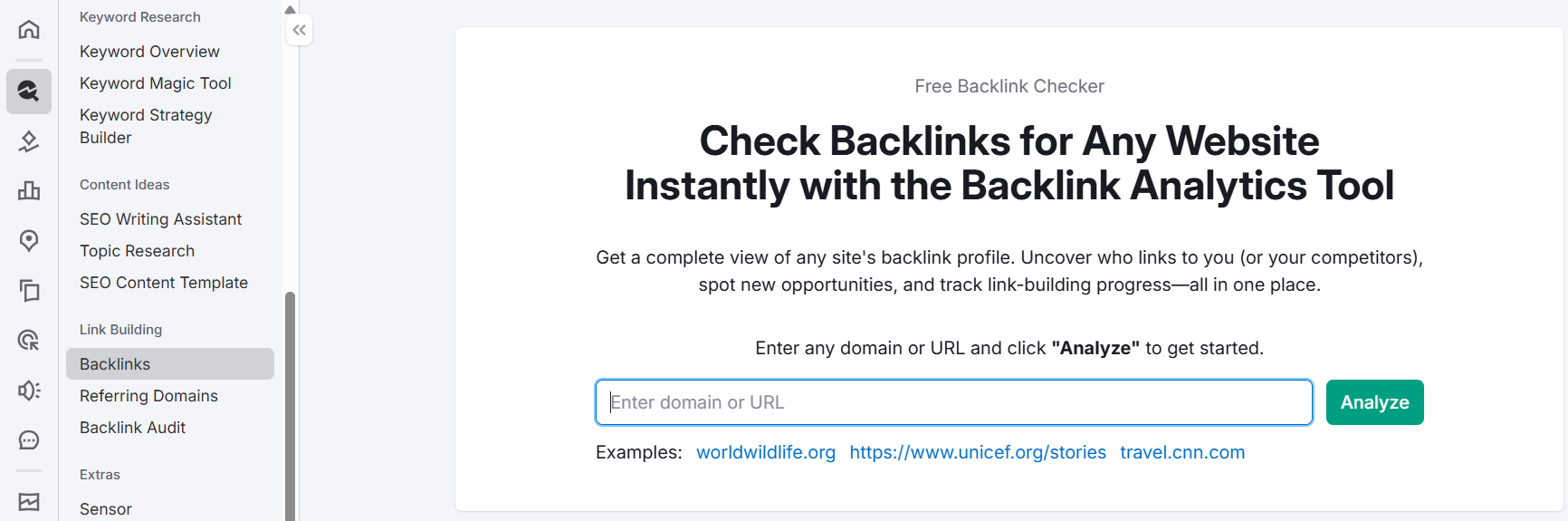
If you don’t see “Link Building” immediately, scroll down slightly in the sidebar — it sits below the “On Page & Tech SEO” section. Once you click Backlink Audit, you’ll land on the tool’s main interface.
One thing worth noting: the Backlink Audit tool is project-based. That means it doesn’t just pull up data instantly like the Backlink Analytics tool does when you type in a domain. You need a project set up first.
Setting Up Your First Backlink Audit Project
This is the step most tutorials gloss over, and it’s actually where the setup can go sideways if you’re not careful.
Creating a New Project
If you haven’t set up a project for your domain yet, Semrush will prompt you to create one. Click “Create project”, enter your domain (root domain, not a specific page), and name the project something you’ll recognize.
Semrush will then ask you to configure three things during setup:
- Your domain’s categories — help the tool benchmark your backlink profile against relevant competitors
- Competitors to compare against — you can add up to 5 competitors whose link profiles you want to compare alongside yours
- Integration with Google Search Console — if connected, Semrush pulls in your GSC data to cross-reference which backlinks Google has already indexed
The GSC integration step is optional, but honestly, it’s worth doing. In my experience auditing sites for clients, connecting GSC often surfaces backlinks that Semrush’s own crawler hadn’t picked up yet — especially from newer or low-authority referring domains. It fills gaps.
Once you hit “Start Backlink Audit”, Semrush begins crawling. Depending on your backlink profile size, this can take anywhere from a few minutes to 15–20 minutes for larger sites.
Opening an Existing Project
If you’ve already set up projects in Semrush, navigate to My Projects (top navigation or the Projects section in the sidebar) and select your domain. From the project dashboard, you’ll see a Backlink Audit widget — click “Set up” or “Go to Backlink Audit” depending on whether it’s already configured.
What You’re Actually Looking At After Setup
Once the audit runs, you land on the Overview tab. Here’s what the main sections show you:
- Overall Toxicity Score — a 0–100 score that Semrush assigns to your entire backlink profile based on how many links carry toxic markers
- Toxic, Potentially Toxic, and Non-Toxic link counts — broken into three categories with individual toxicity scores per link
- Referring Domain Breakdown — total referring domains, follow vs. nofollow ratio, and top-level domain distribution
The Audit tab is where the real work happens. This is where Semrush lists every backlink it found, along with a toxicity score for each one. You can filter by toxic markers — things like low trust scores, money anchor text on unrelated sites, or link networks — and decide what to whitelist, move to the disavow file, or remove manually.
A practical observation from client work: don’t blindly disavow everything with a high toxicity score. Semrush flags aggressively by design. I’ve seen legitimate backlinks from niche blogs get flagged simply because the domain had a low Authority Score. Always sanity-check the flagged links before sending anything to Google.
Which Semrush Plans Include Backlink Audit
Backlink Audit is available across Semrush’s paid plans — both the SEO Classic lineup and the newer Semrush One plans. Here’s where each plan stands:
SEO Classic Plans
| Plan | Monthly Price | Annual Price (billed annually) |
|---|---|---|
| Pro | $139.95/mo | $117.33/mo |
| Guru | $249.95/mo | $208.33/mo |
| Business | $499.95/mo | $416.66/mo |
Pro is the entry point and includes Backlink Audit with access for up to 5 monitored websites and 500 keywords to track daily. Guru adds historical data, multi-location tracking, and bumps you to 15 websites. Business goes to 40 websites with API access and migration from third-party tools.
All three plans come with a 7-day free trial for Pro and Guru — start your free trial here.
Semrush SEO Free Trial ( Pro & Guru )
Get full Pro access for 7 days — keyword research, site audit, backlink analysis & competitor research. No charge until after the trial ends.
Start Your Semrush 7-Day Free Trial→Semrush One Plans
Semrush One is the newer unified offering that bundles traditional SEO tools with AI visibility tracking (GEO, AI search monitoring). It includes everything from the SEO Classic plans plus AI brand performance features.
| Plan | Monthly Price | Annual Price (billed annually) |
|---|---|---|
| Starter | $199/mo | $165.17/mo |
| Pro+ | $299/mo | $248.17/mo |
| Advanced | $549/mo | $455.67/mo |
Backlink Audit is included across all Semrush One plans as part of the SEO toolkit. The Starter and Pro+ plans also offer a free trial.
If you’re purely focused on backlink management and classic SEO workflows, the SEO Classic Pro plan gets you full access to Backlink Audit at the lowest entry price. Semrush One makes more sense if you also want to track how your brand appears in AI-generated answers (ChatGPT, Perplexity, etc.).
Semrush One Free Trial
Everything you need to win AI visibility and drive SEO Success. Get full Semrush One access for 7 days — explore the Starter, Pro+, or Advanced plans. Track your website’s SEO performance, monitor AI visibility and brand share of voice, run deep site audits, and get AI-driven marketing insights. No charge until after your 7-day trial ends.
Start Your Semrush One 7-Day Free Trial →For a detailed breakdown, check out the Semrush plan and pricing comparison.
The Disavow Workflow — From Audit to Submission
Once you’ve reviewed your toxic links and decided what needs to go, Semrush makes the disavow process fairly straightforward.
In the Audit tab, select the links you want to disavow. You can mark individual URLs or entire domains. Move them to the Disavow tab, then export the disavow file directly from Semrush — it formats the file exactly the way Google’s Disavow Tool expects it.
From there, head to Google Search Console → Legacy Tools → Disavow Links, and upload the file.
One thing Semrush does well here that most standalone disavow tools miss: it maintains a history of your previous disavow actions, so you can track what you’ve already submitted and avoid duplicating entries across audits.
A Few Things Worth Knowing Before You Run Your First Audit
Semrush data vs. GSC data won’t always match. Semrush crawls the web independently, so its backlink count for your domain will often differ from what Google Search Console shows. Neither source is “wrong” — they just have different crawl depths and timelines. Using both together (via the GSC integration inside the tool) gives you the most complete picture.
The tool reaudits automatically. Once your project is set up, Semrush continues monitoring your backlink profile in the background. New toxic links that appear over time will show up in subsequent audit runs — you don’t need to recreate the project from scratch each time.
Backlink Audit ≠ Backlink Analytics. They’re separate tools with different purposes. Backlink Analytics is for researching competitor link profiles and finding link-building opportunities. Backlink Audit is specifically for health monitoring and cleanup of your own domain’s backlinks. Both are accessible from the same Link Building section, so it’s easy to confuse them initially.
If you want to dig deeper into what Semrush’s overall backlink data looks like before running a full audit, comparing Semrush vs Ahrefs for backlink coverage is a useful exercise — the two databases have meaningful differences in depth.
Semrush One Free Trial
Dominate the future of AI search. Unlock advanced brand share of voice, monitor generative AI visibility, automate insights, and scale marketing impact across all digital channels.
Semrush Pro & Guru Free Trial
Master your organic rankings. Run comprehensive site audits, track keyword positions, analyze backlink profiles, and spy on competitor SEO strategies completely risk-free for 7 days.
Frequently Asked Questions
Is the Backlink Audit tool available on the free Semrush plan?
The free Semrush plan has very limited access across most tools, and Backlink Audit requires a project setup, which is tied to paid plans. You’ll need at least a Pro plan — or the 7-day free trial — to run a full audit. The free account may let you preview limited data, but it won’t give you a complete crawl of your backlink profile.
How long does a Semrush backlink audit take to complete?
For most sites, the initial audit completes within 5–20 minutes. Larger domains with tens of thousands of backlinks can take longer. Semrush processes the crawl in the background, so you can navigate away and come back — it’ll be ready when you return.
Can I connect Google Search Console to the Backlink Audit tool?
Yes, and it’s genuinely useful to do so. When you connect GSC during project setup (or afterward via project settings), Semrush pulls in additional backlink data from your GSC account. This cross-reference often surfaces links that Semrush’s own crawler hasn’t discovered yet, giving you a more complete audit.
What does the toxicity score actually mean in Semrush Backlink Audit?
The toxicity score is a 0–100 rating Semrush assigns to each backlink based on a combination of factors — low trust scores, spammy anchor text patterns, link network signals, and other markers. A score above 45 is flagged as potentially toxic; above 60 is considered toxic. That said, use your judgment — the tool flags conservatively, and not every high-scored link needs to be disavowed. You can also learn more about how to use Semrush for free to explore what’s accessible before committing to a paid plan.
Does Semrush automatically update the backlink audit over time?
Once a project is set up, Semrush continuously monitors and updates your backlink data. New backlinks — including potentially toxic ones — will appear in future audit runs without you needing to recreate the project. It’s essentially an ongoing health check running in the background.
Can I export the disavow file directly from Semrush?
Yes. After marking links or domains for disavowal in the Audit tab, Semrush generates a properly formatted disavow file that you can export and upload directly to Google’s Disavow Tool in Search Console. The formatting matches exactly what Google expects, which removes one of the more tedious manual steps from the process.
The Bottom Line
The Backlink Audit tool is one of the more actionable tools inside Semrush — not because it’s flashy, but because a cleaned-up backlink profile is one of those foundational SEO moves that quietly pays off over months.
Getting to it is straightforward once you know where to look: left sidebar, Link Building, Backlink Audit. The setup takes minutes. The actual audit work — reviewing toxicity scores, connecting GSC, deciding what to disavow — is where you’ll spend the real time.
If you’re not already on Semrush, the 7-day free trial lets you run a full audit on your domain before paying anything. Worth doing even if you’re on the fence.
Everything You Need About Semrush Free Trial
Activate your Semrush free trial directly, read our step-by-step guide on how to get it, or learn how to cancel before getting charged — all in one place.
Start Semrush Free Trial
Get full Pro access for 7 days — keyword research, site audit, backlink analysis & competitor research. No charge until after the trial ends.
Start Free Trial →How to Get Free Trial
Step-by-step guide to activate your Semrush free trial — what you unlock, how to use it right, and how to get maximum value in 7 days.
Read Full Guide →How to Cancel Trial
Don’t get charged by mistake. Step-by-step guide to cancel your Semrush trial before the billing date — timing tips included.
Read Cancel Guide →