Contents
- 1 What Semrush’s Core Tools Can (and Can’t) Do for YouTube
- 2 The Keyword Analytics for YouTube App — What It Actually Is
- 3 Pricing — Start Here If YouTube Is Your Main Goal
- 4 How This Works in Practice — A Real Workflow
- 5 Where It Falls Short
- 6 So, Who Is This Actually For?
- 7 Frequently Asked Questions
- 7.1 Does Semrush show YouTube search volume?
- 7.2 Can I use Semrush to rank YouTube videos on Google?
- 7.3 Is the Keyword Analytics for YouTube app part of the Semrush subscription?
- 7.4 How does Semrush compare to TubeBuddy or vidIQ for YouTube?
- 7.5 What Semrush plan do I need for YouTube research?
- 7.6 Can I try the YouTube app without paying?
Semrush is built for search. Google search, specifically. So when people ask whether it actually works for YouTube, the honest answer isn’t a simple yes or no — it depends entirely on which part of Semrush you’re using, and what you’re trying to accomplish.
Most articles skip past this nuance. They either hype up Semrush as an all-in-one solution or dismiss it because it’s “not a YouTube tool.” Neither take is particularly useful.
Here’s what actually matters.
Quick Answer
Yes, Semrush works for YouTube — but not through its core SEO toolkit alone. Its native tools give you indirect YouTube insights (competitor traffic, content gaps, Google-YouTube overlap). For direct YouTube keyword data — actual search volumes, trending terms, top-ranking videos — you need its dedicated Keyword Analytics for YouTube app, available in the App Center for $10/mo after a free 7-day trial.
What Semrush’s Core Tools Can (and Can’t) Do for YouTube
Let’s start with the honest part that most guides gloss over.
Semrush’s main platform — the Pro, Guru, and Business plans — is built around Google’s index. Its Keyword Magic Tool, Position Tracking, and Domain Analytics all pull data from Google search. That means they’re great for web SEO, not natively designed for YouTube’s separate search engine.
So if you plug a YouTube keyword into the Keyword Magic Tool, you’ll get Google search volume data. That’s not useless — Google and YouTube often share intent overlap, and ranking in Google can drive YouTube views — but it’s not YouTube-specific data.
What the core plans DO offer that’s useful for YouTube creators:
- Keyword Magic Tool — Find high-intent topics that get searched on both Google and YouTube. In my experience, content that performs well in Google search for informational queries almost always has a corresponding YouTube search demand. It’s an indirect but genuinely useful signal.
- Competitor Research — Analyze what traffic your YouTube niche competitors are pulling from Google. This helps you identify content themes worth producing.
- Content Gap Analysis — Find topics your competitors rank for that you haven’t covered yet. Great for building a video content calendar.
- Position Tracking — Track if your YouTube videos start appearing in Google’s video carousel results (which happens more than most people realize).
What it can’t do natively:
- Show YouTube-specific search volumes
- Surface trending YouTube queries
- Show which videos rank for a given term on YouTube
- Reveal watch time patterns or YouTube-specific competition metrics
That gap is where the dedicated app comes in.
The Keyword Analytics for YouTube App — What It Actually Is
This is Semrush’s answer to YouTube-native research. It lives inside the Semrush App Center and is developed by Raora GmbH.
It pulls real YouTube data — not estimated or Google-proxied — and gives you:
- YouTube search volumes — actual keyword demand within YouTube’s search engine
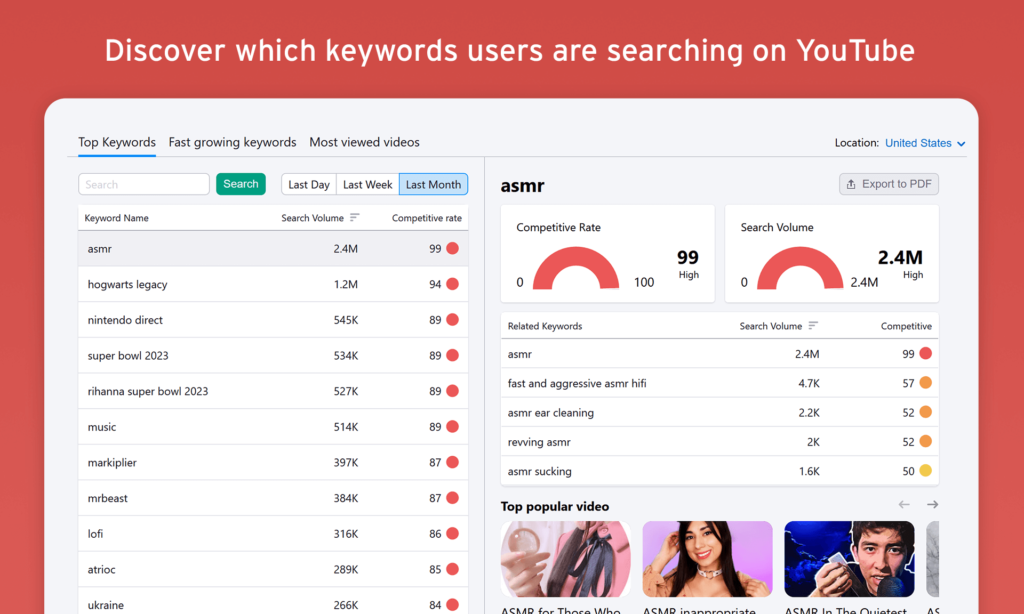
- Fastest-growing keywords — trending terms before they saturate
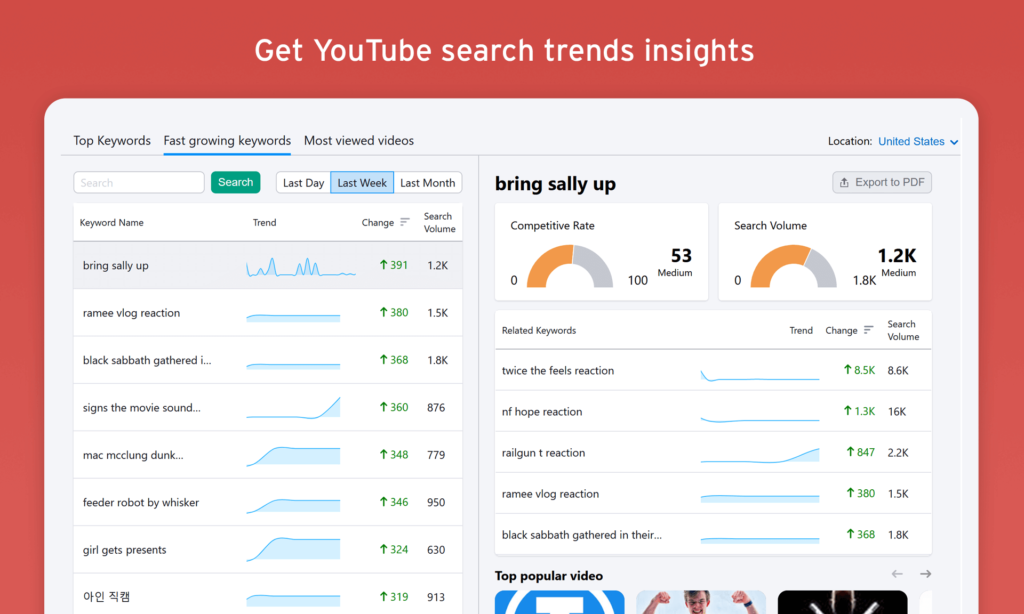
- Top videos per keyword — see what’s already ranking and why
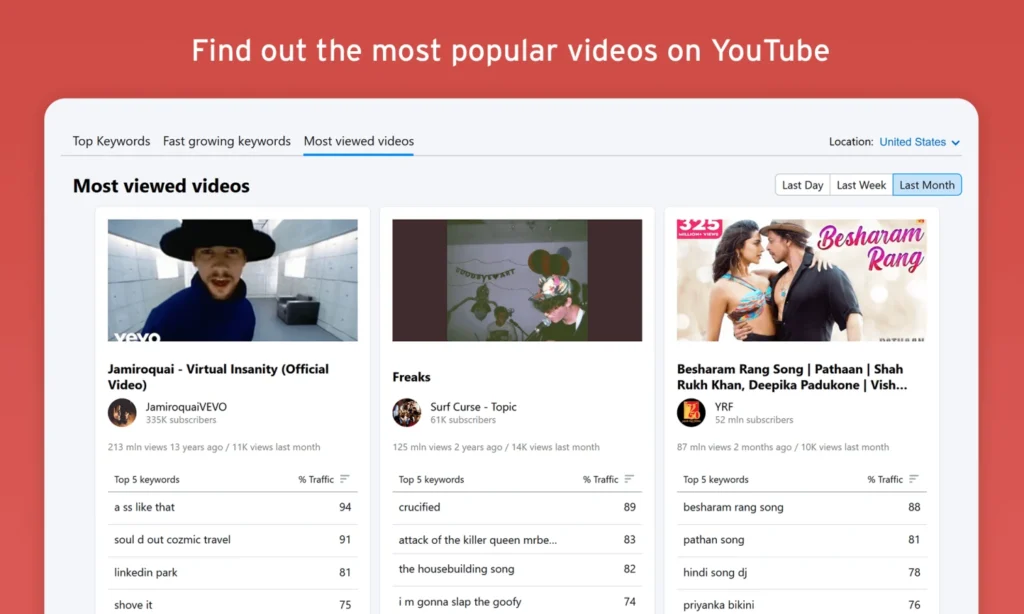
- Commonly searched phrases — long-tail discovery
- Country + language filtering — data across 17 countries and 11 languages
- Daily, weekly, or monthly trend views — useful for timing content
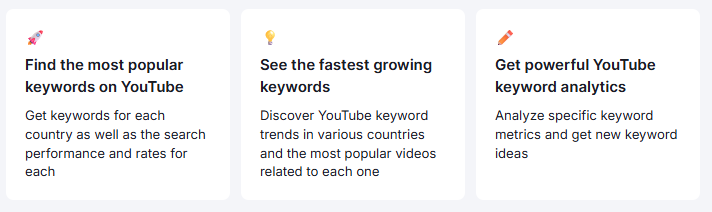
One thing I noticed when testing this: the keyword velocity data is particularly useful. Knowing a keyword is growing matters more than knowing it’s already popular. A term with 8,000 monthly searches but 200% month-over-month growth is often more valuable to target than one sitting at 50,000 with flat or declining interest.
It’s not as deep as a dedicated tool like TubeBuddy or vidIQ on the competition intelligence side — it won’t show you subscriber counts, engagement rates, or video-level CTR data. But for keyword discovery and trend research specifically, it’s solid.
Pricing — Start Here If YouTube Is Your Main Goal
Most people landing on this question are YouTube-first. So let’s lead with what’s actually relevant.
Keyword Analytics for YouTube App — The Direct Entry Point
- Free 7-day trial — try it before paying anything
- $10/mo after the trial, billed month to month, cancel anytime

That’s it. No annual commitment required, no bundled plan needed. The app works independently of a core Semrush subscription — so if YouTube keyword research is your primary need right now, you can start the free trial here without spending $139/mo on a full SEO plan first.
Honestly, $10/mo for real YouTube search volume data across 17 countries is a low-friction way to test whether this fits your workflow before going deeper.
Keyword Analytics for YouTube
Use keyword insights to discover user trends on YouTube. Free 7-day trial, then $10/mo Unsubscribe anytime
Start Your 7-Day Free Trial →If You Also Do Web SEO — Core Plan Pricing
For creators running a channel alongside a website or blog, the core Semrush plans add a significant layer of research depth. Here’s what those look like:
| Plan | Monthly | Annually (per month) |
|---|---|---|
| Pro | $139.95/mo | $117.33/mo |
| Guru | $249.95/mo | $208.33/mo |
| Business | $499.95/mo | $416.66/mo |
Pro and Guru both come with a 7-day free trial. Business is subscription-only.
The Pro plan is the sensible starting point for most individual creators — keyword research, competitor analysis, position tracking, backlinks, site audit, and MCP access all included. Add the $10/mo YouTube app on top and you’ve got a dual-channel research setup for just under $150/mo.
If you’re unsure whether Pro is enough or whether Guru’s extras are worth the jump, the Semrush Pro vs Guru breakdown is worth a quick read before committing.
How This Works in Practice — A Real Workflow
Here’s how I’d actually use this combination for a YouTube channel in, say, the personal finance niche.
Step 1 — Topic discovery via Keyword Magic Tool Start broad. Search “credit card rewards” and filter for informational intent. You’ll see thousands of related queries Google users are searching. These same people are also searching YouTube — the intent almost always crosses over for educational content.
Step 2 — Validate on YouTube via Keyword Analytics app Take your shortlisted keywords from step 1 and check them in the YouTube app. You’ll see actual YouTube search volumes, growth trends, and what videos currently dominate those terms.
Step 3 — Competitor gap analysis Use Semrush’s Organic Research tool to find what web content your YouTube competitors are producing and ranking for. If they’re getting 40,000 monthly Google visits from a “how to maximize credit card points” article, there’s almost certainly a corresponding YouTube audience for the same topic.
Step 4 — Track performance Once you publish, use Position Tracking to monitor if your video appears in Google’s video results — a channel that’s often ignored but genuinely drives views.
This dual-signal approach (Google data + YouTube data together) is honestly more powerful than relying on either source alone.
Where It Falls Short
Being fair here matters. Semrush is not trying to replace TubeBuddy or vidIQ, and it shows in a few places.
No channel analytics integration. You can’t connect your YouTube channel and pull real performance data. It’s purely a research tool, not a channel management one.
Limited competition depth on the app. The Keyword Analytics app shows top videos per keyword, but it doesn’t give you the kind of granular competitive metrics (views per hour, subscriber-to-view ratios, tag analysis) that dedicated YouTube tools offer.
Google-YouTube intent gap. Not every Google keyword maps to YouTube demand. High search volume on Google doesn’t always mean people are looking for a video on that topic — sometimes they just want a quick answer from a webpage. You have to apply judgment, not just data.
The app alone won’t replace a full YouTube tool. At $10/mo it’s genuinely affordable, but if you expect it to do everything TubeBuddy or vidIQ does, you’ll hit its ceiling quickly. It’s a research layer, not a complete YouTube workflow solution.
So, Who Is This Actually For?
Semrush for YouTube makes most sense if:
- You’re running a channel alongside a website or blog and want unified research
- You’re an SEO professional who also creates video content
- You want to build a YouTube strategy grounded in search data, not just trend chasing
- You’re already using Semrush and want to extend its value to YouTube without adopting a completely separate tool
If YouTube is your only channel and you have no interest in web SEO, something like TubeBuddy might give you more YouTube-specific depth at a lower entry cost. But if you’re operating across both search environments — which is increasingly the smart play as Google’s video carousel takes up more SERP real estate — Semrush gives you a kind of cross-channel visibility that standalone YouTube tools simply don’t.
If YouTube is your starting point, the lowest-friction move is the Keyword Analytics for YouTube app free trial — 7 days, $10/mo after, cancel anytime. Test it on a few real keywords from your niche and see if the data changes how you think about content planning.
If you want the full research stack — Google + YouTube together — the core Semrush free trial runs for 7 days too, and you can run both simultaneously before spending anything.
Keyword Analytics for YouTube
Use keyword insights to discover user trends on YouTube. Free 7-day trial, then $10/mo Unsubscribe anytime
Start Your 7-Day Free Trial →If you want to compare plan tiers before committing, the Semrush Pro vs Guru breakdown is worth reading — the differences matter more than most people expect.

Semrush SEO Free Trial
Get full Pro access for 7 days — keyword research, site audit, backlink analysis & competitor research. No charge until after the trial ends.
Start Your Semrush 7-Day Free Trial →Frequently Asked Questions
Does Semrush show YouTube search volume?
Not through its core SEO tools — those pull Google data. For actual YouTube search volumes, you need the Keyword Analytics for YouTube app from the Semrush App Center. It’s a separate add-on priced at $10/mo after a free 7-day trial, and it shows real YouTube keyword demand across 17 countries and 11 languages.
Can I use Semrush to rank YouTube videos on Google?
Yes, and this is actually one of Semrush’s stronger use cases for YouTubers. Its Position Tracking tool can monitor whether your videos appear in Google’s video carousel results. Given that around 15% of desktop Google search result pages feature a video result, this is a more meaningful opportunity than most creators realize. Semrush helps you identify and track it.
Is the Keyword Analytics for YouTube app part of the Semrush subscription?
No. It’s a separate app available in the Semrush App Center, developed by Raora GmbH. It has its own pricing ($10/mo after a 7-day free trial) and can technically be used independently of a core Semrush plan — though combining it with a Pro or Guru plan gives you significantly more research depth. If you’re wondering how to get started with the core platform first, the guide on how to use Semrush for free walks through what’s accessible without paying.
How does Semrush compare to TubeBuddy or vidIQ for YouTube?
They serve different primary purposes. TubeBuddy and vidIQ are channel management tools — they integrate directly with YouTube Studio, show real-time video performance, and help you optimize thumbnails, tags, and upload scheduling. Semrush is a research and keyword intelligence tool. It’s better at finding what topics to cover and understanding search demand; they’re better at optimizing the upload process itself. For serious creators, using Semrush for research alongside a dedicated YouTube tool isn’t an unusual setup.
What Semrush plan do I need for YouTube research?
Honestly, the Pro plan ($139.95/mo, or $117.33/mo billed annually) covers everything you need on the Google/web side. Pair it with the $10/mo Keyword Analytics for YouTube app, and you have a complete research workflow. You don’t need Guru or Business unless you’re managing multiple websites or need historical data for longer-term trend analysis. The Semrush Pro vs Guru comparison breaks down the specific differences if you’re on the fence.
Can I try the YouTube app without paying?
Yes. The Keyword Analytics for YouTube app offers a free 7-day trial — no commitment, cancel anytime. It’s separate from the core Semrush trial, so you can run both simultaneously to evaluate the full stack before deciding.