Contents
- 1 The First Login Experience
- 2 Dashboard Clarity: Day-to-Day Usage
- 3 Where Each Tool Gets Complicated
- 4 Keyword Research: Which Feels More Natural
- 5 Backlink Analysis — UX Comparison
- 6 Ease of Use for Different User Types
- 7 What the Pricing Actually Means for Usability
- 8 The Learning Curve, Honestly
- 9 My Honest Take After 5+ Years
- 10 Frequently Asked Questions
- 11 All Semrush Toolkits — Quick Overview
Most “Semrush vs Moz” articles spend 90% of their space comparing features. Keyword databases, backlink indexes, pricing tiers — you’ve probably read that breakdown a dozen times already.
But the question you’re actually asking is different: which one won’t make me feel lost on day one?
That’s a usability question. And it deserves a real answer.
Quick Answer
Semrush has more tools and a denser interface — but it also has a universal search bar on login that routes you to the right tool instantly. Moz uses a dropdown menu system that feels familiar but works more like a website nav than a professional dashboard. Both have a learning curve; Semrush’s resolves faster once the contextual sidebar clicks. Moz is cheaper to start with; Semrush is built to grow with you.
The First Login Experience
Here’s something I got wrong in most comparisons I’d read before testing this myself: Moz doesn’t actually win on first impressions.
The assumption is that fewer tools equals a calmer experience. But when you log into Moz, what you’re navigating is a dropdown menu system — Products, Free SEO Tools, Learn SEO, Blog, all sitting in a top navigation bar. Click on any of them, and a dropdown opens. It’s a familiar web pattern, but for an SEO tool where you’re trying to move between keyword research, link analysis, and rank tracking fluidly, it doesn’t feel like a dashboard. It feels like a website menu.
The free tools experience reinforces this — Moz’s free Domain Authority checker is essentially a long scrolling page. Useful data, but there’s no sense of “this is your workspace.”
Semrush’s first login is admittedly busier. The sidebar, the project setup prompt, the tool categories — it’s a lot at once. But here’s what most reviews miss: Semrush has a universal search bar at the top of the dashboard. Type in a keyword or a domain, and it routes you directly to the relevant tool. You don’t need to know where anything lives. You just search, and Semrush figures out what you’re trying to do.
For a first-time user, that’s actually a more forgiving entry point than hunting through dropdowns.
Moz feels familiar. Semrush feels functional. Those aren’t the same thing.
Dashboard Clarity: Day-to-Day Usage
The navigation model difference between these two tools is something I haven’t seen explained clearly anywhere — and it’s probably the most practically important UX distinction.
Moz uses a flat dropdown model. All tools are accessible from the top navigation bar through dropdowns. It’s predictable and requires no learning, but every tool visit feels like a separate trip. Keyword Explorer, Link Explorer, Rank Tracker — you’re always going back up to the menu, finding the right dropdown, and starting fresh. There’s no sense of connected workflow.
Semrush uses a contextual sidebar model. When you click into a section — say, Keyword Research — the left sidebar automatically populates with every related tool in that category. Keyword Overview, Keyword Magic Tool, Keyword Gap, Organic Research — all appear together. The tool is essentially telling you: here’s everything relevant to what you’re trying to do right now.
This design choice matters enormously for how efficiently you can work. In my experience across client projects, I’ll go from Keyword Overview → Keyword Magic Tool → Keyword Gap → Organic Research without ever touching top-level navigation. The sidebar keeps me inside the workflow. In Moz, that same sequence requires four separate dropdown lookups.
Yes, Semrush’s sidebar feels like more to absorb on day one. But it’s organized by how SEOs actually work, not just by tool name. Once that clicks — usually within the first week — moving around Semrush becomes noticeably faster than Moz.
The contextual sidebar isn’t a complexity tax. It’s a workflow accelerator that looks complex until you understand what it’s doing.
Where Each Tool Gets Complicated
No tool is frictionless. Both Semrush and Moz have areas where the UX gets genuinely confusing.
Semrush friction points:
- The Semrush One vs SEO Classic plan split creates confusion about which tools you actually have access to
- The advertising and traffic tools are powerful but buried — newer users often don’t discover them for months
- Reports can feel overwhelming until you learn to filter aggressively
Moz friction points:
- Keyword Explorer is strong, but the workflow to go from keyword research to on-page recommendations isn’t obvious
- Link Explorer data and Campaigns data live in separate areas, which means you’re constantly switching contexts
- The MozBar browser extension is useful, but requires a separate mental model from the main dashboard
Honestly, neither tool is perfectly intuitive out of the box. The difference is where the friction lives — Moz’s friction shows up during deeper analysis, while Semrush’s friction shows up earlier but resolves faster.
Keyword Research: Which Feels More Natural
This is one of the first tasks most people use an SEO tool for, so it’s worth looking at closely.
Moz’s Keyword Explorer is genuinely well-designed. Type in a keyword, get the difficulty score, monthly volume, the organic CTR, and the priority score. The priority score — which factors in your current ranking position — is a nice touch that Semrush doesn’t replicate in the same way. The UI is clean, and the data is easy to read.
Semrush’s Keyword Magic Tool is more powerful but requires more from the user. The filtering and grouping options are extensive — you can sort by intent, SERP features, keyword difficulty, question keywords, and more. It takes a session or two to understand how to use filters effectively, but once you do, the depth of data is noticeably richer.
In my experience working across client projects, Semrush surfaces keyword clusters and long-tail variations that Moz simply doesn’t show. That advantage matters more as your SEO work gets more sophisticated.
Backlink Analysis — UX Comparison
Both tools have backlink analysis, but the experience of using them differs.
Moz’s Link Explorer is clean and easy to navigate. Metrics like Domain Authority, Page Authority, and Spam Score are clearly labeled. For quick backlink health checks, it works well. The data depth is where it falls short — Moz’s backlink index is considerably smaller than Semrush’s.
Semrush’s Backlink Analytics gives you more raw data — referring domains, authority scores, link types, anchor text breakdown — and the Backlink Audit tool actively flags toxic links with actionable disavow recommendations. The interface isn’t as instantly readable as Moz’s, but the information density is higher.
For most link-building and audit workflows I’ve run, Semrush provides more actionable output. But if you’re just doing a quick check and want clean data without digging through filters, Moz gets the job done faster.
Ease of Use for Different User Types
Not everyone uses an SEO tool for the same purpose. Here’s an honest breakdown:
Bloggers and content creators: Moz is more approachable. Simpler interface, lower price point, and keyword + on-page tools cover most content SEO needs without overwhelming you. If you’re primarily writing content and want straightforward keyword guidance, Moz Pro is genuinely easier.
Freelance SEOs: Semrush starts making more sense at this level. Client reporting, competitor analysis, site auditing, and rank tracking all live together. The initial learning investment pays off quickly once you’re running multiple projects.
Agency teams: Semrush, clearly. The multi-project management, user permissions, custom reporting, and breadth of tools are built for agency workflows. Moz Pro can work for small agencies, but the limits and interconnectedness don’t scale as well.
In-house SEO teams: Depends on scope. For a team focused purely on organic search and content, Moz is usable. For teams handling technical SEO, competitor monitoring, and reporting, Semrush handles more without requiring third-party tools.
What the Pricing Actually Means for Usability
Here’s something nobody talks about: the plan you can afford directly affects how usable a tool feels. A feature that’s locked behind an upgrade doesn’t exist for you, no matter how good the interface is.
Semrush Plans
Semrush offers two plan families depending on what you need.
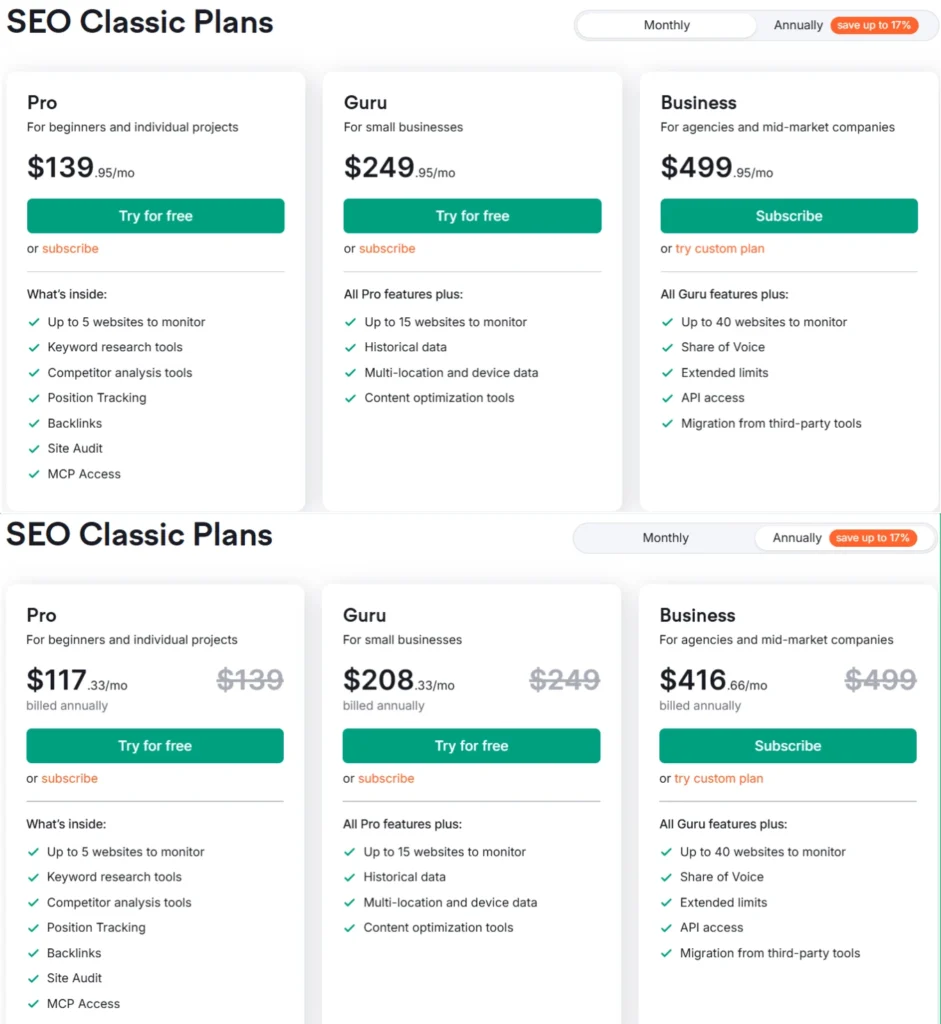
SEO Classic Plans cover traditional SEO workflows:
- Pro — $139.95/mo (monthly) or $117.33/mo billed annually. Covers up to 5 websites, 500 keywords tracked daily, keyword research, site audit, position tracking, backlinks, and MCP access.
- Guru — $249.95/mo (monthly) or $208.33/mo billed annually. Adds historical data, multi-location and device tracking, content optimization tools, up to 15 websites, and 1,500 daily keywords.
- Business — $499.95/mo (monthly) or $416.66/mo billed annually. Built for agencies — 40 websites, 5,000 daily keywords, Share of Voice, API access, and migration from third-party tools.
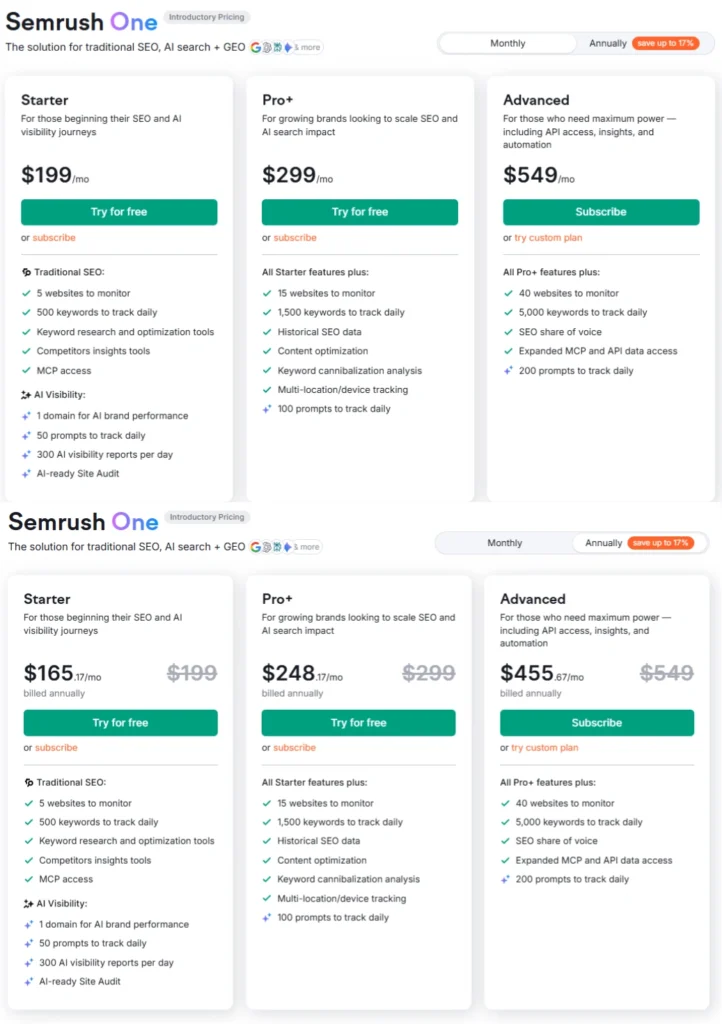
Semrush One combines traditional SEO with AI visibility and GEO tracking:
- Starter — $199/mo (monthly) or $165.17/mo billed annually. 5 websites, 500 keywords daily, plus AI visibility for 1 domain with 50 AI prompts tracked daily and 300 AI visibility reports per day.
- Pro+ — $299/mo (monthly) or $248.17/mo billed annually. Scales to 15 websites, 1,500 daily keywords, adds historical SEO data, keyword cannibalization analysis, and 100 daily AI prompts.
- Advanced — $549/mo (monthly) or $455.67/mo billed annually. 40 websites, 5,000 daily keywords, 200 AI prompts, expanded MCP and API access.
Pro and Guru plans include a 7-day free trial. For a full side-by-side breakdown, the Semrush plan and pricing guide covers each tier in detail.
Moz Pro Plans
Moz Pro pricing is simpler — three plans, monthly or annual:
- Standard — $99/mo (monthly) or $79/mo billed annually. 1 user, 3 tracked sites, 300 tracked keywords/mo, 400K pages crawled/mo. Core SEO features plus AI Overviews by keyword and 2 AI Content Briefs/mo.
- Medium — $179/mo (monthly) or $143/mo billed annually. 2 users, 10 tracked sites, 1,500 tracked keywords/mo, 2M pages crawled/mo. Adds full AI & GEO features: 2 AI Visibility Dashboards, 100 Tracked Prompts/mo (GPT & Gemini), AI Prompt Suggestions, and 10 AI Content Briefs/mo.
- Large — $299/mo (monthly) or $239/mo billed annually. 3 users, 25 tracked sites, 3,000 tracked keywords/mo, 5M pages crawled/mo. Doubles AI quotas: 4 AI Visibility Dashboards, 200 Tracked Prompts/mo, and 50 AI Content Briefs/mo.
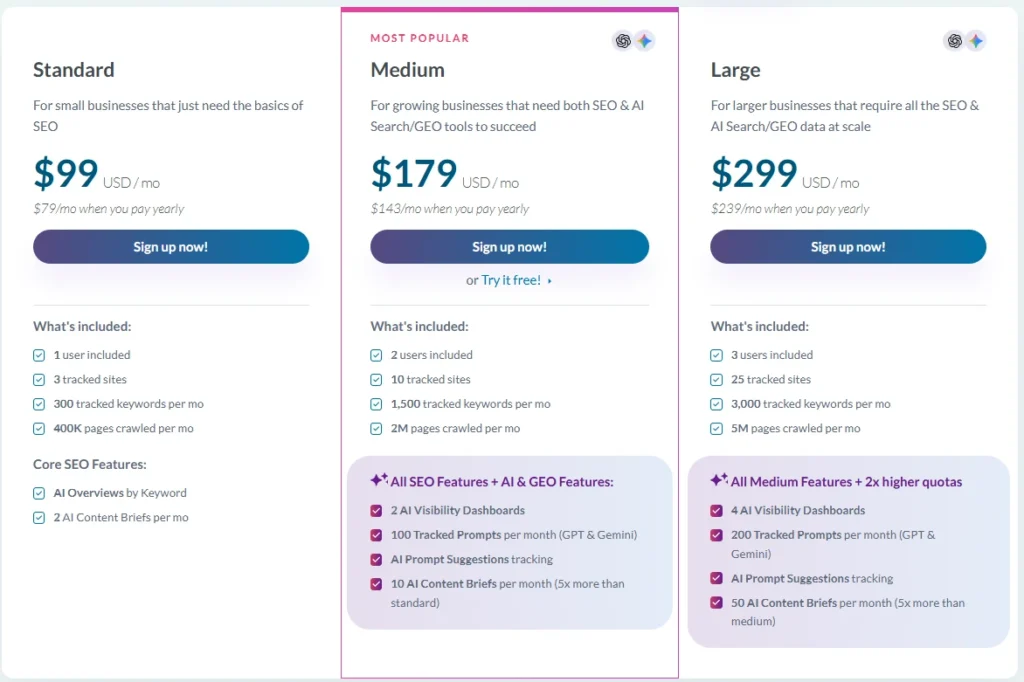
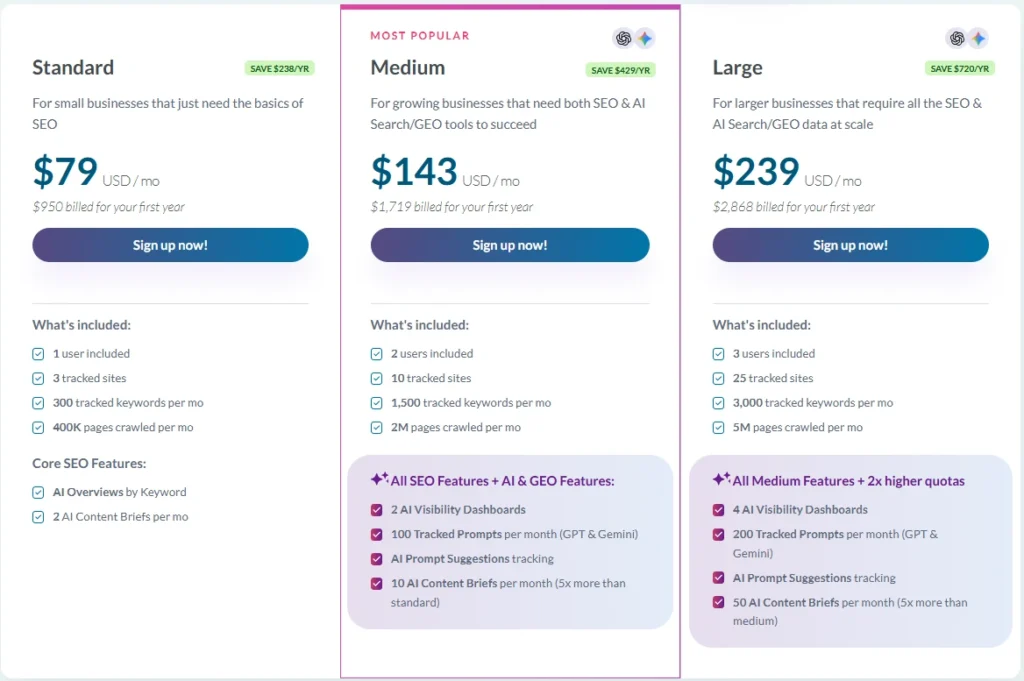
The medium plan includes a free trial option.
How the Pricing Compares
| Semrush Pro | Moz Standard | Semrush Guru | Moz Medium | |
|---|---|---|---|---|
| Monthly price | $139.95 | $99 | $249.95 | $179 |
| Annual price/mo | $117.33 | $79 | $208.33 | $143 |
| Tracked sites | 5 | 3 | 15 | 10 |
| Keywords tracked | 500/day | 300/mo | 1,500/day | 1,500/mo |
| Historical data | ✗ | ✗ | ✓ | ✗ |
| AI visibility | ✗ | Limited | ✗ | ✓ |
| API access | ✗ | ✗ | ✗ | ✗ |
| Site audit pages/mo | 100,000 | 400,000 | 300,000 | 2,000,000 |
One thing worth noting from that table: Moz’s crawl limits are genuinely more generous at the entry level — 400K pages/mo on Standard vs 100K on Semrush Pro. For technical SEO on larger sites, that matters. Semrush only crosses Moz’s crawl limits at the Business plan level.
On the other hand, Semrush tracks keywords daily while Moz tracks them monthly. For active rank tracking and campaign monitoring, that frequency difference is significant.
The usability implication: if you’re on the wrong plan for your needs, any tool feels frustrating. Moz’s simpler three-plan structure makes it easier to pick the right tier. Semrush’s wider range means more fit options — but also more opportunity to land on the wrong one.
The Learning Curve, Honestly
Moz Pro: expect to feel comfortable within 2–3 sessions. The feature set is smaller, which helps.
Semrush: expect 1–2 weeks of regular use before it starts to feel natural. There’s more to learn, but also more reward once you’ve learned it.
One thing worth knowing — Semrush’s free training resources through Semrush Academy are genuinely useful. Structured courses on keyword research, site auditing, and competitive analysis mean the learning curve has guardrails. Moz has strong educational content, too, through their blog, but the in-platform learning path is less structured.
If you want to compare Semrush’s capabilities against similar tools before committing, the Semrush vs Moz Pro deep-dive covers the full feature and data depth comparison separately.
My Honest Take After 5+ Years
I’ve been using Semrush across personal projects and client work for over five years. And I’ll tell you something that took me a while to fully internalize: ease of use is inseparable from depth of use.
Moz feels easier because it does less. That’s not a criticism — for certain workflows, doing less is exactly right. If your SEO needs are focused, Moz Pro is genuinely pleasant to work with.
But when I’m mid-project — auditing a client site, identifying cannibalization issues, pulling competitor keyword gaps, and building a content calendar simultaneously — Semrush’s complexity becomes a feature. The fact that everything is connected, that I can move from research to action without switching tools, makes it the faster choice despite being the more complex one.
For most people reading this, I’d say: if you’re just getting started with SEO tools, try Moz first. If you’re serious about building a long-term SEO workflow, Semrush’s learning investment pays off. You can start with a 7-day free trial of Semrush before making that call.
Semrush SEO Free Trial ( Pro & Guru )
Get full Pro access for 7 days — keyword research, site audit, backlink analysis & competitor research. No charge until after the trial ends.
Start Your Semrush 7-Day Free Trial→Semrush One Free Trial
Dominate the future of AI search. Unlock advanced brand share of voice, monitor generative AI visibility, automate insights, and scale marketing impact across all digital channels.
Semrush Pro & Guru Free Trial
Master your organic rankings. Run comprehensive site audits, track keyword positions, analyze backlink profiles, and spy on competitor SEO strategies completely risk-free for 7 days.
Frequently Asked Questions
Is Semrush harder to learn than Moz?
Yes, initially. Semrush has significantly more tools, more data views, and more configuration options than Moz Pro. Most new users need 1–2 weeks of regular use to feel comfortable navigating it. Moz Pro typically takes 2–3 sessions. That said, Semrush’s onboarding has improved, and the Semrush Academy training resources help flatten the learning curve considerably.
Can a beginner use Semrush effectively?
Absolutely — but expect a ramp-up period. The Projects section is a good starting point; it walks you through the most important tools (site audit, position tracking, backlink monitoring) in a structured way. Beginners who commit to learning Semrush often find they outgrow Moz Pro faster than they expected, since the depth of data supports more sophisticated analysis as skills develop.
Does Moz Pro have enough features for professional SEO?
For focused organic SEO work — keyword research, on-page optimization, link analysis, rank tracking — Moz Pro is capable. Where it starts to feel limited is in competitive intelligence, technical SEO depth, and multi-project management at scale. Freelancers and in-house SEOs handling larger sites often find they need to supplement Moz with other tools, which partially negates the cost advantage.
Which tool is better for keyword research usability?
Moz Keyword Explorer is cleaner and faster for quick lookups. Semrush’s Keyword Magic Tool requires more familiarity with filtering but returns richer data — especially for long-tail clusters, intent filtering, and keyword grouping. If you’re doing light, occasional keyword research, Moz is more immediately usable. If keyword research is a core daily workflow, Semrush gives more back for the learning investment.
Is there a free version of either tool?
Moz offers limited free features through Moz Bar and a restricted version of its tools. Semrush offers a free account with daily query limits, plus a 7-day free trial on paid plans that gives full access to test the platform before committing. If you want to explore the free options in more depth, the guide on using Semrush for free covers the available features.
Which is a better value for a small business?
It depends on what “value” means for your workflow. Moz Pro is cheaper at the entry level and covers core SEO needs well. Semrush costs more but consolidates tools that you might otherwise buy separately — PPC research, content tools, social tracking, and technical auditing. For a small business doing primarily content SEO, Moz offers strong value. For a business wanting one platform to cover most of its digital marketing research, Semrush’s broader scope often justifies the price difference.
All Semrush Toolkits — Quick Overview
Semrush is not just one tool. It’s a complete platform of 8 specialized toolkits — each built for a specific marketing goal. Pick the one that fits your workflow, or go all-in with Semrush One.