Most email marketers focus obsessively on subject lines, send times, and segmentation — and then wonder why their campaigns keep bouncing. The problem is usually upstream: the email list itself is dirty.
Semrush isn’t just an SEO platform anymore. Through its App Center, it offers a standalone Email Verifier tool that checks whether addresses on your list are actually deliverable. But does it work well enough to rely on? And is it worth the cost compared to dedicated email verification tools?
Here’s what actually matters.
Quick Answer: Yes, Semrush has an email address valid checker called Email Verifier, available in the Semrush App Center. It validates individual and bulk email addresses by checking format, DNS records, and SMTP connectivity — without sending a single email. The free tier allows 100 verifications per day and 300 per month. Paid plans start at $10/mo.
What Semrush’s Email Verifier Actually Does
Before getting into how it works, it’s worth understanding what “email validation” really means — because a lot of people assume it just checks if the address looks right.
It goes much further than that.
The Email Verifier app inside Semrush’s App Center runs each address through a multi-step technical check:
- Format check — confirms the email is spelled and structured correctly
- DNS/MX record check — verifies the domain actually has a mail server configured to receive messages
- SMTP handshake — connects to the mail server and checks whether it would accept delivery for that specific address
Here’s the part most people don’t realize: the app does all of this without actually sending an email. It initiates the connection, gets the answer, then terminates before any message is delivered. That’s what makes it non-invasive and reliable for large-scale list cleaning.
After verification, each address gets classified into one of seven statuses:
- Verified — confirmed deliverable
- Invalid — misspelled or incorrectly formatted
- Non-existent — no such recipient exists at that domain
- Catch-all — the server accepts all mail, so deliverability can’t be fully confirmed
- Duplicated — the same address appeared more than once in your upload
- Disposable — temporary, throwaway, or darknet-linked address
- Unknown — technically valid, but deliverability status couldn’t be determined
The “Catch-all” and “Unknown” categories are where judgment comes in. Depending on your campaign goals, you might include or exclude these based on your risk tolerance.
How to Actually Use It
Getting started is straightforward. You’ll find the Email Verifier in Semrush’s App Center — you need to be logged into your Semrush account to access it.
Once inside, the interface gives you two input options:
Option 1: Upload a file — drag and drop a CSV or XLSX file containing your email list. Keep in mind: max file size is 5 MB, the tool reads XLSX (not .xls), and if your file has multiple tabs, only the first tab is processed.
Option 2: Paste emails manually — enter addresses one per line on the right side of the screen. Useful for smaller spot-checks.
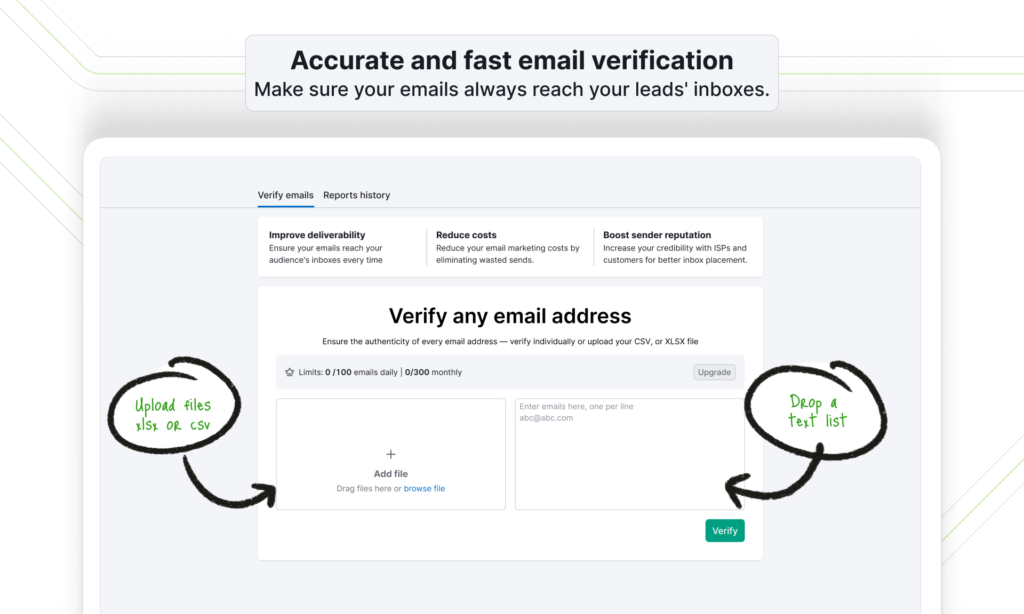
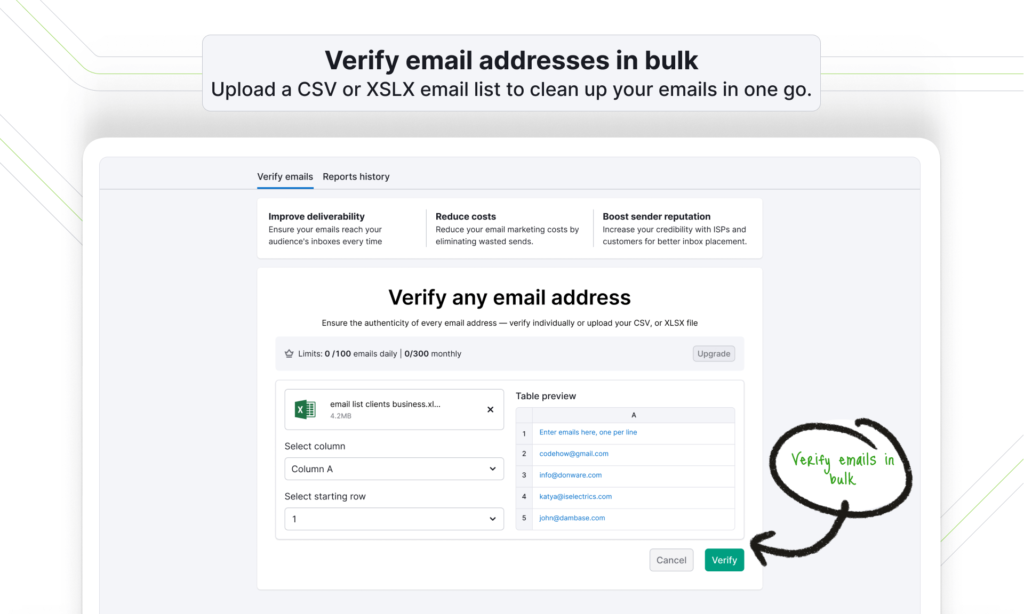
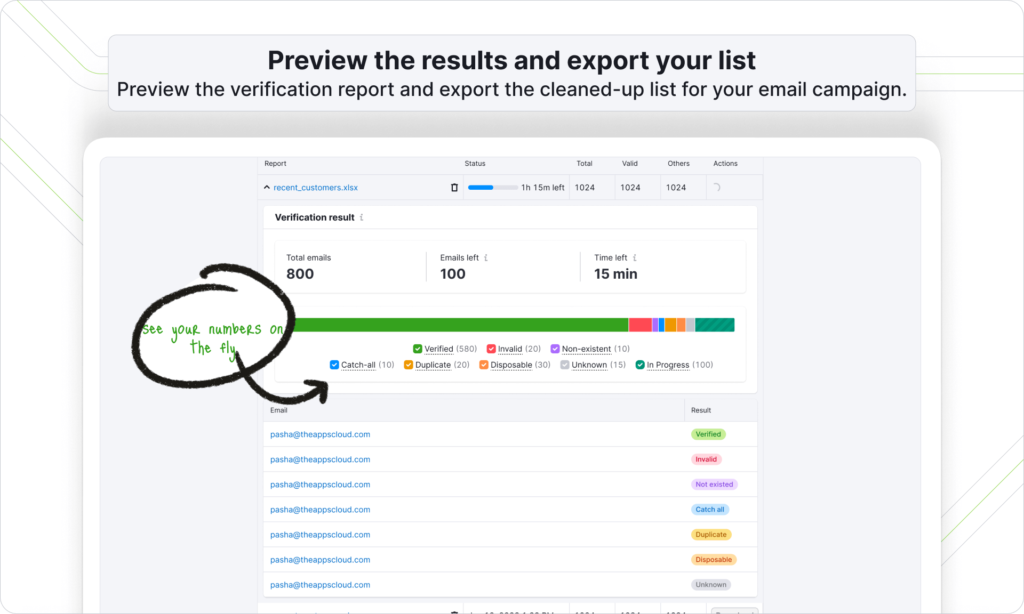
Hit “Verify,” and a progress pop-up appears showing the total number of emails, how many are left, and a time estimate. Once complete, you get two choices: view Reports History or return to the main page.
The Reports History view is where the real value lives. It breaks down results per batch with a visual bar showing the distribution of statuses. You can toggle individual result types on or off to filter the view, then download the cleaned list as an XLSX or CSV file.
In practice, I’ve found the status breakdown particularly useful when cleaning inherited email lists for client projects. Lists that looked clean on the surface often surfaced 15–20% non-existent or disposable addresses — the kind of thing that quietly tanks your sender reputation over time without ever triggering an obvious alert.
What the Results Mean for Your Campaigns
This is where a lot of guides stop short. They explain the statuses but don’t address the strategic decision that follows: which statuses should you actually keep?
It depends on your campaign context.
High-stakes or paid campaigns (product launches, expensive broadcast sends): Keep only “Verified.” Anything else introduces unnecessary risk to your sender score.
Broad awareness or reach campaigns (low-cost sends, seasonal outreach): You can reasonably include “Catch-all” and “Unknown” to maximize reach — just monitor bounce rates closely.
Lead gen or outreach lists: Remove “Invalid,” “Non-existent,” and “Disposable” without exception. These are the categories that damage your domain reputation fastest.
The download file maps each email to its status, making it easy to filter in a spreadsheet and segment accordingly before your next send.
Pricing — What It Actually Costs
The Email Verifier isn’t part of a Semrush core subscription. It’s a separate app available through the App Center, with its own pricing structure.
Free tier:
- 100 emails per day
- 300 emails per month
- Bulk verification supported
Paid plans (monthly):
- $10/mo — Base plan (same limits as free; this tier is the paid activation)
- $30/mo — 1,000 emails/day, 10,000 emails/month
- $149/mo — 10,000 emails/day, 100,000 emails/month
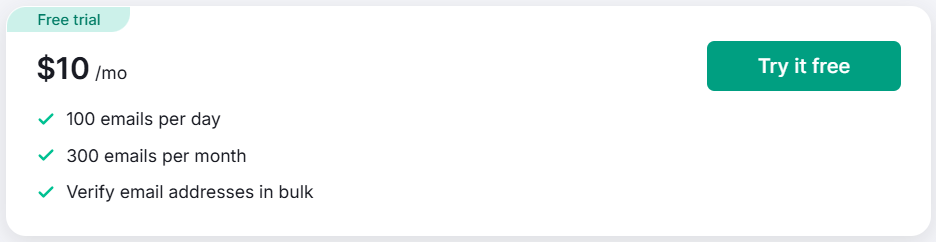
There’s also a 3-day free trial available before the paid plans kick in.
One thing worth noting: the free tier’s 300 emails/month cap is genuinely limiting if you’re running active campaigns. It’s fine for occasional one-off validation — checking a handful of leads before an outreach sequence, for example — but anyone managing a list over even a few thousand addresses will hit that ceiling fast.
At $30/mo for the mid-tier, the cost is reasonable compared to dedicated tools like NeverBounce or ZeroBounce, especially if you’re already inside the Semrush ecosystem. You’re not paying for a new platform — just an additional app layer.
Where It Fits in the Semrush Ecosystem
The Email Verifier is part of Semrush’s broader App Center, which includes tools for lead generation, social, and outreach — essentially capabilities that sit alongside the core SEO and research toolset.
If you’re on a Semrush SEO Classic plan (Pro, Guru, or Business), accessing the App Center requires logging in with the same account. The Email Verifier operates independently of your plan tier.
SEO Classic Plans (billed annually):
- Pro — $117.33/mo (regular $139.95/mo)
- Guru — $208.33/mo (regular $249.95/mo)
- Business — $416.66/mo (regular $499.95/mo)
Semrush SEO Free Trial ( Pro & Guru )
Get full Pro access for 7 days — keyword research, site audit, backlink analysis & competitor research. No charge until after the trial ends.
Start Your Semrush 7-Day Free Trial→Semrush One (billed annually):
- Starter — $165.17/mo (regular $199/mo)
- Pro+ — $248.17/mo (regular $299/mo)
- Advanced — $455.67/mo (regular $549/mo)
Semrush One Free Trial
Everything you need to win AI visibility and drive SEO Success. Get full Semrush One access for 7 days — explore the Starter, Pro+, or Advanced plans. Track your website’s SEO performance, monitor AI visibility and brand share of voice, run deep site audits, and get AI-driven marketing insights. No charge until after your 7-day trial ends.
Start Your Semrush One 7-Day Free Trial →The Email Verifier is an add-on regardless of which plan you’re on. If you’re exploring Semrush for the first time and want to test the core platform before committing, there’s a 7-day free trial available here.
For a deeper look at whether Pro or Guru suits your workflow better, the Semrush Pro vs Guru breakdown covers the key differences.
What It Does Well — and Where It Falls Short
No tool is perfect, and the Email Verifier is no exception.
What works:
- Fast bulk processing with a clear status breakdown
- SMTP-level verification without sending actual emails
- Export to CSV or XLSX for easy list management
- Clean, simple interface — setup takes under two minutes
- Free tier available without a credit card barrier
Where it’s limited:
- The free tier’s 300/month cap is tight for anyone with active lists
- No API access at the base tier — you’re limited to the UI
- “Catch-all” addresses remain genuinely ambiguous, which is a technical limitation of the verification method itself (not specific to Semrush)
- It’s an App Center tool, not a native Semrush feature — it feels slightly separate from the main dashboard workflow
If you’re already heavily embedded in the Semrush platform for SEO and research, adding the Email Verifier makes sense as a consolidation play. But if email verification is a core part of your operation and you’re processing large volumes, dedicated tools with deeper integration options might serve you better.
Semrush One Free Trial
Dominate the future of AI search. Unlock advanced brand share of voice, monitor generative AI visibility, automate insights, and scale marketing impact across all digital channels.
Semrush Pro & Guru Free Trial
Master your organic rankings. Run comprehensive site audits, track keyword positions, analyze backlink profiles, and spy on competitor SEO strategies completely risk-free for 7 days.
Frequently Asked Questions
Does Semrush have an email address or a valid checker?
Yes. Semrush offers an Email Verifier app through its App Center. It checks whether email addresses are deliverable by validating format, DNS/MX records, and SMTP server responses — without sending any actual emails. It supports both individual and bulk list verification.
Is the Semrush Email Verifier free to use?
There’s a free tier that allows 100 emails per day and 300 per month, plus a 3-day free trial of the paid version. For higher volumes, paid plans start at $30/mo for 1,000 emails daily (10,000 monthly) and $149/mo for 10,000 emails daily (100,000 monthly).
What email statuses does Semrush’s Email Verifier return?
The tool classifies each address as one of seven statuses: Verified, Invalid, Non-existent, Catch-all, Duplicated, Disposable, or Unknown. Each carries a specific meaning around deliverability — the Reports History view breaks these down visually and lets you download filtered results.
Can I upload a bulk email list to Semrush for verification?
Yes, bulk verification is supported on all tiers, including the free plan. You can upload a CSV or XLSX file (max 5 MB, first tab only for multi-tab files). The tool processes the entire list and provides a downloadable results file.
How accurate is Semrush’s email verification?
The accuracy depends on the verification method used. Format and DNS checks are highly reliable. SMTP-level checks are accurate for most providers, but “Catch-all” domains introduce inherent uncertainty — this isn’t a Semrush limitation specifically, it’s a known constraint of SMTP-based verification across all tools. For critical campaigns, treat “Catch-all” and “Unknown” addresses as conditional rather than confirmed.
Is the Email Verifier included in my Semrush subscription?
No. It’s a separate app available through the Semrush App Center with its own pricing. It works alongside any Semrush plan (SEO Classic or Semrush One) but isn’t bundled into the core subscription. If you’re looking to understand how to use Semrush for free before committing, that guide covers your options.
What file formats does the Email Verifier accept?
The tool accepts CSV files and XLSX files (not the older .xls format). The maximum file size is 5 MB. If your file has multiple tabs, the verifier will only process data from the first tab — worth checking before uploading.
The Bottom Line
Semrush’s Email Verifier does what it says. For marketers already working inside the Semrush ecosystem, it’s a practical addition — particularly for cleaning inherited lists, validating leads before outreach sequences, or doing periodic hygiene checks on subscriber databases.
It’s not a replacement for enterprise-grade email verification platforms if you’re processing millions of addresses monthly. But for the typical SEO professional or small-to-mid-sized marketing team already on a Semrush plan? The free tier is useful immediately, and the $30/mo mid-tier offers solid value for the volume it covers.
The real question isn’t whether the tool works — it does. The question is how often you need it. If email list quality is a recurring concern in your workflow, it’s worth adding. If it’s an occasional need, the free tier will likely be enough.