Contents
- 0.1 Why This Actually Costs You Something
- 0.2 Method 1: The Backlinks Tool (Fastest Check)
- 0.3 Method 2: Backlink Audit (Better for Ongoing Monitoring)
- 0.4 What Counts as “Broken” Here
- 0.5 Fixing What You Find
- 0.6 Where This Falls Short
- 0.7 Pricing Snapshot
- 0.8 Semrush One Free Trial
- 0.9 Semrush Pro & Guru Free Trial
- 1 Frequently Asked Questions
- 1.1 Can I find broken backlinks in Semrush without a paid plan?
- 1.2 How is this different from finding a competitor’s broken backlinks?
- 1.3 How often should I check for broken backlinks?
- 1.4 Should I fix every broken backlink I find?
- 1.5 What’s the difference between a lost backlink and a broken backlink?
- 2 All Semrush Toolkits — Quick Overview
Here’s the thing — most guides on this topic either bury Semrush inside a five-tool roundup or only show you how to spy on a competitor’s dead links. Neither actually walks you through finding the broken backlinks pointing at your own site using what Semrush actually offers for that job.
Quick Answer: To find broken backlinks in Semrush, use the Backlinks tool’s Indexed Pages report and filter by “Broken Pages” to catch 4xx and 5xx errors, or set up a Backlink Audit project and filter by “Lost” backlinks cross-referenced against dead target URLs. Backlink Audit is better for ongoing monitoring; Backlinks tool is faster for a one-time check.
Why This Actually Costs You Something
A broken backlink isn’t cosmetic. It’s a link pointing at nothing, and whatever authority it was passing just stops moving.
In my testing across client projects, this shows up most often after a site redesign or a category restructure — someone merges old blog posts, deletes a product page, or changes a URL slug, and nobody thinks to check who’s still linking to the old one. Six months later, referring domain counts have quietly dropped and nobody knows why.
Method 1: The Backlinks Tool (Fastest Check)
This is the quickest way to get a snapshot of broken links pointing at your domain.
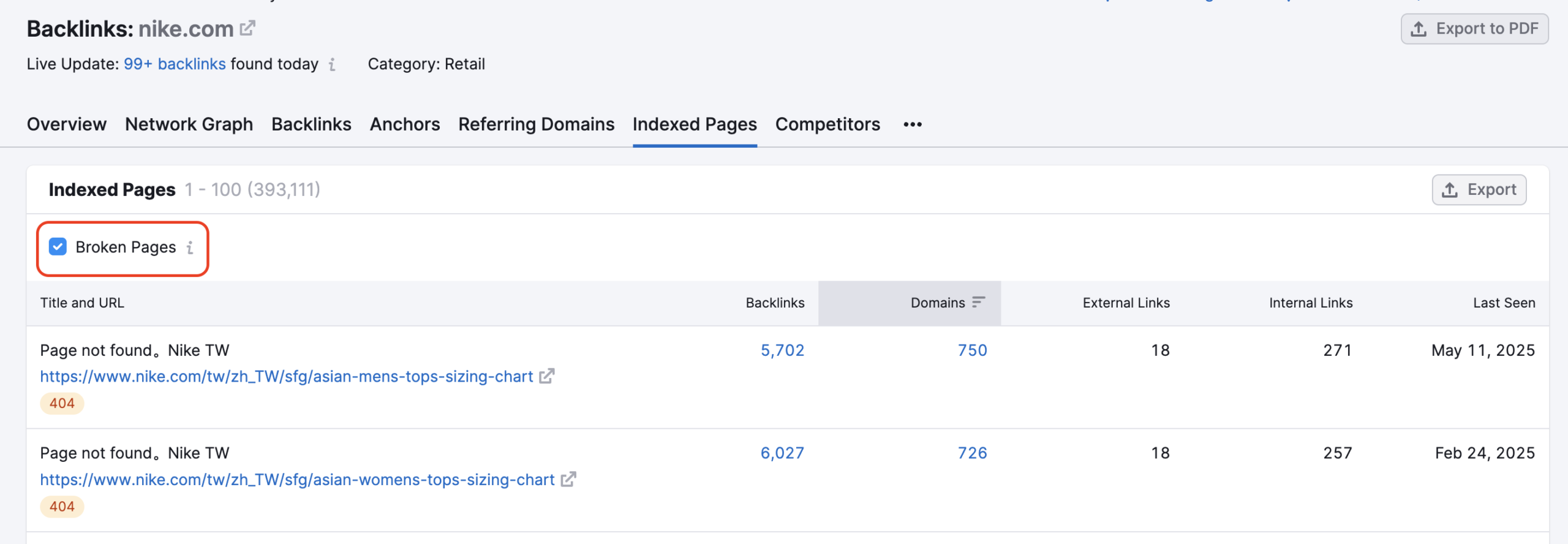
- Open the Backlinks tool and enter your domain.
- Go to the Indexed Pages report.
- Check the Broken Pages filter — this isolates pages returning 4xx or 5xx status codes.
- Click the backlink count next to any broken URL to open the Individual URL Backlinks report and see exactly which sites are still linking to it.
- Filter by Active to exclude already-lost links, then export.
Pro Observation: a lot of people stop at step 3 and never click into the individual URL report. That’s where the actual value is — you need the list of referring domains before you can do anything about the broken link, not just know it exists.
Method 2: Backlink Audit (Better for Ongoing Monitoring)
The Backlinks tool gives you a snapshot. Backlink Audit gives you a trend.
- Create a project and connect your domain to Backlink Audit.
- Once the audit completes, open the Backlinks Overview tab.
- Filter by “Lost” backlinks, then cross-check the target URL column for 404 status.
- Sort by Authority Score of the referring domain to prioritize.
When I audited client sites this way, the pattern was almost always the same — a handful of high-Authority-Score domains buried in a much longer list of low-value ones. Fixing the top 10% by Authority Score usually recovered most of the practical value.
What Counts as “Broken” Here
Not every flagged URL is worth chasing. Quick clarification since this trips people up:
- 4xx codes (like 404) mean the page itself is gone — this is what you’re hunting for
- 5xx codes mean a server issue, sometimes temporary — worth a recheck before assuming it’s permanent
- 3xx codes mean a redirect is in place — not broken, though a redirect chain can still leak some equity
Fixing What You Find
- 301 redirect the dead page to the closest relevant live page, not just your homepage
- Recreate the page if it had strong backlink value and nothing else fits as a redirect target
- Email the referring site if the link is old and there’s no good redirect target — ask them to update it directly
Across multiple projects, redirecting high-Authority-Score broken backlinks to relevant live pages has consistently helped recover a meaningful share of that lost equity within a few weeks of Google recrawling.
Where This Falls Short
Semrush’s backlink index is large, but it isn’t instant. There’s usually some lag between a link actually going dead and Semrush’s crawler reflecting that status in your report. If you’re dealing with a handful of high-priority links and need real-time confirmation, a quick manual check alongside Semrush is worth the extra five minutes.
Pricing Snapshot
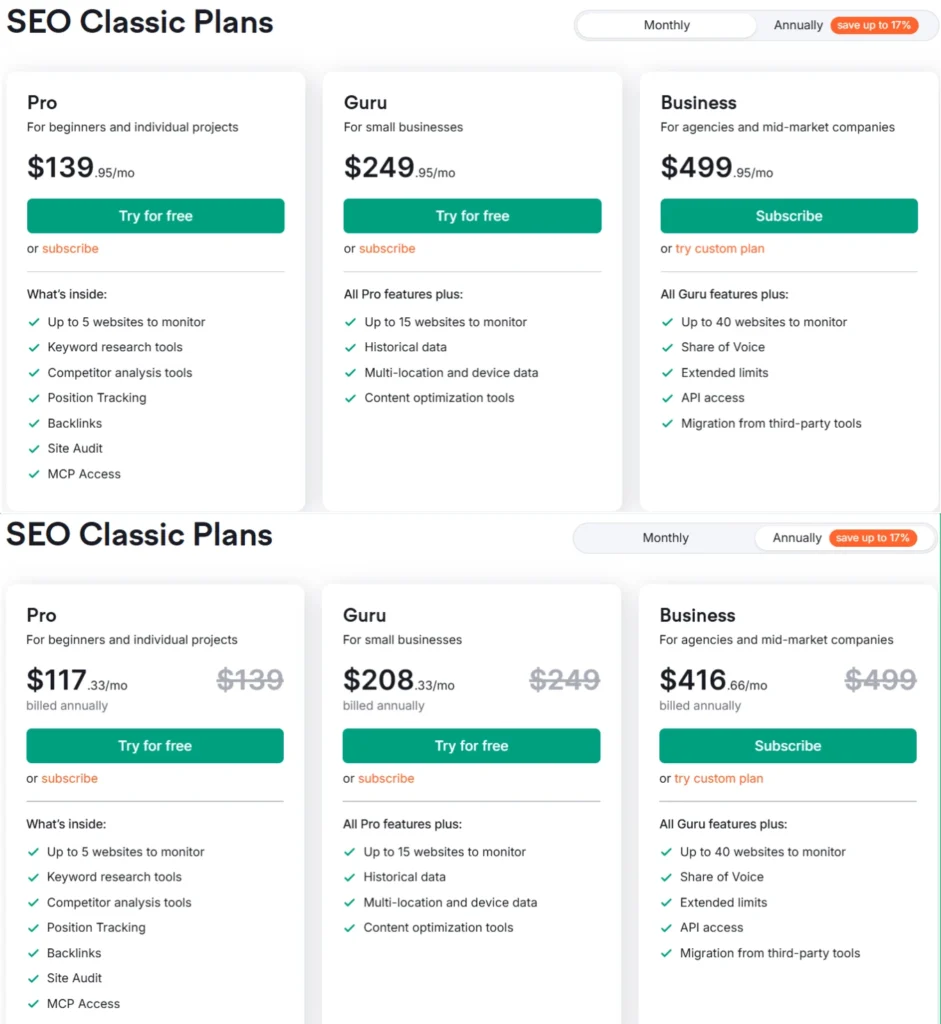
Backlink Audit and the Backlinks tool are both included starting from the SEO Toolkit Pro plan at $139.95/mo (or $117.33/mo billed annually), which also covers Site Audit, Position Tracking, and keyword research tools. If you’re deciding between tiers based on how much backlink monitoring you actually need, it’s worth comparing against Semrush Pro vs Guru — Guru adds historical data, which matters if you want to track backlink trends over time rather than just current snapshots.
Semrush also offers a 7-day free trial, which is enough time to run a full Backlink Audit and get a real read on how many broken backlinks your site is currently carrying.
Semrush One Free Trial
Dominate the future of AI search. Unlock advanced brand share of voice, monitor generative AI visibility, automate insights, and scale marketing impact across all digital channels.
Semrush Pro & Guru Free Trial
Master your organic rankings. Run comprehensive site audits, track keyword positions, analyze backlink profiles, and spy on competitor SEO strategies completely risk-free for 7 days.
Frequently Asked Questions
Can I find broken backlinks in Semrush without a paid plan?
You can get limited visibility through the free version of Semrush, but full Backlink Audit access with lost-link filtering and export requires a paid plan or the 7-day free trial. The free tier caps daily lookups too low for a proper audit on an active site.
How is this different from finding a competitor’s broken backlinks?
Finding your own broken backlinks means auditing your domain for dead pages that others still link to, so you can redirect or fix them. Finding a competitor’s broken backlinks is a link-building tactic — you locate their dead pages, then pitch site owners linking to those dead pages on relevant content of yours instead.
How often should I check for broken backlinks?
Monthly is reasonable for a stable site. If you’ve recently gone through a redesign, URL migration, or content pruning, check weekly for the first couple of months — that’s when most breakage happens.
Should I fix every broken backlink I find?
Not really worth it. In my experience with Semrush, sorting by Authority Score of the referring domain and focusing on the top tier saves a lot of wasted effort. A small number of high-value fixes typically matters more than clearing out fifty low-value ones.
What’s the difference between a lost backlink and a broken backlink?
A lost backlink means the link was removed from the referring page, but that page is still live. A broken backlink means the link points to a dead URL — a 404 or similar error — on the target side. Both need attention, but broken links usually point to a bigger structural issue on your end.
All Semrush Toolkits — Quick Overview
Semrush is not just one tool. It’s a complete platform of 8 specialized toolkits — each built for a specific marketing goal. Pick the one that fits your workflow, or go all-in with Semrush One.