Most people open Semrush for the first time, stare at the dashboard, and quietly close the tab.
There’s just a lot happening. Dozens of tools. Hundreds of metrics. Reports pulling data from every direction. It doesn’t exactly hold your hand.
But here’s the thing — once you understand the logic behind how Semrush is structured, it stops feeling overwhelming and starts feeling like the most useful SEO tool you’ve ever touched. The data is genuinely deep. The problem is just knowing where to look first.
This guide walks you through exactly that.
How to Use Semrush: Quick Answer
Semrush is used through a left-side navigation panel that groups tools by function — SEO, competitor research, content, advertising, and more. Start with Domain Overview to analyze any site, use Keyword Magic Tool for research, run a Site Audit to find technical issues, and set up Position Tracking to monitor rankings. Most core workflows take under 10 minutes once you know the flow.
First Things First: Understanding the Semrush Dashboard
When you log in, the left sidebar is your control panel. Everything branches from there.
Semrush organizes its tools into workspaces — SEO, Competitive Research, Advertising, Content Marketing, Social Media, and Local SEO. You won’t need all of them right away. Most beginners should focus on four core areas to start:
- Site Audit — to fix what’s broken on your own site
- Position Tracking — to monitor how your pages actually rank
- Domain Overview — your starting point for any research
- Keyword Magic Tool — for finding keywords worth targeting
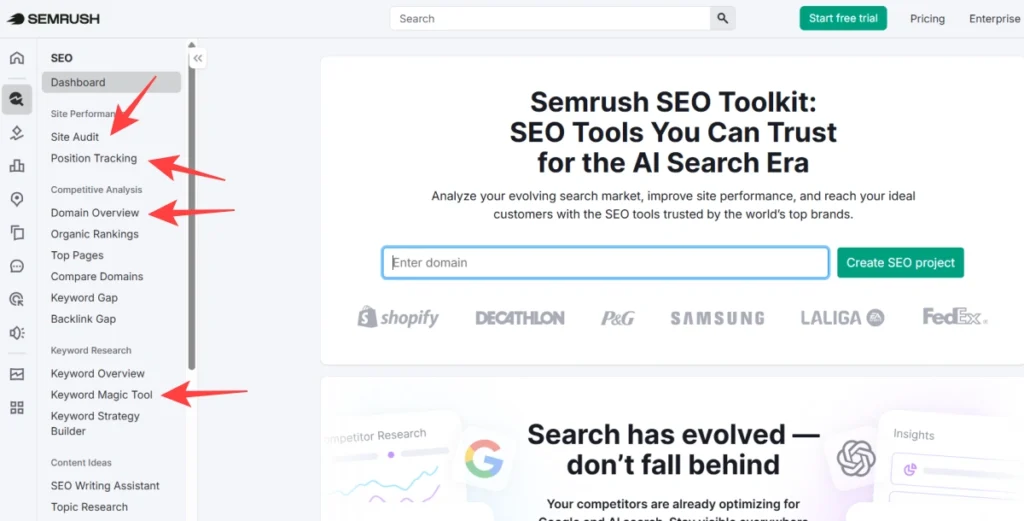
That’s honestly 80% of what most people use Semrush for on a weekly basis.
How to Analyze Any Website (Including Your Competitors)
Type any domain into the search bar at the top and run a Domain Overview. This single report tells you:
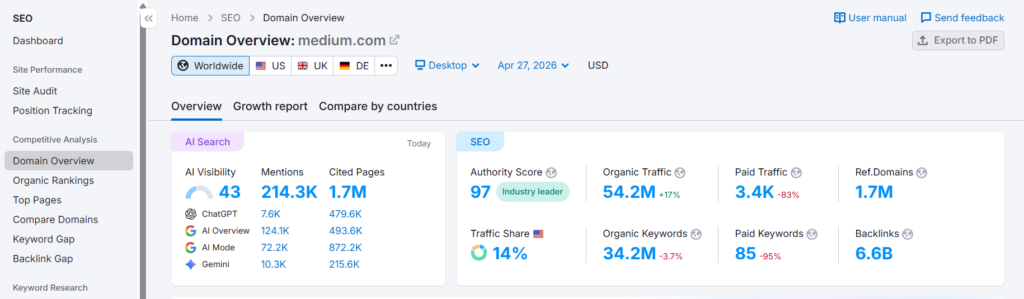
- Estimated organic traffic
- Total keywords the site ranks for
- Authority Score (Semrush’s version of domain strength)
- Top organic keywords
- Backlink profile snapshot
- Paid search activity
In my testing, running a Domain Overview on a competitor before starting any content campaign saved hours of guesswork. You can immediately see which pages are pulling traffic and what keywords they’re ranking for — then reverse-engineer that into your own strategy.
One thing worth noting: the Pro plan gives you 10,000 results per report, Guru bumps that to 30,000, and Business goes up to 50,000. For most solo users and small teams, Pro is more than enough. Agencies working across multiple client domains will feel that ceiling faster.
Keyword Research: The Right Way to Use the Keyword Magic Tool
This is where most people spend the majority of their time — and rightfully so.
Go to Keyword Magic Tool, enter a seed keyword (something broad like “email marketing” or “running shoes”), and Semrush returns a massive list of related terms grouped by topic clusters on the left side.
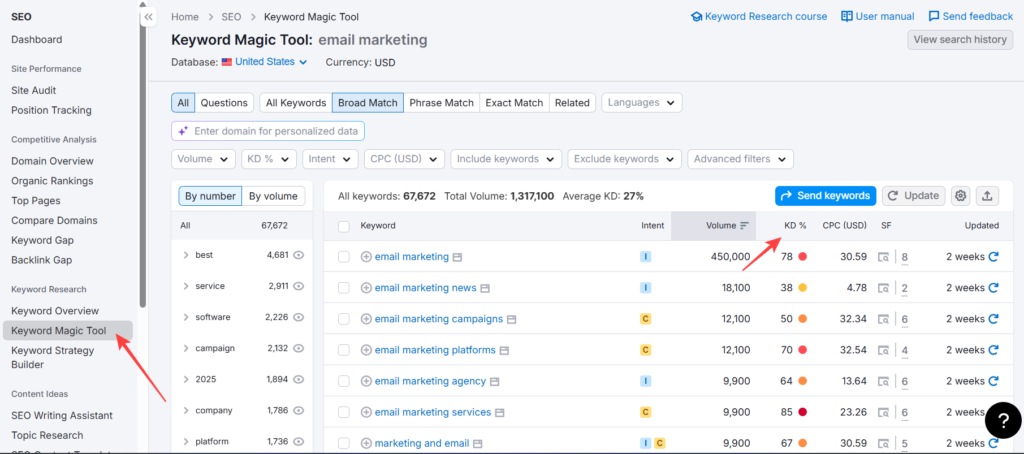
Here’s what to actually pay attention to:
KD% (Keyword Difficulty) — This tells you how hard it’ll be to rank. Under 30 is generally approachable for newer sites. Over 70 and you’re competing with established players.
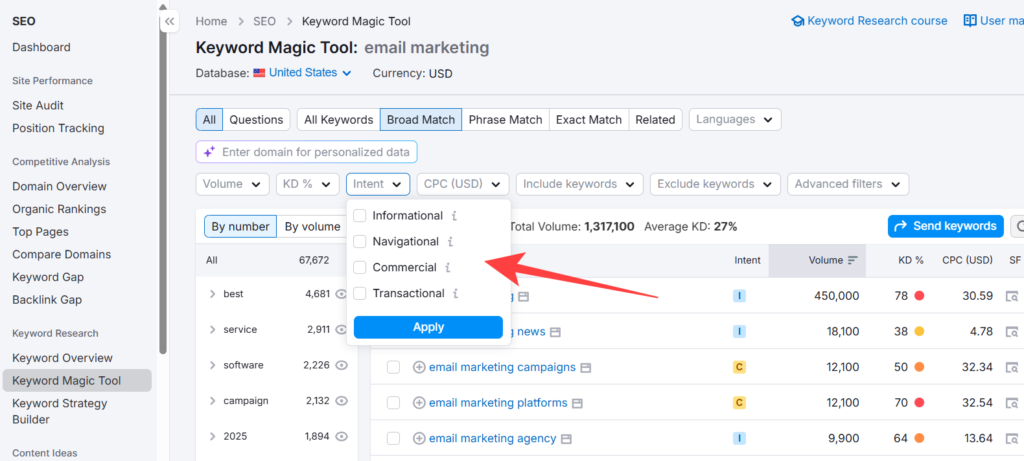
Intent filter — Beginners underuse this. Filter by Informational, Commercial, Navigational, or Transactional to match keywords to the appropriate content type.
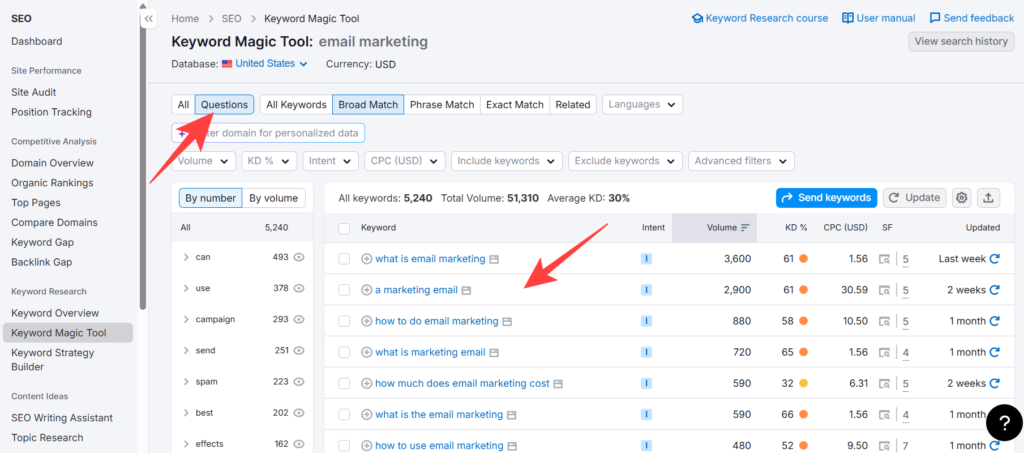
Questions tab — Pure gold for blog content. Shows you exactly what people are actually asking around your topic.
One pro observation worth mentioning: the keyword metric updates limit matters more than people realize. On Pro, you get 250 keyword metric updates per month. Guru gives you 1,000. If you’re running bulk keyword list analyses or refreshing large sets regularly, that limits hits faster than expected.
Running a Site Audit (And What to Actually Fix)
Go to Site Audit, create a project for your domain, and let Semrush crawl your site. It checks over 140 technical and on-page SEO factors.
The results come back organized into three buckets: Errors (fix these first), Warnings (fix these second), Notices (low priority, situational).
Common things it catches:
- Broken internal links
- Missing or duplicate meta tags
- Slow page load signals
- Crawlability issues
- HTTPS problems
- Core Web Vitals-related flags
Pro plan allows 100,000 pages crawled per month with up to 20,000 pages per monitored website, across 5 websites. Guru scales to 300,000 pages per month and 15 websites. Business handles 1,000,000 pages and 40 websites.
For a single-site freelancer or blogger, Pro is completely fine. If you’re managing multiple client sites, Guru’s 15-site limit is the practical upgrade point.
One thing Karan noticed during testing with a mid-size e-commerce client: Semrush flagged 47 pages with duplicate title tags that the client’s internal team had completely missed for over a year. Fixing those alone produced a measurable rankings uptick within six weeks. That’s the kind of catch that justifies the subscription.
Position Tracking: Monitoring Your Rankings Daily
Setting up Position Tracking is straightforward — add your domain, select your target location and device type (desktop or mobile), and enter the keywords you want to monitor.
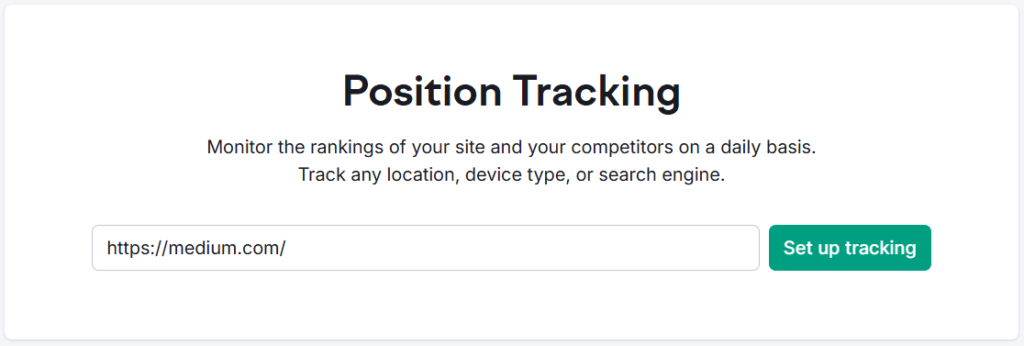
Semrush then tracks your daily ranking position for each keyword and shows movement over time.
Here’s where the plan differences actually matter in daily use:
| Feature | Pro | Guru | Business |
|---|---|---|---|
| Keywords to track (daily) | 500 | 1,500 | 5,000 |
| Targets per monitored website | 1 | 10 | Unlimited |
| Share of Voice tracking | ✗ | ✗ | ✓ |
| Keyword Cannibalization report | ✗ | ✓ | ✓ |
| Websites to monitor | 5 | 15 | 40 |
The Keyword Cannibalization report (Guru and above) is something most people overlook. It identifies when multiple pages on your site are competing for the same keyword — a surprisingly common issue that silently tanks rankings. If you’re managing content at scale, this alone is worth the Guru upgrade. Check the full Semrush Pro vs Guru breakdown if you’re deciding between the two.
Backlink Analysis: Understanding Your Link Profile
Go to Backlink Analytics, enter your domain (or a competitor’s), and you’ll see:
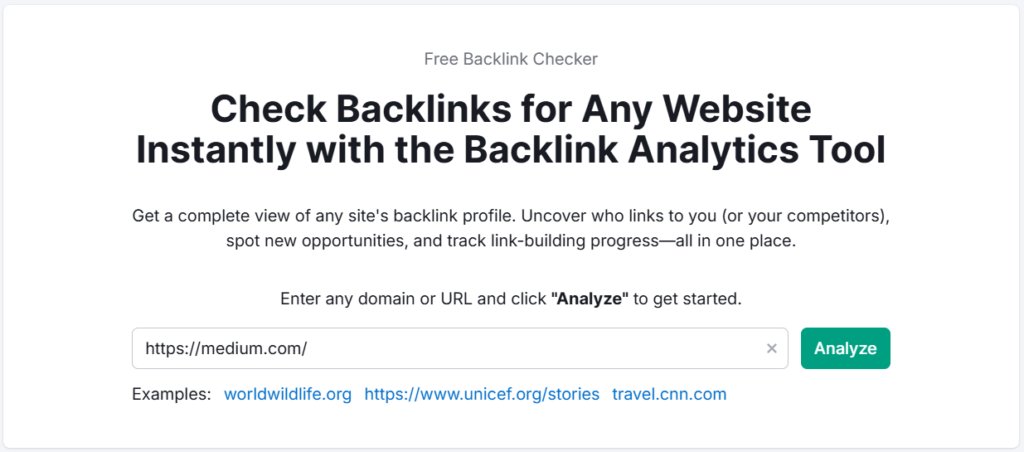
- Total backlinks and referring domains
- Authority Score distribution
- New vs. lost backlinks over time
- Anchor text breakdown
- Top linked pages
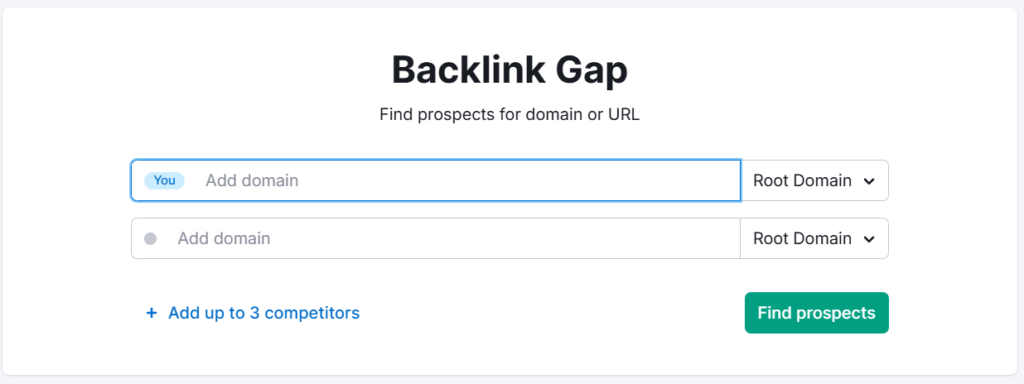
The Backlink Gap tool is particularly useful — it compares your backlink profile against up to four competitors simultaneously, showing domains that link to them but not to you. That’s a ready-made link prospecting list.
Historical backlink data is only available on Guru and Business plans — not Pro. This matters if you’re trying to understand how a competitor built their authority over time, or if you’re doing a link penalty audit. For basic current-state backlink analysis, Pro works fine.
Competitor Research: The Features Most People Miss
Beyond Domain Overview, Semrush has dedicated tools for competitive intelligence that go deeper than most users ever explore.

Traffic Analytics — Estimates a competitor’s total traffic, traffic sources (organic, paid, referral, social, direct), and geographic distribution. Genuinely useful for market sizing.
Organic Research — Shows every keyword a competitor ranks for, their ranking positions, and which pages drive the most traffic.
Advertising Research — Reveals paid search keywords, ad copy, and landing pages your competitors are running. Useful even if you’re not running ads yourself — it shows you what’s converting for them.
Topic Research — Surface content ideas based on what’s trending in your niche. Helps you map out a content calendar backed by actual search data.
These fall under the broader Semrush SEO Toolkit, which is where most of the core competitive research lives.
Semrush Pricing: Which Plan Actually Makes Sense for You
Here’s the current pricing pulled directly from Semrush (as of 2026):
| Plan | Monthly Price | Annual Price (per month) | Free Trial |
|---|---|---|---|
| Pro | $139.95/mo | $117.33/mo | ✓ Yes |
| Guru | $249.95/mo | $208.33/mo | ✓ Yes |
| Business | $499.95/mo | $416.66/mo | ✗ No |
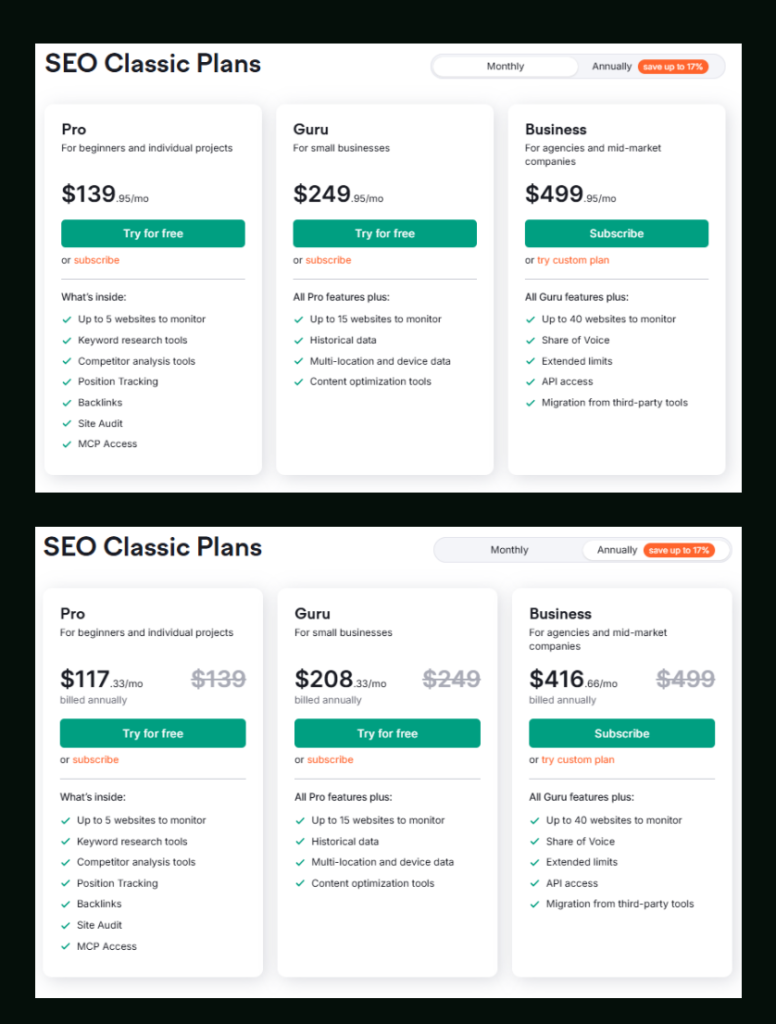
Paying annually saves up to 17% — roughly $270/year on Pro and around $500/year on Guru.
Who should pick Pro: Freelancers, bloggers, and individual project owners. Covers keyword research, site audit, position tracking, backlinks, and competitor analysis — everything you need to do solid SEO work on up to 5 websites.
Who should pick Guru: Small agencies, content teams, and SEO professionals managing multiple clients. You get historical data, content optimization tools, multi-location tracking, Looker Studio integration, and up to 15 websites. The Keyword Cannibalization report alone is a meaningful operational upgrade.
Who should pick Business: Mid-market agencies, large teams, and enterprises. 40 websites, 5,000 tracked keywords, unlimited targets per site, Share of Voice tracking, API access, and migration from third-party tools.
Both Pro and Guru come with a free trial — Business does not. If you want to test the waters before committing, the Semrush free trial is the right starting point.
Add-Ons Worth Knowing About
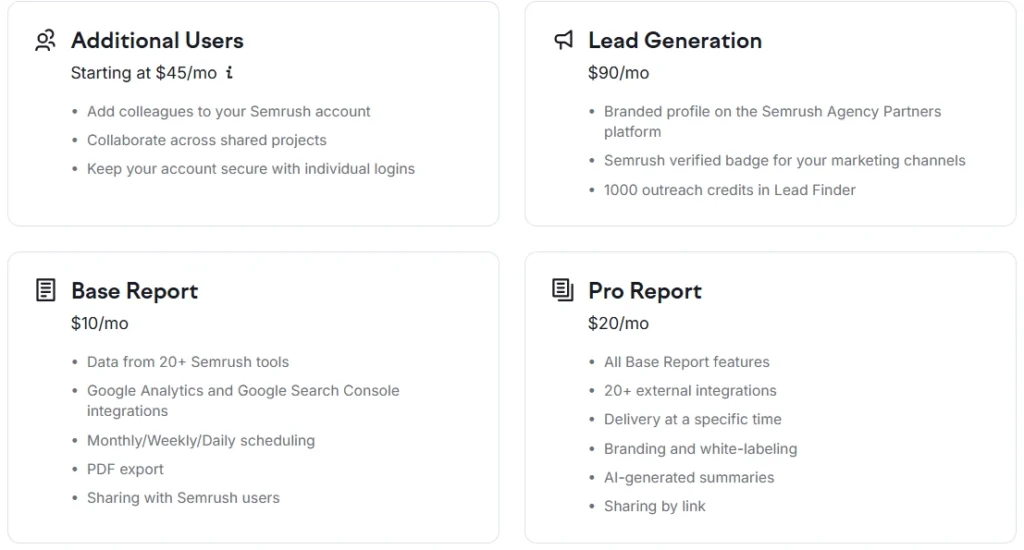
Semrush lets you bolt on extras regardless of which base plan you’re on:
- Additional Users — Starting at $45/mo. Useful for teams who want shared access with individual logins.
- Lead Generation — $90/mo. Includes a branded agency profile on Semrush’s partner platform plus 1,000 outreach credits in Lead Finder.
- Base Report — $10/mo. Automated reports pulling data from 20+ tools, with Google Analytics and Search Console integration, PDF export, and scheduling.
- Pro Report — $20/mo. Everything in Base Report, plus white-labeling, AI-generated summaries, 20+ external integrations, and shareable links. Worth it for any agency delivering reports to clients.
Where Semrush Falls Short
Honestly, no tool is perfect — and Semrush has real limitations worth knowing:
The learning curve is real. There are dozens of tools, and the interface isn’t always intuitive. New users often spend the first few sessions just figuring out where things live.
Traffic estimates aren’t exact. Semrush’s organic traffic figures are estimates based on modeled data, not pulled directly from Google. They’re directionally useful, not analytically precise.
Pro plan limits can pinch. Only 250 keyword metric updates per month, and no historical data, can feel restrictive once your workflow scales up. If you find yourself constantly bumping into limits, that’s the signal to go Guru.
Price point is significant. $139.95/mo isn’t casual spending for a solo freelancer. That said, if you’re actively using it to grow revenue — ranking new clients, finding content gaps, auditing sites — the ROI math tends to work out. If you’re unsure, using Semrush for free or trialing before buying is the smarter move.
A Simple Weekly Workflow to Get Real Results
Here’s what an effective weekly Semrush routine actually looks like for a solo SEO or small team:
Monday: Check Position Tracking for ranking changes over the past week. Flag any drops worth investigating.
Tuesday–Wednesday: Keyword research for upcoming content. Use the Keyword Magic Tool, filter by intent, and export a working list.
Thursday: Run or review Site Audit findings. Prioritize one batch of errors to fix.
Friday: Quick competitor Domain Overview on 1–2 competitors. Note any new pages or keywords they’re picking up.
That’s maybe 3–4 hours total, spread across the week. Not overwhelming — and it keeps you consistently improving instead of doing sporadic bursts of work.
Everything You Need About Semrush Free Trial
Activate your Semrush free trial directly, read our step-by-step guide on how to get it, or learn how to cancel before getting charged — all in one place.
Start Semrush Free Trial
Get full Pro access for 7 days — keyword research, site audit, backlink analysis & competitor research. No charge until after the trial ends.
Start Free Trial →How to Get Free Trial
Step-by-step guide to activate your Semrush free trial — what you unlock, how to use it right, and how to get maximum value in 7 days.
Read Full Guide →How to Cancel Trial
Don’t get charged by mistake. Step-by-step guide to cancel your Semrush trial before the billing date — timing tips included.
Read Cancel Guide →
Semrush SEO Free Trial
Get full Pro access for 7 days — keyword research, site audit, backlink analysis & competitor research. No charge until after the trial ends.
Try Free Trial →Frequently Asked Questions
Is Semrush good for complete beginners?
It can be, but there’s a learning curve. The interface has a lot going on, and it takes a few sessions to find your rhythm. Start with Domain Overview and Keyword Magic Tool — those two alone cover most beginner needs. Semrush also has a free learning platform (Semrush Academy) with courses that help accelerate that process.
Can I use Semrush for free without a trial?
Yes, to a limited extent. A free Semrush account gives you 10 keyword searches per day and limited access to a few tools — but no Site Audit, no Position Tracking, and restricted data. It’s enough to get a feel for the interface, but not enough for real work. The free trial unlocks full Pro or Guru access for a limited period, which is worth doing if you want to properly evaluate it.
What’s the difference between Pro and Guru for someone doing content marketing?
Guru includes content optimization tools and historical data — both directly useful for content strategy. The ability to see how keyword rankings evolved helps you understand what’s working and why. If content is your primary focus and you’re publishing more than a few pieces per month, Guru is the more capable plan. See the full Semrush Pro vs Guru comparison for a deeper breakdown.
How accurate is Semrush’s keyword data?
Generally reliable for directional decision-making. In testing, Semrush’s volume and difficulty figures aligned closely enough with actual performance data to be trusted for prioritization. That said, always cross-reference with real click data from Google Search Console when precision matters — particularly for low-volume or highly niche terms.
Does Semrush work for local SEO?
Yes, though local-specific features are more developed in the separate Local Toolkit add-on. The base plans include position tracking with location targeting, which is useful for local keyword monitoring. For businesses running location-based campaigns at scale, the Local Toolkit adds GBP management, local listing tracking, and review monitoring.
How many people can use one Semrush account?
By default, one Semrush account supports one user login. Additional users can be added starting at $45/month per seat, which gives each person their own login while sharing the same plan limits. This is better than sharing credentials — it keeps the account secure and activity trackable across team members.
Is Semrush worth it compared to cheaper alternatives?
Depends on what you need. Tools like Mangools or SE Ranking are genuinely solid at lower price points and cover keyword research and rank tracking well. Where Semrush pulls ahead is data depth, the breadth of competitive intelligence features, and the sheer number of tools under one roof. If you’re doing serious SEO work across multiple sites or clients, Semrush’s value proposition is hard to argue with. For a single-site blogger on a budget, a lighter tool might make more sense. Check the full Semrush vs Ahrefs breakdown if you’re deciding between the two biggest players.
The Bottom Line
Semrush isn’t a tool you master in a day — but you don’t need to. Start with the four core workflows: Domain Overview, Keyword Magic Tool, Site Audit, and Position Tracking. Get comfortable with those, build them into a weekly habit, and the rest of the platform will start making sense naturally.
The free trial covers Pro and Guru fully, so there’s no real reason not to try it before spending anything. Start your free trial here and see how much of this guide makes more sense once you’re actually inside the tool.
Best Semrush Alternatives to Consider
If Semrush’s pricing feels steep after the trial, these three tools cover most of what you need at a lower price point — SE Ranking, Mangools, and Ubersuggest all offer free trials too.
SE Ranking
More affordable entry pricing, solid rank tracking and audit features. Good for small agencies and freelancers who don’t need Semrush’s full data depth.
Try SE Ranking →Mangools
Beginner-friendly, clean UI, strong keyword and SERP tools at a much lower price point. Perfect for solo bloggers who need keyword research without the complexity.
Try Mangools →Ubersuggest
Neil Patel’s SEO Tool — keyword research, site audit, and competitor analysis at a very affordable price. Great for beginners and small business owners on a tight budget.
Try Ubersuggest →